Type text, add images, blackout confidential details, add comments, highlights and more.
02. Sign it in a few clicks
Draw your signature, type it, upload its image, or use your mobile device as a signature pad.
03. Share your form with others
Send it via email, link, or fax. You can also download it, export it or print it out.
How to use or fill out ar 990ez with our platform
Ease of Setup
DocHub User Ratings on G2
Ease of Use
DocHub User Ratings on G2
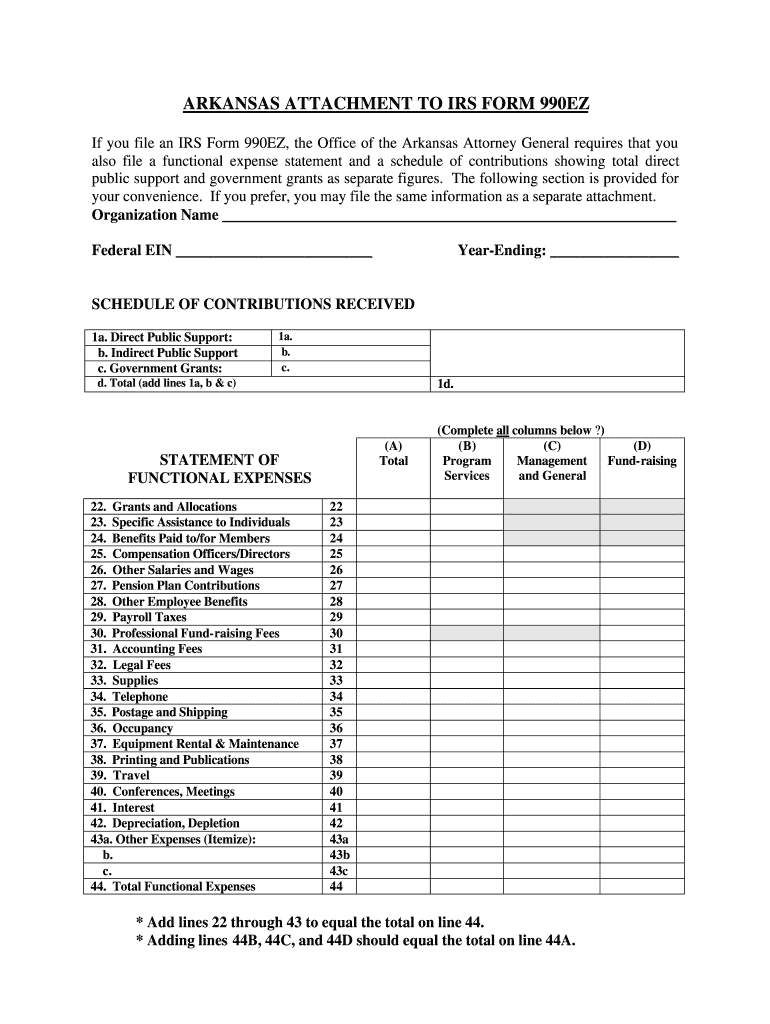
Click ‘Get Form’ to open the AR 990EZ in the editor.
Begin by entering your Organization Name and Federal EIN at the top of the form. Ensure these details are accurate as they are essential for identification.
Fill in the Year-Ending date to specify the fiscal year for which you are reporting.
In the SCHEDULE OF CONTRIBUTIONS RECEIVED section, input figures for Direct Public Support, Indirect Public Support, and Government Grants in their respective fields. Calculate the total by adding these amounts together.
Proceed to the STATEMENT OF FUNCTIONAL EXPENSES section. Carefully enter expenses under each category such as Grants and Allocations, Compensation, and Other Expenses. Make sure to itemize any other expenses as needed.
Finally, ensure that totals from each column equal the overall total on line 44A. Review all entries for accuracy before finalizing your document.
Start using our platform today to streamline your AR 990EZ completion process for free!
File 990-EZ online990-EZ (2025)How to file 990-EZIRS Form 990-EZ 2025 PDF downloadIRS Form 990-EZ Schedule A990-EZ instructionsSchedule O Form 990-EZTurboTax 990-EZ
Security and compliance
At DocHub, your data security is our priority. We follow HIPAA, SOC2, GDPR, and other standards, so you can work on your documents with confidence.
May 2, 2025 For Paperwork Reduction Act Notice, see the separate instructions. Cat. No. 10642I. Form 990-EZ (2025) Created 5/2/25. Form 990-EZ.Read more
Cookie consent notice
This site uses cookies to enhance site navigation and personalize your experience.
By using this site you agree to our use of cookies as described in our Privacy Notice.
You can modify your selections by visiting our Cookie and Advertising Notice.