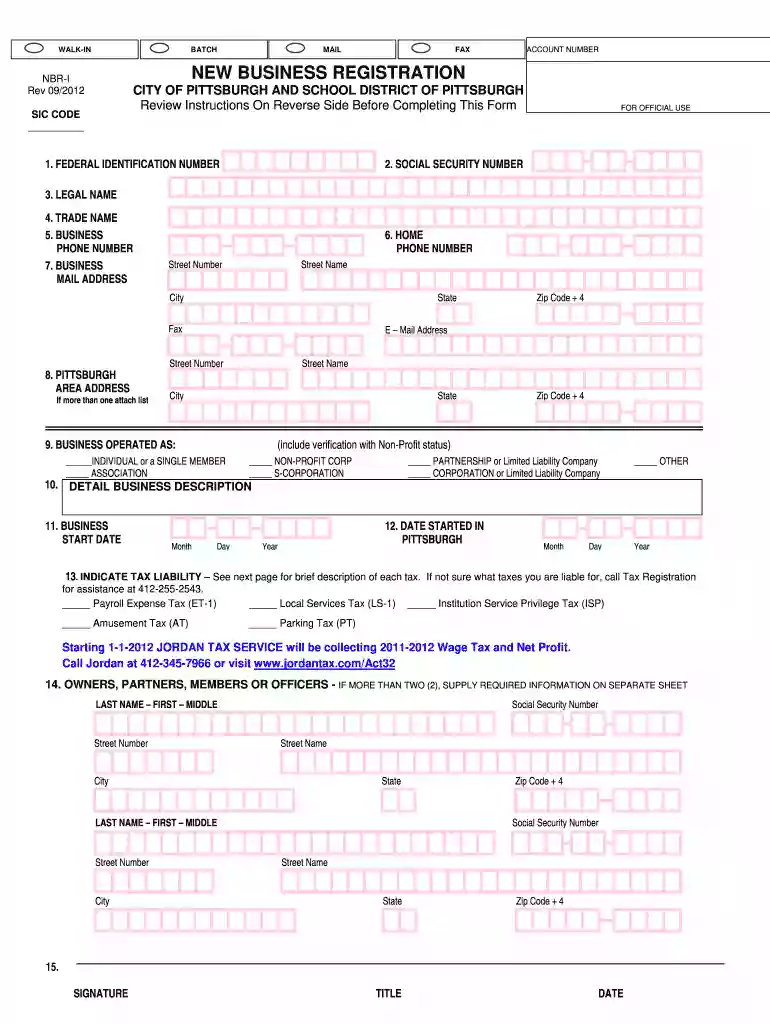
Registration city pittsburgh 2026

Get Form
iid pittsburgh Preview on Page 1

Here's how it works

01. Edit your iid pittsburgh online
Type text, add images, blackout confidential details, add comments, highlights and more.

02. Sign it in a few clicks
Draw your signature, type it, upload its image, or use your mobile device as a signature pad.

03. Share your form with others
Send iid pittsburgh pa via email, link, or fax. You can also download it, export it or print it out.

How to use or fill out registration city pittsburgh with our platform

Form edit decoration
9.5
Ease of Setup
DocHub User Ratings on G2
9.0
Ease of Use
DocHub User Ratings on G2
  1. Click ‘Get Form’ to open the registration city pittsburgh document in the editor.
  2. Begin by entering your Federal Identification Number. If you haven't received one yet, simply write 'APPLIED FOR' and provide an explanation.
  3. Next, input the Social Security Number of the owner or primary partner. This is crucial for identification purposes.
  4. Fill in the Legal Name of your business as registered with state or federal agencies. If applicable, also include your Trade Name.
  5. Provide your Business Phone Number and Home Phone Number for contact purposes.
  6. Enter your Primary Business Address where tax returns will be sent. Include a street address if using a P.O. Box.
  7. If your business operates at multiple locations in Pittsburgh, list all addresses in the designated section.
  8. Indicate the type of business entity you are registering (e.g., Individual, Corporation, Partnership) by checking the appropriate box.
  9. Describe your business activities in detail to help determine tax liabilities accurately.
  10. Finally, sign and date the form before submitting it to ensure it's processed without delays.

Start filling out your registration city pittsburgh form online for free today!

See more registration city pittsburgh versions

We've got more versions of the registration city pittsburgh form. Select the right registration city pittsburgh version from the list and start editing it straight away!
Versions Form popularity Fillable & printable
2018 4.8 Satisfied (22 Votes)
2012 4.4 Satisfied (208 Votes)
be ready to get more

Complete this form in 5 minutes or less

Get form

Got questions?

We have answers to the most popular questions from our customers. If you can't find an answer to your question, please contact us.
Contact us
Residents pay 1% city tax and 2% school tax for a total of 3%. Non-Pennsylvania residents who work within the City pay 1%. Mt. Oliver Borough residents pay the School Earned Income Tax of 2% to the city which acts as the tax collector for the School District.
Online - Please click on the New Business Registration link below, download and save the form as a PDF. Right click and open the form using docHub Reader. Please complete and sign the form and then email it to registration@pittsburghpa.gov. Please allow up to 5-10 business days for your business to be registered.
Looking for general information concerning the City of Pittsburgh? You can contact the 311 Response Center for detailed information, non-emergency concerns and feedback. Dial 3-1-1, outside of Pittsburgh? Call 412-255-2621.
When parking at commercial lots and garages, expect hourly rates between $5.00 and $9.00 and $19.00 per 24 hours, on average. Long-term parking is around $185.00. Rates for on-street parking vary from $0.50 to $4.00 per hour, based on the location. Street meters allow parking from 15 minutes up to 10 hours.
On average, it takes about 2 to 3 business days for the Pennsylvania Department of State to process your business registration. Processing times can vary based on the type of entity, volume of applications and time of year.

Security and compliance

At DocHub, your data security is our priority. We follow HIPAA, SOC2, GDPR, and other standards, so you can work on your documents with confidence.

Learn more
ccpa2
pci-dss
gdpr-compliance
hipaa
soc-compliance
be ready to get more

Complete this form in 5 minutes or less

Get form