ncaeop Preview on Page 1

Ncaeop membership form 2026

Here's how it works

  • 01. Edit your ncaeop online

    Type text, add images, blackout confidential details, add comments, highlights and more.

  • 02. Sign it in a few clicks

    Draw your signature, type it, upload its image, or use your mobile device as a signature pad.

  • 03. Share your form with others

    Send ncaeop membership form via email, link, or fax. You can also download it, export it or print it out.

How to use or fill out ncaeop membership form with our platform

Form edit decoration
9.5
Ease of Setup
DocHub User Ratings on G2
9.0
Ease of Use
DocHub User Ratings on G2
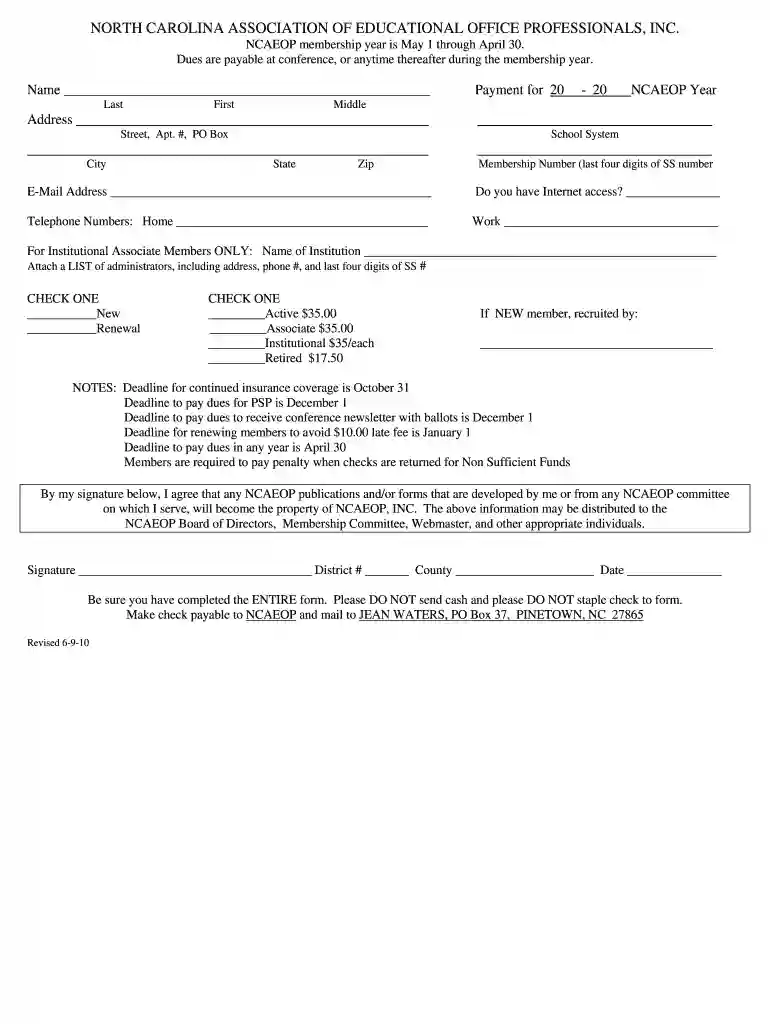
  1. Click ‘Get Form’ to open the NCAEOP membership form in the editor.
  2. Begin by entering your name in the designated fields for Last, First, and Middle names.
  3. Fill in your address, including Street, Apt. #, or PO Box, followed by City, State, and Zip code.
  4. Indicate the NCAEOP year and your school system in the provided sections.
  5. Provide your email address and confirm if you have Internet access by checking 'Yes' or 'No'.
  6. Enter your home and work telephone numbers in the respective fields.
  7. If you are an Institutional Associate Member, include the name of your institution and attach a list of administrators as instructed.
  8. Select whether you are a New member or Renewal by checking the appropriate box.
  9. Choose your membership type (Active, Associate, Institutional, or Retired) and note the corresponding dues.
  10. If you are a new member recruited by someone, fill in their name in the provided space.
  11. Sign at the bottom of the form to agree to terms regarding NCAEOP publications and forms.

Start filling out your NCAEOP membership form online for free today!

See more ncaeop versions

We've got more versions of the ncaeop form. Select the right ncaeop version from the list and start editing it straight away!

VersionsForm popularityFillable & printable
20184.8 Satisfied (90 Votes)
20164.3 Satisfied (158 Votes)
20154 Satisfied (24 Votes)
20104 Satisfied (40 Votes)

be ready to get more

Complete this form in 5 minutes or less

Got questions?

We have answers to the most popular questions from our customers. If you can't find an answer to your question, please contact us.

In this step-by-step guide, well show you how to create a registration form using Google Forms. Go to Google Forms. Start a New Form. Title and Description. Add Questions. Customize Your Registration Form. Adjust Settings. Design Your Form. Preview Your Form.
How to Start a Membership Program? Understand Your Organization. Understanding Your Audience. Choose Membership Packages. Offer Exclusive Benefits. Creating An Engaging Community. Promote Your Membership Program.
Here are some tips on creating a clear and user-friendly membership application form. Start by describing shortly your club and what you have to offer. Collect personal data, such as name, date of birth (for future celebrations), email, phone number, address. List membership options and their fees.
Go to File New. In the Search for online templates field, type Forms or the kind of form you want. Then press Enter. In the displayed results, right-click any item, then select Create.
To make a form, you should do the following: Gather personal information like date of birth, phone number and mailing address. Describe the application process and any membership requirements. Provide information about membership levels. Tell them all about membership benefits. Explain membership fees and payment options.

Security and compliance

At DocHub, your data security is our priority. We follow HIPAA, SOC2, GDPR, and other standards, so you can work on your documents with confidence.

Related links

CCC and TI Board of Trustees Agenda

Chairman Taylor presented the SEI No Change Form (Attachment L) and the SEI Long Form (Attachment M) to Board members and reminded them that the forms mustRead more

Learn more
If you believe that this page should be taken down, please follow our DMCA take down process here