Type text, add images, blackout confidential details, add comments, highlights and more.

02. Sign it in a few clicks
Draw your signature, type it, upload its image, or use your mobile device as a signature pad.

03. Share your form with others
Send comm of mass eft ma dor pay meaning via email, link, or fax. You can also download it, export it or print it out.

How to use or fill out ma payment voucher form with our platform
Ease of Setup
DocHub User Ratings on G2
Ease of Use
DocHub User Ratings on G2
Click ‘Get Form’ to open the ma payment voucher form in the editor.
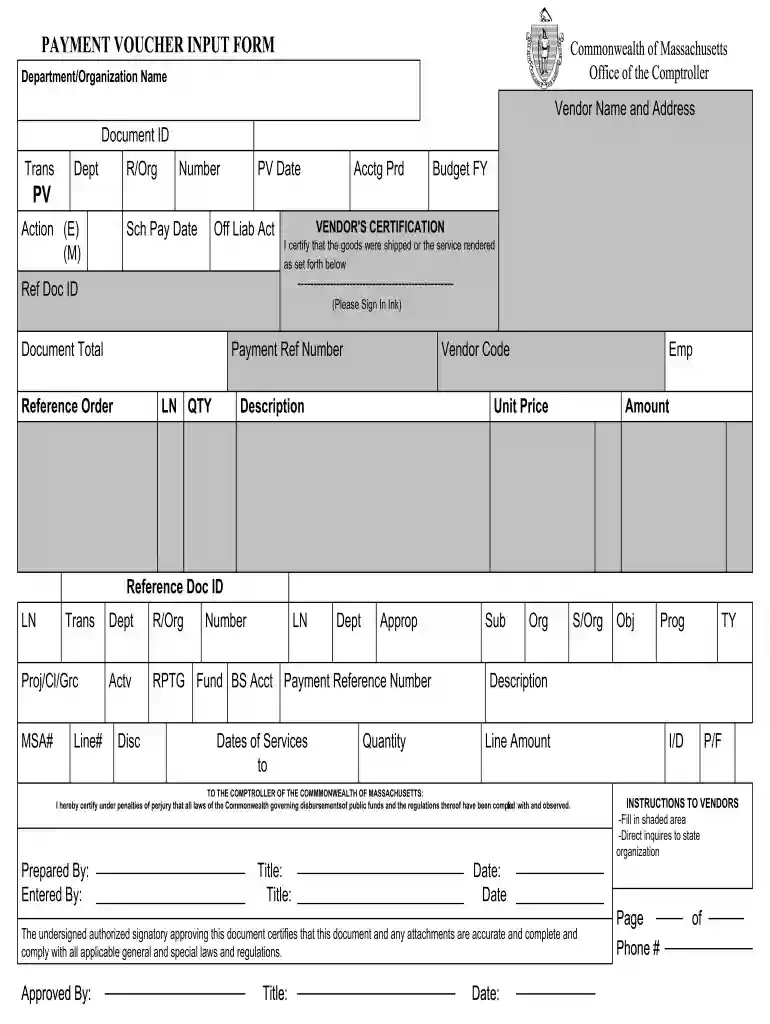
Begin by entering your Department/Organization Name at the top of the form. This identifies who is submitting the payment request.
Fill in the Vendor Name and Address section accurately, as this information is crucial for processing payments.
Complete the Document ID, Transaction Number, and other relevant fields such as PV Date and Budget FY to ensure proper tracking.
In the VENDOR'S CERTIFICATION section, confirm that goods were shipped or services rendered by signing in ink where indicated.
Detail each line item by entering quantities, descriptions, unit prices, and amounts. Ensure all calculations are correct for a smooth approval process.
Finally, have an authorized signatory approve the document by filling in their title and date before submission.
Start using our platform today to fill out your ma payment voucher form online for free!
The Massachusetts Income Tax Payment Voucher, also known as Form PV, is a document used to submit payments for your state income tax liability to the Massachusetts Department of Revenue (DOR). It serves as a companion to your tax return, indicating the amount you owe and providing instructions for sending your payment.
How to fill the payment voucher?
0:27 1:20 And follow the instructions to fill out and print your voucher. Remember these key points to makeMoreAnd follow the instructions to fill out and print your voucher. Remember these key points to make sure your payment is processed on time. Make sure you identify the correct tax. Year.
How to print an IRS voucher?
To print IRS Form 1040-V, Payment Voucher: Sign in to your TaxAct account. Click the My Taxes tile at the bottom of the page. Click the Open link to the right of the return you wish to open. Click Print Center. Click Custom. Check the box for Federal Form 1040-V - Your Name. Scroll down and click the Print button.
What is a Form 1040 payment voucher?
Department of the Treasury. Internal Revenue Service. What Is Form 1040-V? Its a statement you send with your check or money order for any balance due on the Amount you owe line of your 2024 Form 1040, 1040-SR, or 1040-NR. Consider Making Your Tax Payment.
What is a Massachusetts income tax payment voucher?
The voucher itself is a sheet of paper with your information listed on it so you can simply include your check and mail it to the IRS.
mass gov masstaxconnect quick links
Ma payment voucher form pdfMa payment voucher form onlineMa payment voucher form downloadMA Form 1-NR/PY instructions2026 Form 1040-ES payment voucherMA Form 1 InstructionsMa tax voucherMA State tax Form 2026
Security and compliance
At DocHub, your data security is our priority. We follow HIPAA, SOC2, GDPR, and other standards, so you can work on your documents with confidence.
If you owe the IRS money, the last thing you want is for your payment to get lost or misapplied. Thats where Form 1040-V comes in a simple but important payment voucher that helps ensure your check or money order is correctly processed.
mass tax payment voucher
Notes - bg3.wiki
Sep 28, 2025 A list of all in-game notes and letters found within Baldurs Gate 3.
2025 Form PV Massachusetts Income Tax Payment Voucher
Pay online at mass.gov/masstaxconnect. Or, return this voucher with check or money order payable to: Commonwealth of Massachusetts. Mail to: MassachusettsRead more
Cookie consent notice
This site uses cookies to enhance site navigation and personalize your experience.
By using this site you agree to our use of cookies as described in our Privacy Notice.
You can modify your selections by visiting our Cookie and Advertising Notice.