Type text, add images, blackout confidential details, add comments, highlights and more.
02. Sign it in a few clicks
Draw your signature, type it, upload its image, or use your mobile device as a signature pad.
03. Share your form with others
Send form 1446 via email, link, or fax. You can also download it, export it or print it out.
How to use or fill out 1446 form with our platform
Ease of Setup
DocHub User Ratings on G2
Ease of Use
DocHub User Ratings on G2
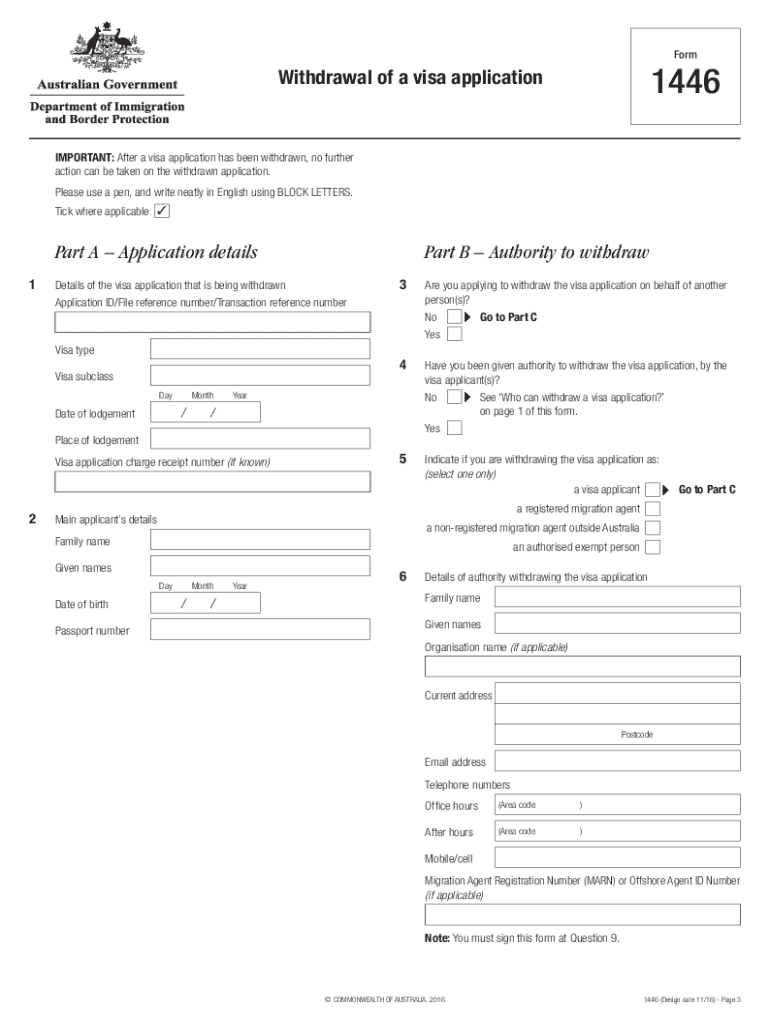
Click ‘Get Form’ to open the 1446 form in the editor.
Begin with Part A, entering your application details such as Application ID and visa type. Ensure all fields are filled accurately.
In Part B, indicate if you are withdrawing on behalf of another person. If yes, provide their details and confirm your authority to act on their behalf.
Proceed to Part C where you will list the details of all applicants involved in the withdrawal. Include names, dates of birth, and contact information.
In Part D, while not mandatory, consider providing reasons for withdrawal as it may assist in future processing by the department.
Finally, complete Part E by signing and dating the declaration. Ensure that all applicants over 18 also sign this section.
Start using our platform today for free to streamline your form completion process!
Form 1445 Employers Final Evaluation of Student (fillable) Form 1446 Students Final Self-Evaluation Form 1567 - Midterm Employer Site Visit Report FormRead more
Partnership withholding | Internal Revenue Service
Feb 7, 2026 The partnership must use Form 8813, Partnership Withholding Tax Payment Voucher (Section 1446), to make payments of withheld tax to the US Treasury.Read more
Cookie consent notice
This site uses cookies to enhance site navigation and personalize your experience.
By using this site you agree to our use of cookies as described in our Privacy Notice.
You can modify your selections by visiting our Cookie and Advertising Notice.