Samc ordering information online 2026

Get Form
samc patient portal login Preview on Page 1

Here's how it works

01. Edit your samc patient portal login online
Type text, add images, blackout confidential details, add comments, highlights and more.
02. Sign it in a few clicks
Draw your signature, type it, upload its image, or use your mobile device as a signature pad.
03. Share your form with others
Send it via email, link, or fax. You can also download it, export it or print it out.

How to use or fill out samc ordering information online with our platform

Form edit decoration
9.5
Ease of Setup
DocHub User Ratings on G2
9.0
Ease of Use
DocHub User Ratings on G2
  1. Click ‘Get Form’ to open the samc ordering information in the editor.
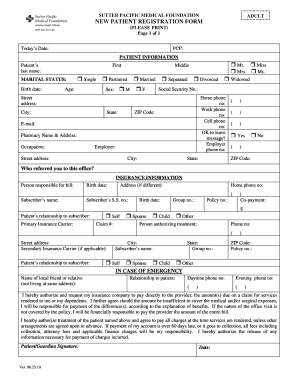
  2. Begin by entering the patient's personal details, including their name, address, phone number, and date of birth. Ensure accuracy as this information is crucial for processing.
  3. Indicate any required fasting by selecting the appropriate checkbox. This is important for tests that necessitate fasting for accurate results.
  4. In the 'Diagnosis/Patient Ordering Information' section, select the relevant diagnosis codes from the provided list. Make sure to indicate which codes correspond to each test ordered.
  5. Specify the priority of the tests by checking either Routine, ASAP, or STAT based on urgency.
  6. Fill in any additional comments or specific instructions in the designated area at the bottom of the form.
  7. Finally, review all entered information for accuracy before submitting your order through our platform.

Start filling out your samc ordering information online today for free and experience seamless document management!

See more samc ordering information online versions

We've got more versions of the samc ordering information online form. Select the right samc ordering information online version from the list and start editing it straight away!
Versions Form popularity Fillable & printable
2009 4.8 Satisfied (141 Votes)
be ready to get more

Complete this form in 5 minutes or less

Get form

Got questions?

We have answers to the most popular questions from our customers. If you can't find an answer to your question, please contact us.
Contact us
Visit to select from our wide variety of Personal checks, Business checks, Deposit products, and Accessories. Once youve entered your shipping address, you can personalize your check, and information MUST match the records on file at your financial institution.
If the email is lost or deleted, you can still track orders through your online account by following these steps. Sign in to your account. Open Purchase history. Filter by status (open or canceled), date range (within the past 3 years), and source (Online orders or In club purchases)
By using SamsClub.com, you can take advantage of 24-hour shopping with delivery direct to your door or utilize curbside Pickup. 2. You can also access your Purchase History online for up to 3 years on all purchases, check a gift card balance, check Sams Cash, update your membership and track online orders.
Order and purchase club merchandise online using Curbside Pickup. Shop online or in the Sams Club app. When your order is ready just head to the club and check in via app or text.
How do I contact Sams Club? Contact Sams Club, (888) 746-7726 Email Sams Club Contact Members Mark, (888) 301-0332 Contact Sams Club Credit, (866) 220-0254 Find any Sams Club At this time, Sams Club does not offer assistive-listening telephone lines.

Security and compliance

At DocHub, your data security is our priority. We follow HIPAA, SOC2, GDPR, and other standards, so you can work on your documents with confidence.

Learn more
ccpa2
pci-dss
gdpr-compliance
hipaa
soc-compliance