




Here's how it works



How to use or fill out letter of recommendation for critical care RN's with our platform

- Click ‘Get Form’ to open the letter of recommendation in the editor.
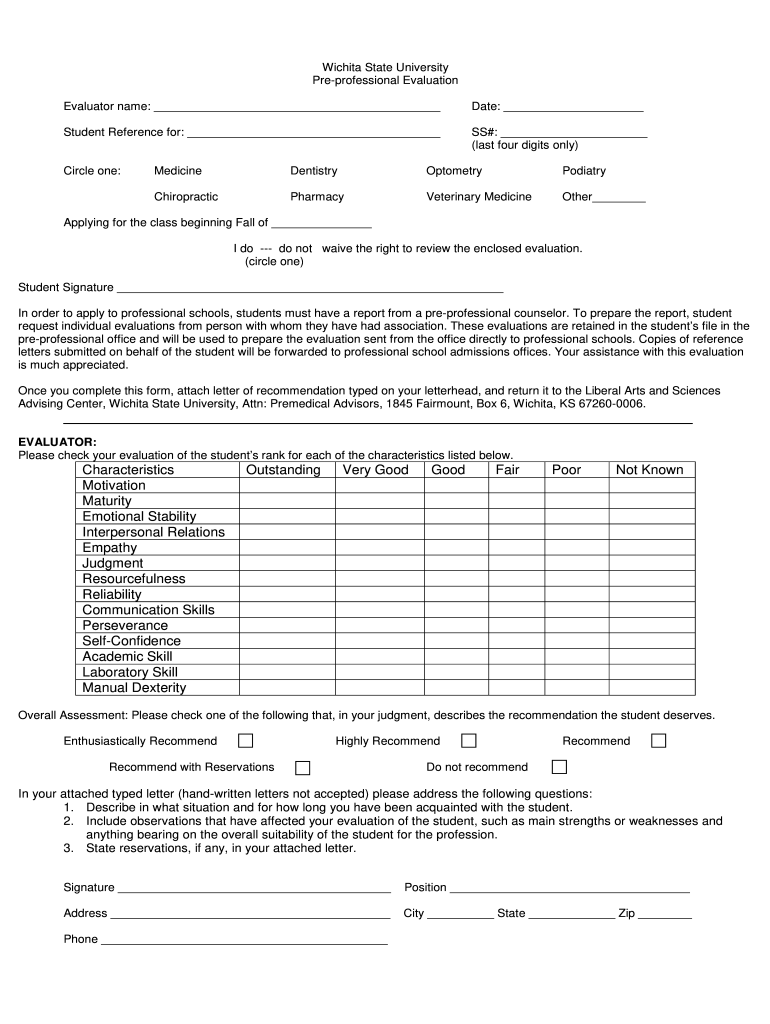
- Begin by entering the evaluator's name and date at the top of the form. This establishes who is providing the recommendation and when it was completed.
- Fill in the student's reference information, including their last four digits of SS# and the specific program they are applying for, such as Medicine or Nursing.
- Indicate whether you waive your right to review the evaluation by circling 'do' or 'do not'. This is an important aspect of transparency in recommendations.
- Evaluate the student on various characteristics by checking appropriate boxes. Be honest and thoughtful in your assessment to provide a comprehensive view of their capabilities.
- In your attached typed letter, address key questions about your relationship with the student, observations that influenced your evaluation, and any reservations you may have.
- Finally, complete your signature, position, address, and contact information at the bottom of the form before submitting it as instructed.
Start using our platform today to streamline your document editing process for free!
It's free
Got questions?
How can I sign my letter of reccomendation for critical care rn's online?
Sign in to your DocHub account and add your letter of reccomendation for critical care rn's to our editor using one of its upload options - from your device, cloud storage, protected URL, or your DocHub folders if you have already processed your form before. Open our editor, click the Sign key in the top toolbar, and choose your signing method. You can upload a picture of your handwritten signature, draw it, enter your name, or utilize a QR code as an alternative.
How to manage my letter of reccomendation for critical care rn's from Gmail?
In case your go-to electronic mail service is Gmail, it is simple to integrate your DocHub editor into your work. Edit your letter of reccomendation for critical care rn's with DocHub tools and attach it to your drafts in Gmail. See how effortless it can be to exchange papers and work together having a swift PDF editing solution at hand.
Who should write letters of recommendation for nursing?
What are good things to say in a letter of recommendation?
What should be in a nursing school letter of recommendation?
Security and compliance
At DocHub, your data security is our priority. We follow HIPAA, SOC2, GDPR, and other standards, so you can work on your documents with confidence.
Learn more


