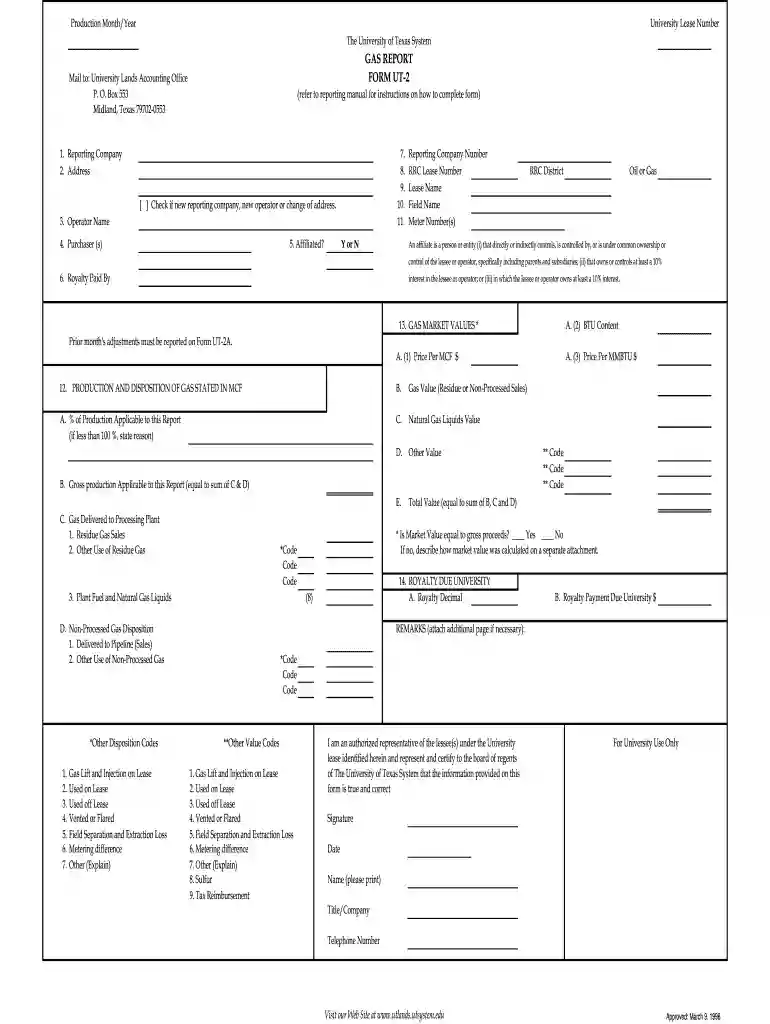
form ut 2 Preview on Page 1

Form ut 2 2026

Here's how it works

  • 01. Edit your form online

    Type text, add images, blackout confidential details, add comments, highlights and more.

  • 02. Sign it in a few clicks

    Draw your signature, type it, upload its image, or use your mobile device as a signature pad.

  • 03. Share your form with others

    Send it via email, link, or fax. You can also download it, export it or print it out.

How to use or fill out form ut 2 with our platform

Form edit decoration
9.5
Ease of Setup
DocHub User Ratings on G2
9.0
Ease of Use
DocHub User Ratings on G2
  1. Click ‘Get Form’ to open it in the editor.
  2. Begin by entering the Reporting Company name and Address in the designated fields. If this is a new reporting company or if there’s a change of address, check the appropriate box.
  3. Fill in the Operator Name and Purchaser(s) details. Indicate whether they are affiliated by selecting 'Y' or 'N'.
  4. Complete the sections for Reporting Company Number, RRC Lease Number, Lease Name, Field Name, and Meter Number(s). Ensure all information is accurate.
  5. In the Production and Disposition of Gas section, provide values for Price Per MCF and BTU Content. Report any adjustments from the previous month as required.
  6. Calculate and enter the Total Value based on your production data. Make sure to include all relevant dispositions.
  7. Finally, sign and date the form at the bottom, ensuring that your name, title/company, and telephone number are clearly printed.

Start filling out form ut 2 today for free using our platform!

See more form ut 2 versions

We've got more versions of the form ut 2 form. Select the right form ut 2 version from the list and start editing it straight away!

VersionsForm popularityFillable & printable
19984.9 Satisfied (262 Votes)

be ready to get more

Complete this form in 5 minutes or less

Got questions?

We have answers to the most popular questions from our customers. If you can't find an answer to your question, please contact us.

Schedule 2: Supporting documentation for tax form 1040 if box 11b is checked. This Schedule is used to report additional taxes owed such as the alternative minimum tax, self-employment tax, or household employment taxes. Schedule 3: Supporting documentation for tax form 1040 if box 12b is checked.
The Company has irrevocably appointed xx pursuant to a Form U-2 Uniform Consent to Service of Process filed with the Secretary of State of the State of California, as its agent to receive service of process or other legal summons for purposes of any such suit, action or proceeding that may be instituted in
Form T-2 shall be used for statements of eligibility of individuals designated to act as trustees under trust indentures to be qualified pursuant to Sections 305 or 307 of the Trust Indenture Act of 1939.
A W-2 is a document that employers must send or mail to employees by the end of January. It contains a summary of the income earned and the amount of taxes withheld during the prior tax year. Employees use this statement to fill out their tax returns.

Security and compliance

At DocHub, your data security is our priority. We follow HIPAA, SOC2, GDPR, and other standards, so you can work on your documents with confidence.

Related links

2017 Schedule A (Form 940)

Place an X in the box of EVERY state in which you had to pay state unemployment tax this year. For each state with a credit reduction rate greater thanRead more

Learn more
01 29 54.2 Reconciliation Form UT T-2

01 29 54.2 RECONCILIATION FORM UT T-2. The University of Tennessee, October 2018. Page 1 of 1. APPLICATION FOR DEPOSIT OF RETAINAGE FORM UT T-2. SUBMITTEDRead more

Learn more
If you believe that this page should be taken down, please follow our DMCA take down process here