Change of heavy vehicle use 2026

Get Form
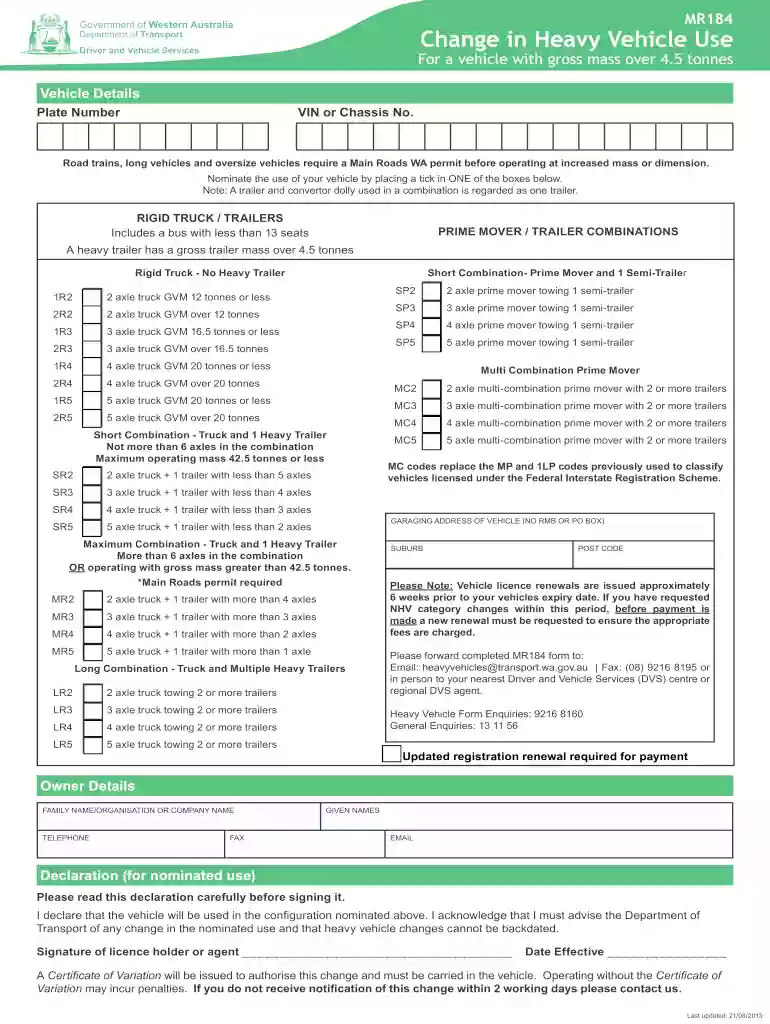
change of heavy vehicle use Preview on Page 1

Here's how it works

01. Edit your form online
Type text, add images, blackout confidential details, add comments, highlights and more.

02. Sign it in a few clicks
Draw your signature, type it, upload its image, or use your mobile device as a signature pad.

03. Share your form with others
Send it via email, link, or fax. You can also download it, export it or print it out.

How to use or fill out change of heavy vehicle use with our platform

Form edit decoration
9.5
Ease of Setup
DocHub User Ratings on G2
9.0
Ease of Use
DocHub User Ratings on G2
  1. Click ‘Get Form’ to open the Change of Heavy Vehicle Use document in the editor.
  2. Begin by entering the vehicle details, including the Plate Number and VIN or Chassis Number. Ensure accuracy as this information is crucial for identification.
  3. In the 'Nominate the use of your vehicle' section, select one option that best describes your vehicle's configuration by ticking the appropriate box. This includes options for rigid trucks, prime movers, and various combinations.
  4. Fill in the garaging address of the vehicle, ensuring it is a physical address (no PO Box). This is important for official records.
  5. Complete the Owner Details section with your family name or organization name, given names, telephone number, fax number, and email address.
  6. Read through the declaration carefully before signing. Confirm that you will notify the Department of Transport about any changes in usage.
  7. Finally, submit your completed form via email or fax as indicated at the bottom of the document.

Start using our platform today to streamline your heavy vehicle documentation process for free!

See more change of heavy vehicle use versions

We've got more versions of the change of heavy vehicle use form. Select the right change of heavy vehicle use version from the list and start editing it straight away!
Versions Form popularity Fillable & printable
2020 4.8 Satisfied (95 Votes)
2019 4.4 Satisfied (249 Votes)
2017 4.4 Satisfied (119 Votes)
2013 4.4 Satisfied (112 Votes)
be ready to get more

Complete this form in 5 minutes or less

Get form

Got questions?

We have answers to the most popular questions from our customers. If you can't find an answer to your question, please contact us.
Contact us
Form 2290 is tied to the unique vehicle and VIN: You cant simply move the tax or filing to a different truck, even if you bought a new one mid-year. The IRS treats each vehicle separately, so if you replace or sell a truck, youll need to file a new Form 2290 for the new vehicle.
Passenger Vehicles ( 6,000 lbs. GVWR): These follow standard depreciation rules with a lower first-year deduction cap. Heavy Vehicles (Over 6,000 lbs. GVWR): SUVs, trucks, and vans that exceed 6,000 pounds Gross Vehicle Weight Rating (GVWR) qualify for a larger tax write-off for vehicles over 6,000 lbs.
What is the Tax Form 2290 Bracket? Vehicle Gross Weight (lbs)Taxable Gross Weight CategoryAnnual Tax (USD) 64,000 65,999 Category F $210 66,000 67,999 Category G $232 68,000 69,999 Category H $254 70,000 71,999 Category I $27610 more rows Oct 28, 2024
Form 2290 Due Dates for Vehicles Placed Into Service During Reporting Period Month New Vehicle Is First UsedMonth Form 2290 Must Be Filed December 2024 January 31, 2025 January 2025 February 28, 2025 February 2025 March 31, 2025 March 2025 April 30, 20258 more rows

Security and compliance

At DocHub, your data security is our priority. We follow HIPAA, SOC2, GDPR, and other standards, so you can work on your documents with confidence.

Learn more
ccpa2
pci-dss
gdpr-compliance
hipaa
soc-compliance
be ready to get more

Complete this form in 5 minutes or less

Get form