




01. Edit your eye prescription template online
Type text, add images, blackout confidential details, add comments, highlights and more.

Type text, add images, blackout confidential details, add comments, highlights and more.

Draw your signature, type it, upload its image, or use your mobile device as a signature pad.

Send editable eye doctor prescription template via email, link, or fax. You can also download it, export it or print it out.
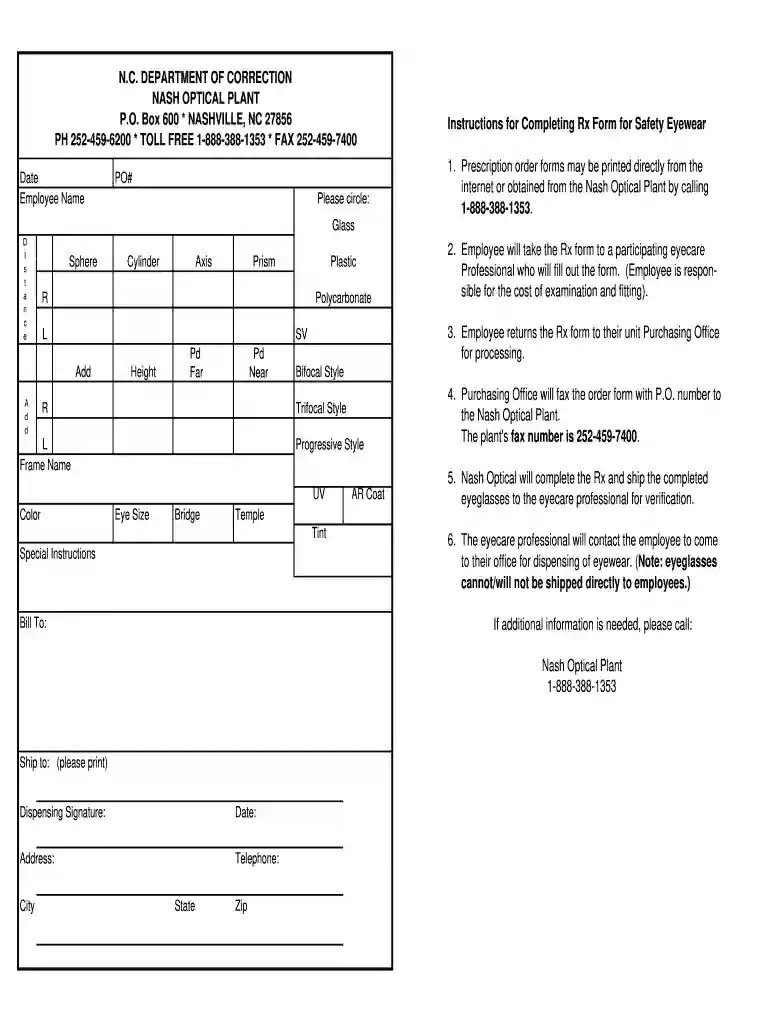
An eye prescription PDF serves as an official document that specifies the details necessary for ordering corrective lenses. This document is generated by licensed eye care professionals, such as optometrists and ophthalmologists, and is vital for both eyeglass and contact lens wearers. Below, we explore the various facets of this important document format.
An eye prescription typically includes several crucial components, which vary based on the type of lenses required. These include:
Patient Information: Full name and date of birth.
Examination Date: When the eye examination was conducted.
Optometrist or Ophthalmologist Details: Name, contact information, and license number of the prescribing practitioner.
Prescription Details (for eyeglasses):
Prescription Details (for contact lenses):
Understanding these components ensures that users can correctly interpret their prescriptions when ordering glasses or contact lenses.
Creating an eye prescription PDF can be simplified by utilizing specialized templates. These templates are designed to capture all necessary prescription details effectively. Here's a step-by-step guide:
Select a Template: Choose an eye prescription template in PDF format that meets your needs. Editable versions can be useful for eye care professionals to customize for different patients.
Fill in Patient Information: Ensure all patient details are accurately entered, including contact information and relevant medical history.
Enter Prescription Information: Input the specific measurements from the eye examination. For eyeglasses, ensure that all optical measurements like SPH, CYL, and PD are included.
Review for Accuracy: Before finalizing the document, double-check all entries to prevent errors that could affect the accuracy of the lenses.
Save and Export: Once completed, save the document as a PDF to ensure it maintains its formatting when sent electronically to labs or patients.
Using an eye prescription template streamlines the process of documenting patient information and allows for consistent presentation.
It is important to recognize that eye prescriptions are legally binding documents governed by regulations that vary by state. In the United States, the Fairness to Contacts Consumers Act mandates that patients must receive a copy of their contact lens prescription after an eye exam. Eye care providers are required to provide prescriptions in an accessible format, such as a PDF, which patients can use to order their lenses from a provider of their choice.
Both patients and eye care providers should maintain accurate and up-to-date records of eye prescriptions for several reasons:
For patients, retaining their eye prescription PDF enables easy access and ordering possibilities for future lens purchases, ensuring they always have updated information at hand.
There are multiple formats for eye prescriptions based on specific needs. Examples include:
Templates can vary in design but should always capture the essential components as listed above.
An eye prescription PDF is an essential document for anyone requiring corrective lenses. By understanding how to create, maintain, and utilize these prescriptions effectively, both patients and professionals ensure that vision correction is accurate and efficient. Maintaining clarity around the details contained in prescriptions contributes to better eye health management and satisfies legal and insurance obligations.
A lot of software applications are available on the market for document modifying and signing. DocHub is one of the most widely used online solutions that comply with all security and compliance standards and guarantees your eSigned documentation is legally enforceable. All you need to give it a try is to create an account, add your eye prescription format pdf, provide the necessary details, and click Sign. Create your electronic signature by typing, drawing it, uploading its picture to your form, or scanning a unique QR code.
If you are using Chrome, there are two straightforward methods to edit your eyeglass prescription template online. First, go to the DocHub website, add your file, and edit it using our toolbar. You may also set up our Chrome extension and edit any document by dragging and dropping it in your web browser tab.
At DocHub, your data security is our priority. We follow HIPAA, SOC2, GDPR, and other standards, so you can work on your documents with confidence.
A schematic eye (Figure 33) helps to conceptualize the optical properties of the human eye. The reduced schematic eye treats the eye as if it were a singleRead more
Oct 1, 2010 In addition to the new prescription, an eye doctor or primary care practitioner should provide the enrollee with a written, patientRead more


