Type text, add images, blackout confidential details, add comments, highlights and more.
02. Sign it in a few clicks
Draw your signature, type it, upload its image, or use your mobile device as a signature pad.
03. Share your form with others
Send it via email, link, or fax. You can also download it, export it or print it out.
How to use or fill out California Form CT NRP 1
Ease of Setup
DocHub User Ratings on G2
Ease of Use
DocHub User Ratings on G2
Click ‘Get Form’ to open it in the editor.
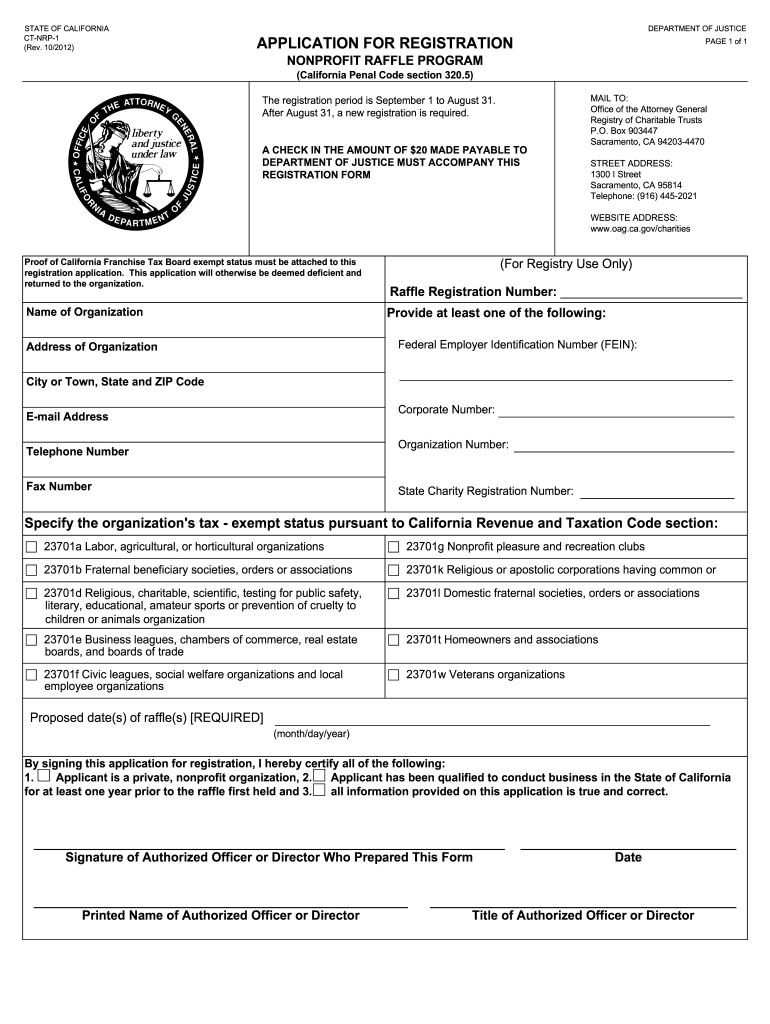
Begin by entering the name of your organization in the designated field. Ensure that this matches your official registration documents.
Provide your organization's address, including city, state, and ZIP code. This information is crucial for identification purposes.
Fill in at least one of the required identifiers: Federal Employer Identification Number (FEIN) or Corporate Number. This helps verify your nonprofit status.
Select the appropriate tax-exempt status from the list provided. This is essential for compliance with California Revenue and Taxation Code.
Indicate the proposed date(s) of your raffle(s) in the specified format (month/day/year). This ensures timely processing of your application.
Finally, have an authorized officer sign and date the form, providing their printed name and title to validate the application.
Start filling out California Form CT NRP 1 today using our platform for free!
Fill out california form ct nrp 1 online It's free
California form ct nrp 1 pdfCalifornia form ct nrp 1 templateCalifornia form ct nrp 1 2021California form ct nrp 1 onlineCalifornia form ct nrp 1 2022CT-NRP-2RRF-1CT-TR-1
Security and compliance
At DocHub, your data security is our priority. We follow HIPAA, SOC2, GDPR, and other standards, so you can work on your documents with confidence.
Complete the raffle annual registration form (CT-NRP-1) and mail it to the Registry of. Charitable Trusts with the $20 registration fee. Checks should beRead more
Apr 30, 2021 Fracking in the Marcellus Shale formation in Pennsylvania had dropped by more than 50 percent since its peak in 2010, attributed primarily to the low marketRead more
Nonprofit Raffles | State of California - Department of Justice
If you do not register by January 1, we recommend you submit Form CT-NRP-1 at least 60 days before the scheduled date for a raffle to ensure adequate time toRead more
Cookie consent notice
This site uses cookies to enhance site navigation and personalize your experience.
By using this site you agree to our use of cookies as described in our Privacy Notice.
You can modify your selections by visiting our Cookie and Advertising Notice.