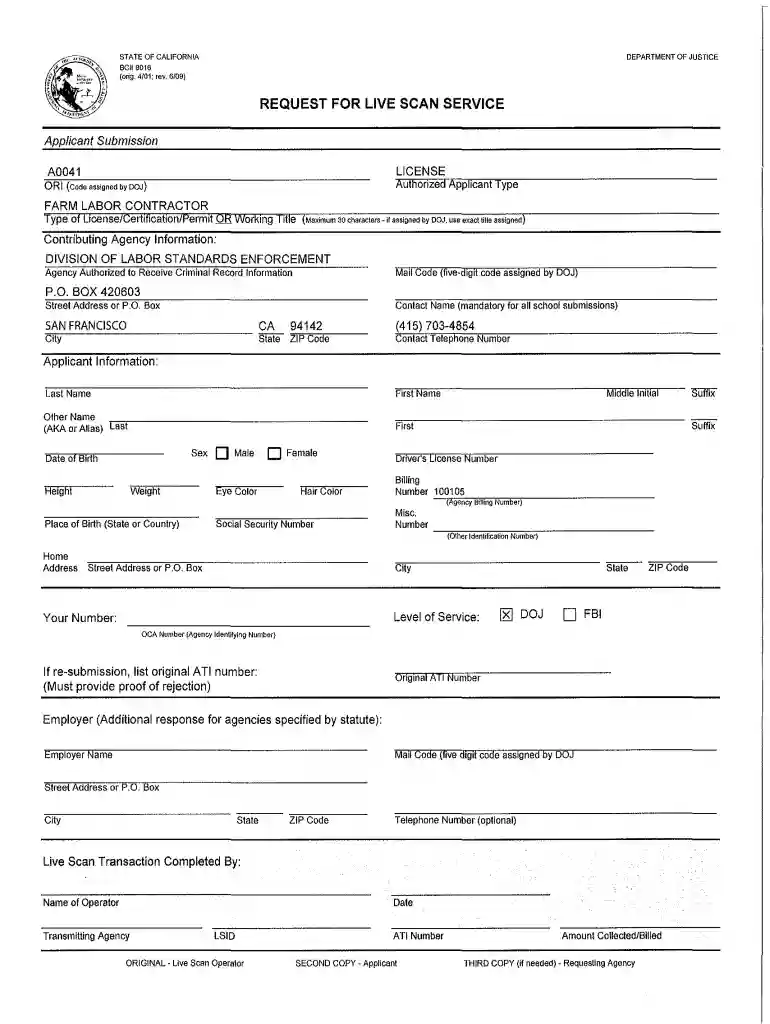
Flc livescan request form 2026

Get Form
flc livescan request form Preview on Page 1

Here's how it works

01. Edit your form online
Type text, add images, blackout confidential details, add comments, highlights and more.

02. Sign it in a few clicks
Draw your signature, type it, upload its image, or use your mobile device as a signature pad.

03. Share your form with others
Send it via email, link, or fax. You can also download it, export it or print it out.

How to use or fill out flc livescan request form with our platform

Form edit decoration
9.5
Ease of Setup
DocHub User Ratings on G2
9.0
Ease of Use
DocHub User Ratings on G2
  1. Click ‘Get Form’ to open the flc livescan request form in the editor.
  2. Begin by filling out the 'Applicant Submission' section. Enter your authorized applicant type, license number, and working title. Ensure that the title does not exceed 30 characters.
  3. In the 'Contributing Agency Information' section, provide the agency name and mail code assigned by DOJ. Include a contact name and telephone number for any inquiries.
  4. Next, complete the 'Applicant Information' section. Fill in your first name, last name, middle initial, date of birth, height, weight, sex, eye color, hair color, and driver's license number.
  5. If applicable, provide your social security number and place of birth. Complete any additional fields related to employer information if required.
  6. Finally, review all entered information for accuracy before submitting your form electronically through our platform.

Start using our platform today to easily fill out your flc livescan request form for free!

be ready to get more

Complete this form in 5 minutes or less

Get form

Got questions?

We have answers to the most popular questions from our customers. If you can't find an answer to your question, please contact us.
Contact us
The BCIA 8016 form, also known as the Request for Live Scan Service, is a California Department of Justice form used for electronic fingerprinting and background checks. It is required by authorized entities to obtain criminal history information for various purposes like employment, volunteer work, or licensing.
Check Status of Your Live Scan: After completing the Live Scan, you can check on the status by visiting . Please note, to check on the status you must have your ATI number and your date of birth.
As an individual, you may not receive a copy directly. To obtain a copy of your Live Scan results, you can request it from the agency or employer who initiated the process. They should be able to provide you with a copy or grant you access to the results as per their internal policies.
Its easy! Visit a local IdentoGO Centers, securely provide your fingerprints which we will submit electronically to the FBI. A link will be emailed to you to safely access your Federal background check results.
How do I request a copy of my background check report? You may contact our Client Services team at 800.216.8024, or send an email to customerservice@accurate.com. Please include your full name and the search reference ID, if available.

Security and compliance

At DocHub, your data security is our priority. We follow HIPAA, SOC2, GDPR, and other standards, so you can work on your documents with confidence.

Learn more
ccpa2
pci-dss
gdpr-compliance
hipaa
soc-compliance
be ready to get more

Complete this form in 5 minutes or less

Get form

People also ask

At least one ID document must be from the primary list and match your current name and date of birth. At least one ID document must contain your current valid US address.
Is there a cost for fingerprinting? Yes, you are required to pay the Live Scan operator the $49 fingerprint processing fee ($32 for DOJ and $17 for FBI), as well as the Live Scan site rolling fee.
If you need to check the status or see the results, youll need to contact the requesting agency. You can also track the submission using your Transaction Control Number (TCN), which you receive after your appointment.

Related links