Form ct 13 2012-2025

Get Form
form ct 13 2012 Preview on Page 1

Here's how it works

01. Edit your form online
Type text, add images, blackout confidential details, add comments, highlights and more.

02. Sign it in a few clicks
Draw your signature, type it, upload its image, or use your mobile device as a signature pad.

03. Share your form with others
Send it via email, link, or fax. You can also download it, export it or print it out.

How to use or fill out form ct 13 2012 with our platform

Form edit decoration
9.5
Ease of Setup
DocHub User Ratings on G2
9.0
Ease of Use
DocHub User Ratings on G2
  1. Click ‘Get Form’ to open the CT-13 in the editor.
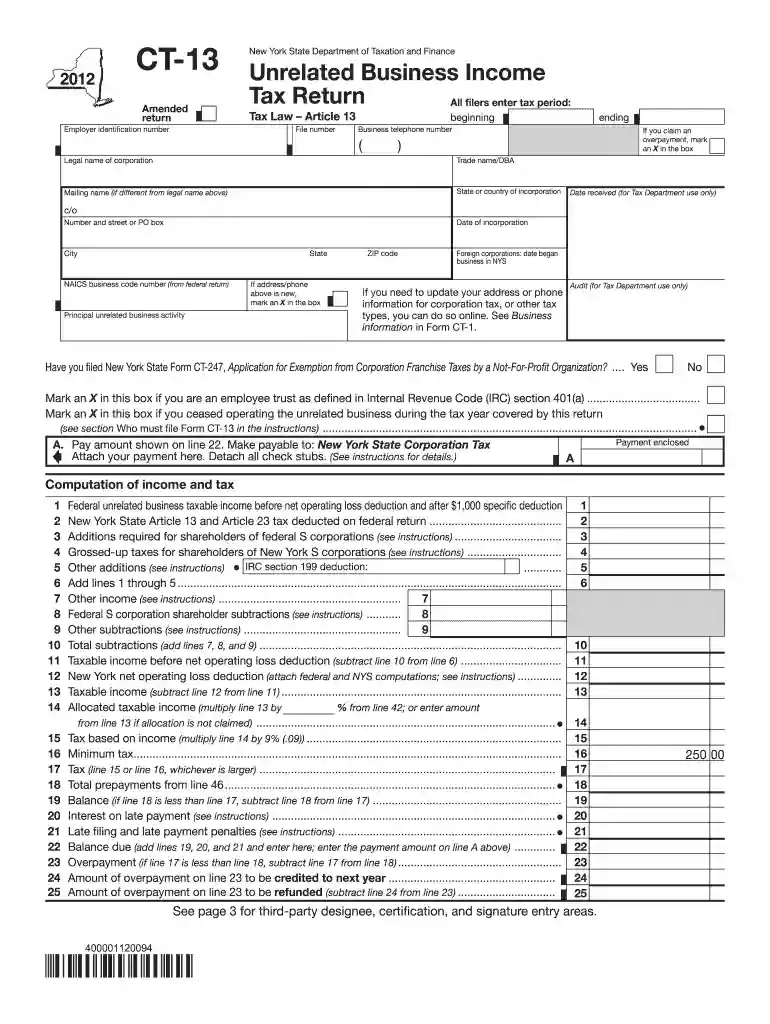
  2. Begin by entering the tax period at the top of the form. Ensure that you provide your employer identification number and file number accurately.
  3. Fill in the legal name of your corporation, along with any mailing name if it differs. Include your business telephone number and trade name/DBA.
  4. Complete the sections regarding your incorporation details, including state and date of incorporation. If applicable, indicate if you are claiming an overpayment by marking an X in the designated box.
  5. Proceed to the computation section where you will input figures related to federal unrelated business taxable income and other required additions or subtractions as per instructions.
  6. Finally, review all entries for accuracy before signing and submitting. Use our platform’s features to save or share your completed form easily.

Start using our platform today for free to streamline your form completion process!

See more form ct 13 2012 versions

We've got more versions of the form ct 13 2012 form. Select the right form ct 13 2012 version from the list and start editing it straight away!
Versions Form popularity Fillable & printable
2023 4.2 Satisfied (25 Votes)
2022 4.6 Satisfied (20 Votes)
2021 4.8 Satisfied (139 Votes)
2020 4.2 Satisfied (37 Votes)
2019 4.3 Satisfied (80 Votes)
2018 4.3 Satisfied (125 Votes)
2017 4.2 Satisfied (68 Votes)
2014 4 Satisfied (20 Votes)
2012 4.3 Satisfied (100 Votes)
be ready to get more

Complete this form in 5 minutes or less

Get form

Got questions?

We have answers to the most popular questions from our customers. If you can't find an answer to your question, please contact us.
Contact us
HOW TO OBTAIN CONNECTICUT TAX FORMS Connecticut state tax forms can be downloaded at the Department of Revenue Services (DRS) website: .ct.gov/drs/ Connecticut tax forms and publications are available at any DRS offices, during tax filing season.
Each system unit and local lodge unit must file an annual tax return, Form CT-1, Employers Annual Railroad Retirement Tax Return, with the Internal Revenue Service (IRS).
Connecticut Resident Income Tax Return.
Requesting Copies of Previously Filed Returns Log into myconneCT. Open the More menu. Locate the Correspondence group and click the Send a Message link. Select the account, period, message area (e.g. account, return, refund), and category. Enter the subject and message. You can also add attachments to your message.
A Connecticut estate tax return must be filed after your death, regardless of the size of your estate. It will be your executors responsibility to file either Form CT-706 (for taxable estates) or CT-706 NT (for nontaxable estates). Both the return and any tax owed are due six months after the death.

People also ask

To request this extension, you must file Form CT-1127, Application for Extension of Time for Payment of Income Tax, with your timely filed Connecticut income tax return or extension. Purpose: Use Form CT-1040 EXT to request a six-month extension to file your Connecticut income tax return for individuals.
Get the current filing years forms, instructions, and publications for free from the IRS. Download them from IRS.gov. Order online and have them delivered by U.S. mail. Order by phone at 1-800-TAX-FORM (1-800-829-3676)

Related links