Type text, add images, blackout confidential details, add comments, highlights and more.
02. Sign it in a few clicks
Draw your signature, type it, upload its image, or use your mobile device as a signature pad.
03. Share your form with others
Send 8655 form via email, link, or fax. You can also download it, export it or print it out.
How to use or fill out 8655 fillable form irs with our platform
Ease of Setup
DocHub User Ratings on G2
Ease of Use
DocHub User Ratings on G2
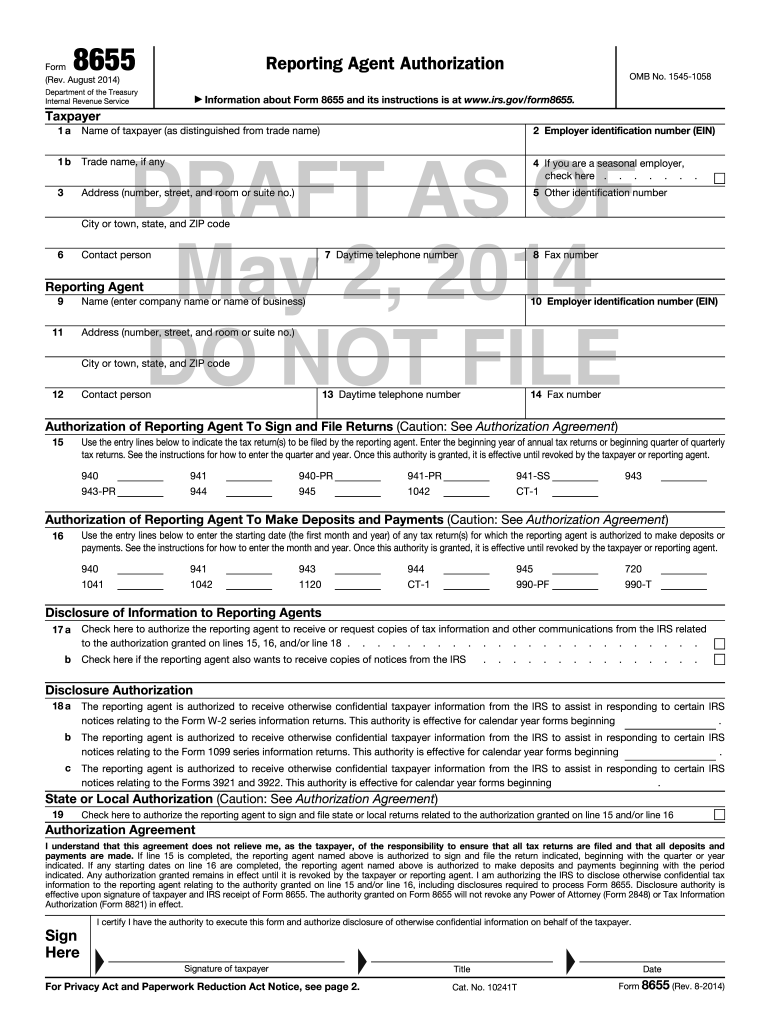
Click ‘Get Form’ to open the 8655 fillable form in the editor.
Begin by entering the taxpayer's name and Employer Identification Number (EIN) in fields 1a and 2. Ensure accuracy as this information is crucial for identification.
Fill in the address details in section 3, including street number, city, state, and ZIP code. This ensures that all correspondence reaches the correct location.
In section 15, specify the tax return types your reporting agent will file. Use the appropriate format: 'YYYY' for annual returns and 'MM/YYYY' for quarterly returns.
For section 16, indicate the starting date for deposits or payments using 'MM/YYYY'. This sets a clear timeline for your reporting agent's authority.
Complete sections regarding disclosure of information (lines 17 and 18) to authorize your reporting agent to receive necessary communications from the IRS.
Finally, sign and date the form at the bottom to validate your authorization. Ensure you have the authority to execute this form on behalf of the taxpayer.
Start filling out your IRS Form 8655 effortlessly with our platform today!
8655 fillable form irs pdf8655 fillable form irs templateForm 8655 fillableForm 8655 PDFForm 8655 instructionsIRS Form 8655How to fill out 8655 fillable form irs8655 fillable form irs example
Security and compliance
At DocHub, your data security is our priority. We follow HIPAA, SOC2, GDPR, and other standards, so you can work on your documents with confidence.
Dec 16, 2024 Direct File is a permanent option to file individual federal tax returns onlinefor freedirectly and securely with the IRS starting in 2025.Read more
I am authorizing the IRS to disclose otherwise confidential tax information to the reporting agent relating to the authority granted on line 15 and/or line 16,Read more
Cookie consent notice
This site uses cookies to enhance site navigation and personalize your experience.
By using this site you agree to our use of cookies as described in our Privacy Notice.
You can modify your selections by visiting our Cookie and Advertising Notice.