Aamu withdrawal form 2026

Get Form
aamu withdrawal form Preview on Page 1

Here's how it works

01. Edit your form online
Type text, add images, blackout confidential details, add comments, highlights and more.

02. Sign it in a few clicks
Draw your signature, type it, upload its image, or use your mobile device as a signature pad.

03. Share your form with others
Send it via email, link, or fax. You can also download it, export it or print it out.

How to use or fill out aamu withdrawal form with our platform

Form edit decoration
9.5
Ease of Setup
DocHub User Ratings on G2
9.0
Ease of Use
DocHub User Ratings on G2
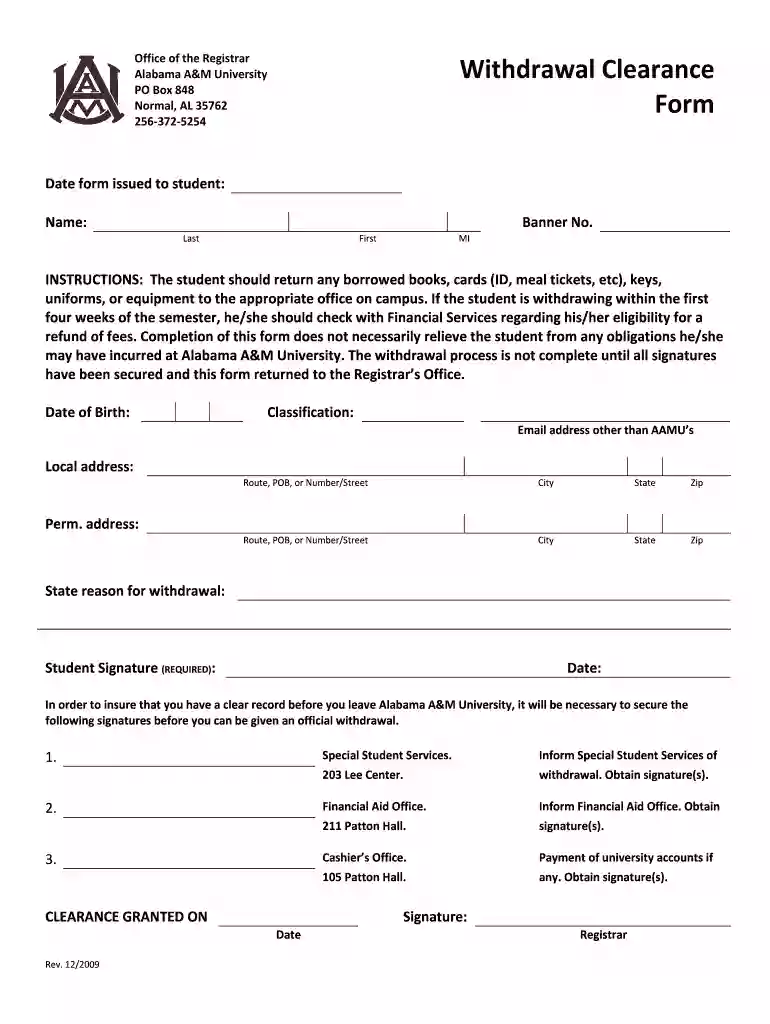
  1. Click ‘Get Form’ to open the aamu withdrawal form in the editor.
  2. Begin by entering the date the form is issued to you. This helps track your withdrawal process.
  3. Fill in your personal details: Name, Banner Number, Date of Birth, and Classification. Ensure accuracy for proper identification.
  4. Provide your email address (other than AAMU’s) and both local and permanent addresses. This information is crucial for communication regarding your withdrawal.
  5. State your reason for withdrawal clearly in the designated field. This helps the university understand your situation better.
  6. Sign and date the form where indicated. Your signature is required to validate the request.
  7. Secure necessary signatures from Special Student Services, Financial Aid Office, and Cashier’s Office as instructed on the form.
  8. Once all signatures are obtained, return the completed form to the Registrar’s Office to finalize your withdrawal process.

Start using our platform today to fill out your aamu withdrawal form easily and for free!

be ready to get more

Complete this form in 5 minutes or less

Get form

Got questions?

We have answers to the most popular questions from our customers. If you can't find an answer to your question, please contact us.
Contact us
The withdrawal process is initiated online through the students myBama account. The Tuition and Other Expenses section of this catalog provides information regarding the effects of withdrawal upon tuition fee payments and financial aid.
Log on to Self-Service Banner (SSB) and follow the steps to set up your Banner Self-Service account. Click through the following tabs: Student, Student Records, and Academic Transcript. Click submit to view and print your unofficial transcript.
Withdrawal from The University Complete the Withdrawal Clearance Form. Complete exit interview with the Office of Student Financial Aid.
For additional information about how to officially withdraw from AU, please contact AU Central at 202-885-8000 or aucentral@american.edu. If you have questions about your Title IV program funds, you can call the Federal Student Aid Information Center at 1-800-4-FEDAID (1-800-433-3243).
Discuss your decision with your professors and academic advisor first, and finish out the semester if you can. Once youve decided to drop out of college, submit an official withdrawal request through your university. These requests usually require you to complete some paperwork before your enrollment is terminated.

Security and compliance

At DocHub, your data security is our priority. We follow HIPAA, SOC2, GDPR, and other standards, so you can work on your documents with confidence.

Learn more
ccpa2
pci-dss
gdpr-compliance
hipaa
soc-compliance
be ready to get more

Complete this form in 5 minutes or less

Get form

People also ask

University Excuse Process: Student submits Official University Excuse Request Form in Laserfiche. The Associate Deans office will receive an email notification of the submission. The Associate Deans office personnel will review and approve excuses on the form that was submitted via Laserfiche.

Related links