




Here's how it works



How to use or fill out ecb vetting form 2021 with DocHub

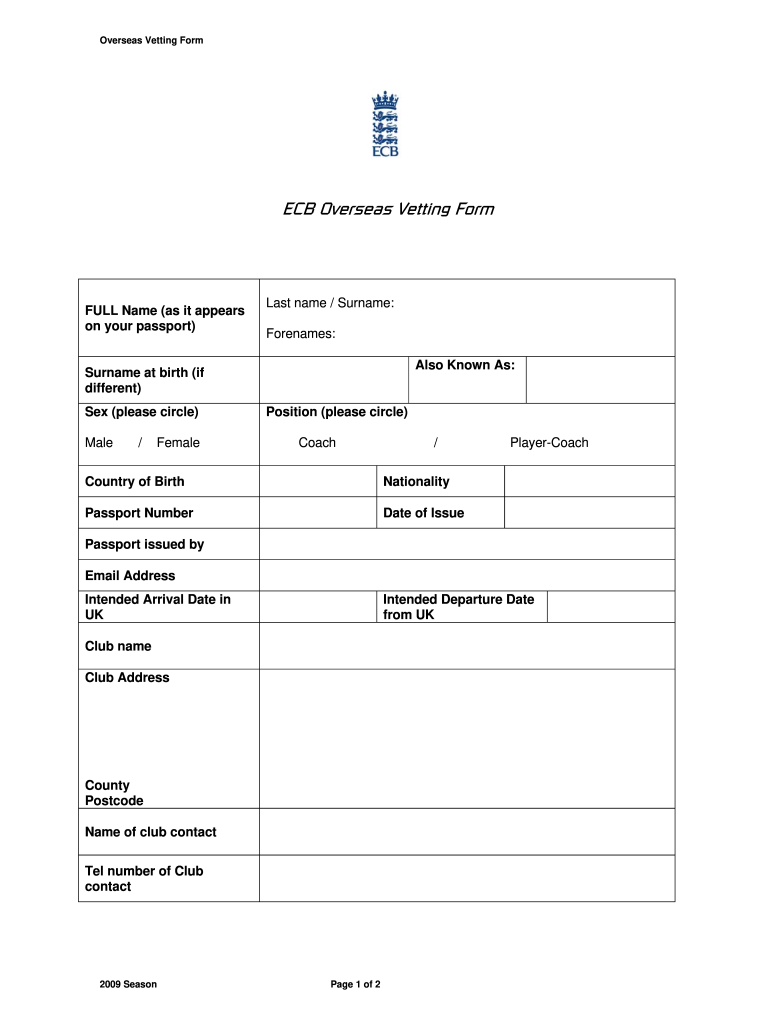
- Click ‘Get Form’ to open the ECB Overseas Vetting Form in our editor.
- Begin by entering your FULL Name as it appears on your passport, including Last name/Surname and Forenames. If applicable, include your Surname at birth.
- Indicate your Sex by circling either Male or Female, and select your Position (Coach or Player-Coach).
- Fill in your Country of Birth, Nationality, and Passport Number. Also, provide the Date of Issue and the authority that issued your passport.
- Enter your Email Address along with the Intended Arrival and Departure Dates in the UK.
- Complete the Club name and address details, including County and Postcode. Don’t forget to add the name and telephone number of a club contact.
- Provide your Current Home Address overseas. Confirm if you have resided there for the last 5 years; if not, attach a previous address form with all relevant addresses.
- Attach evidence of clearance such as a Certificate of Good Conduct from your local Police Authority or High Commission.
- Finally, sign the form to confirm that all information is accurate before submitting it to the ECB Governing Body Endorsements.
Start filling out your ECB vetting form today using our platform for free!
It's free
See more ecb vetting form 2021 versions
Got questions?
Can I sign my vetting form in electronic format?
According to eSignature regulations, forms approved digitally have the same validity as traditionally approved ones. You can electronically sign almost any business and private documentation. Four types of paperwork still demand handwritten signatures only - wills and testamentary trusts, court orders and other court forms, state statutes governing divorce, adoption, or other family law, and notice of cancellation of utility services. If you follow the rules and utilize a reliable and compliant software solution, like DocHub, you can eSign your vetting form without printing it.
How do you edit vetting form template in Chrome?
If you use Chrome, there are two simple ways to edit your vetting form template online. First, go to the DocHub website, add your document, and edit it using our toolbar. You may also set up our Chrome extension and edit any document by dragging and dropping it in your browser tab.
Security and compliance
At DocHub, your data security is our priority. We follow HIPAA, SOC2, GDPR, and other standards, so you can work on your documents with confidence.
Learn more




