Cwf1 form pdf 2026

Get Form
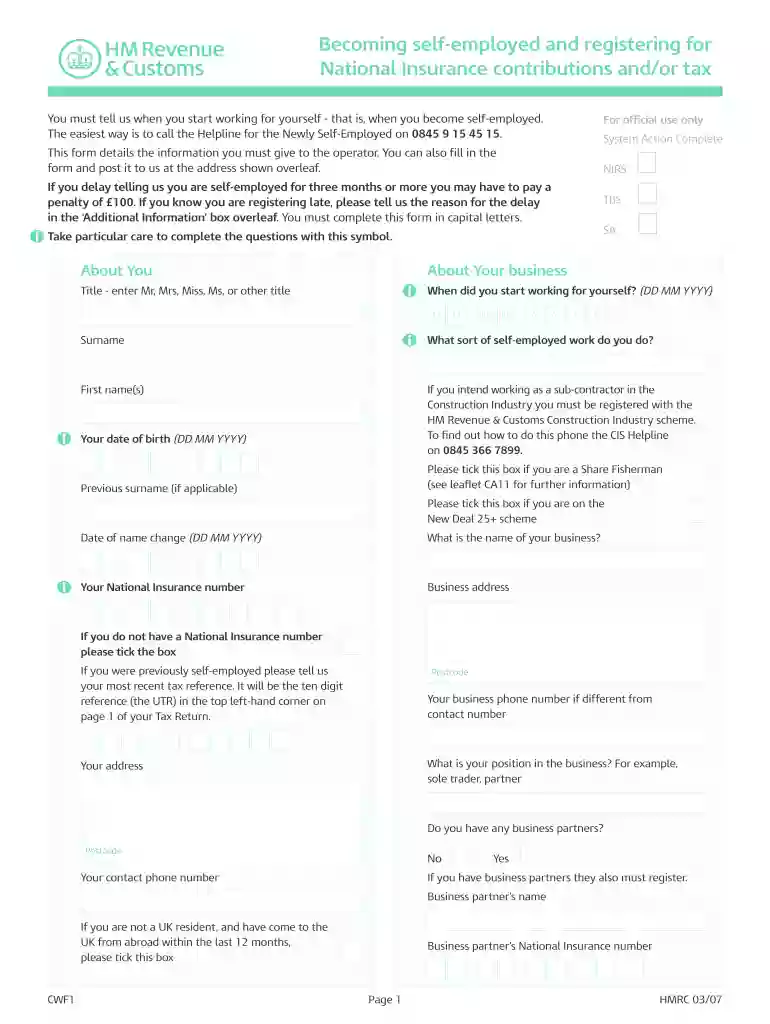
cwf1 form pdf Preview on Page 1

Here's how it works

01. Edit your cwf1 form pdf online
Type text, add images, blackout confidential details, add comments, highlights and more.

02. Sign it in a few clicks
Draw your signature, type it, upload its image, or use your mobile device as a signature pad.

03. Share your form with others
Send cwf1 form via email, link, or fax. You can also download it, export it or print it out.

How to use or fill out cwf1 form pdf with our platform

Form edit decoration
9.5
Ease of Setup
DocHub User Ratings on G2
9.0
Ease of Use
DocHub User Ratings on G2
  1. Click ‘Get Form’ to open the cwf1 form PDF in the editor.
  2. Begin by filling in your personal details in the 'About You' section. Enter your title, first name(s), surname, and date of birth in the specified format (DD MM YYYY).
  3. Next, provide information about your business. Indicate when you started working for yourself and describe the type of self-employed work you do.
  4. Complete your business address and contact number. If applicable, include details about any business partners and their National Insurance numbers.
  5. In the 'Additional Information' box, mention if you are registering late or provide any other relevant details as required.
  6. Finally, review all entries for accuracy before signing and dating the form at the bottom.

Start using our platform today to easily fill out your cwf1 form PDF for free!

be ready to get more

Complete this form in 5 minutes or less

Get form

Got questions?

We have answers to the most popular questions from our customers. If you can't find an answer to your question, please contact us.
Contact us
After your CWF1 has been submitted and processed, HMRC will post you a UTR number. This number is unique to your business and is needed when you submit your self-assessment tax return. The UTR number is normally sent within about 10 working days of you making your submission.
Whats the difference between a CWF1 Form and a SA1 Form? Submitting a SA1 Form signs you up for Self Assessment, but there are lots of different reasons why you might need to register. A CWF1 Form confirms to HMRC that youre setting up your own business.
The CWF1 form applies to self-employed individuals and can be used to register for self-assessment, as well as Class 2 National Insurance. If you are not self-employed but have other income streams, youll most likely use the SA1 form to register and receive your UTR.
This includes filling out the digital version of the CWF1. You can find the online registration at: . Paper Form: You can download a printable CWF1 form from HMRCs website, fill it out and send it by post. This form can be found on the GOV.UK website.
Call HMRC to order Self Assessment forms.

Security and compliance

At DocHub, your data security is our priority. We follow HIPAA, SOC2, GDPR, and other standards, so you can work on your documents with confidence.

Learn more
ccpa2
pci-dss
gdpr-compliance
hipaa
soc-compliance
be ready to get more

Complete this form in 5 minutes or less

Get form