Tr1 form completed example 2026

Get Form
tr1 form witness Preview on Page 1

Here's how it works

01. Edit your tr1 form witness online
Type text, add images, blackout confidential details, add comments, highlights and more.
02. Sign it in a few clicks
Draw your signature, type it, upload its image, or use your mobile device as a signature pad.
03. Share your form with others
Send tr1 form completed example via email, link, or fax. You can also download it, export it or print it out.

How to use or fill out tr1 form completed example with our platform

Form edit decoration
9.5
Ease of Setup
DocHub User Ratings on G2
9.0
Ease of Use
DocHub User Ratings on G2
  1. Click ‘Get Form’ to open the tr1 form completed example in the editor.
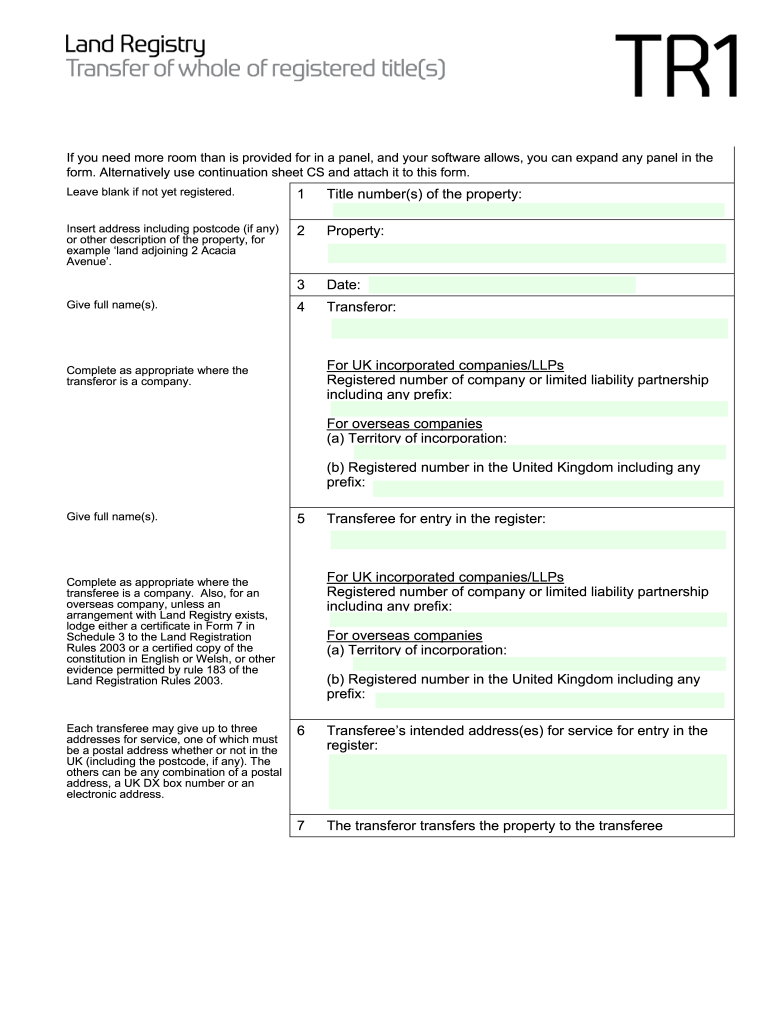
  2. Begin by entering the title number(s) of the property and its address, including postcode if available. This information is crucial for identifying the property.
  3. In the 'Transferor' section, provide the full name(s) of the transferor. If applicable, include registered numbers for UK companies or LLPs.
  4. For each transferee, complete their details in the 'Transferee' section, ensuring to include up to three addresses for service. One must be a postal address.
  5. Indicate whether the transferor transfers with full title guarantee or limited title guarantee by placing an 'X' in the appropriate box.
  6. Complete any additional provisions or declarations as necessary in panel 11 before executing the transfer as a deed.

Start using our platform today to easily fill out your tr1 form and streamline your document processes!

be ready to get more

Complete this form in 5 minutes or less

Get form

Got questions?

We have answers to the most popular questions from our customers. If you can't find an answer to your question, please contact us.
Contact us
A conveyancer or solicitor usually fills out the TR1 form, but it can also be completed by the buyer or seller themselves. However, errors can lead to delays, so professional assistance is recommended.
For example, if two spouses own a property and one dies, the ownership is then passed to the surviving spouse. A survivorship deed is used to avoid going through probate after a death, or the process to transfer assets of a deceased person, which can be a complicated and long legal process.
Common mistakes to avoid One common error is providing incorrect property details, such as the wrong address or title number. Ensuring that all information is accurate and up-to-date is crucial. Another mistake is missing signatures or failing to have the form properly witnessed.
In a standard conveyancing transaction: Contracts are exchanged to make the sale legally binding. The TR1 form is only signed after exchange and is completed on the day of completion. Once the transaction completes, the TR1 form is sent to the Land Registry to officially transfer ownership.
0:25 1:50 And grantee the granter is the seller. And the grantee is the buyer. It will also describe theMoreAnd grantee the granter is the seller. And the grantee is the buyer. It will also describe the property in detail.

Security and compliance

At DocHub, your data security is our priority. We follow HIPAA, SOC2, GDPR, and other standards, so you can work on your documents with confidence.

Learn more
ccpa2
pci-dss
gdpr-compliance
hipaa
soc-compliance
be ready to get more

Complete this form in 5 minutes or less

Get form

People also ask

This is because your conveyancer uses Form TR1 to create the deed of transfer. This needs to be sent on to the buyer and then on to HM Land Registry to legally transfer the ownership of the property. If no TR1 Form has been completed by this point, the property sale will not be able to go ahead.
The processing time for a TR1 form depends on the complexity of the transaction and the Land Registrys workload. On average, it takes two to six weeks for the Land Registry to update the records once the form is submitted. However, this can vary.

tr1 form