Type text, add images, blackout confidential details, add comments, highlights and more.
02. Sign it in a few clicks
Draw your signature, type it, upload its image, or use your mobile device as a signature pad.
03. Share your form with others
Send pennsylvania exemption certificate rev 1220 via email, link, or fax. You can also download it, export it or print it out.
How to use or fill out rev 1220 with our platform
Ease of Setup
DocHub User Ratings on G2
Ease of Use
DocHub User Ratings on G2
Click ‘Get Form’ to open the rev 1220 in the editor.
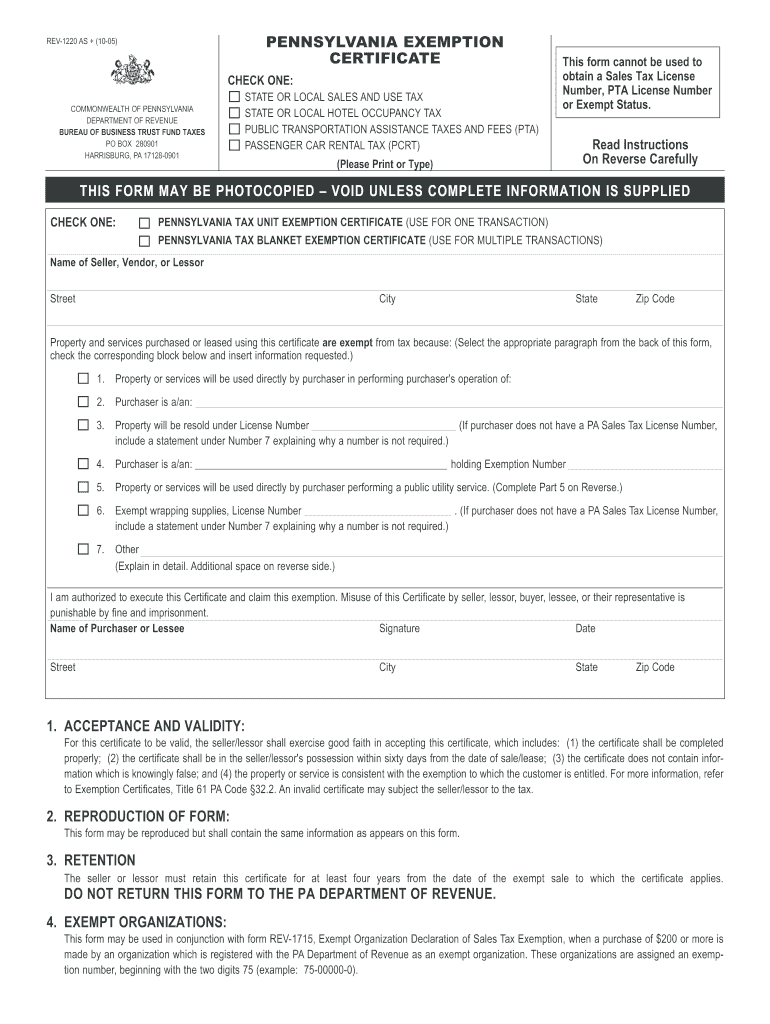
Begin by selecting the appropriate tax exemption type at the top of the form. Choose between State or Local Sales and Use Tax, Hotel Occupancy Tax, PTA Taxes, or Passenger Car Rental Tax.
Fill in the seller's name, address, and contact information in the designated fields. Ensure all details are accurate for proper processing.
Select the reason for exemption from the provided options. Each option requires you to check a box and may need additional information based on your selection.
Complete the purchaser's information section, including name, signature, and date. This confirms your authorization to claim the exemption.
Review all entries for accuracy before saving or exporting your completed form. Make sure no fields are left blank to avoid delays.
Start using our platform today to fill out rev 1220 easily and efficiently!
pennsylvania exemption certificate how to fill out
Technical Protocol for Evaluating Natural Attenuation of
The information in this document was developed through a collaboration between the U.S.. EPA (Subsurface Protection and Remediation Division, National RiskRead more
This form may be used in conjunction with form REV-1715, Exempt Organization Declaration of Sales Tax Exemption, when a purchase of $200 or more is made by anRead more
Cookie consent notice
This site uses cookies to enhance site navigation and personalize your experience.
By using this site you agree to our use of cookies as described in our Privacy Notice.
You can modify your selections by visiting our Cookie and Advertising Notice.