Type text, add images, blackout confidential details, add comments, highlights and more.
02. Sign it in a few clicks
Draw your signature, type it, upload its image, or use your mobile device as a signature pad.
03. Share your form with others
Send business license surrey via email, link, or fax. You can also download it, export it or print it out.
How to use or fill out surrey business license with our platform
Ease of Setup
DocHub User Ratings on G2
Ease of Use
DocHub User Ratings on G2
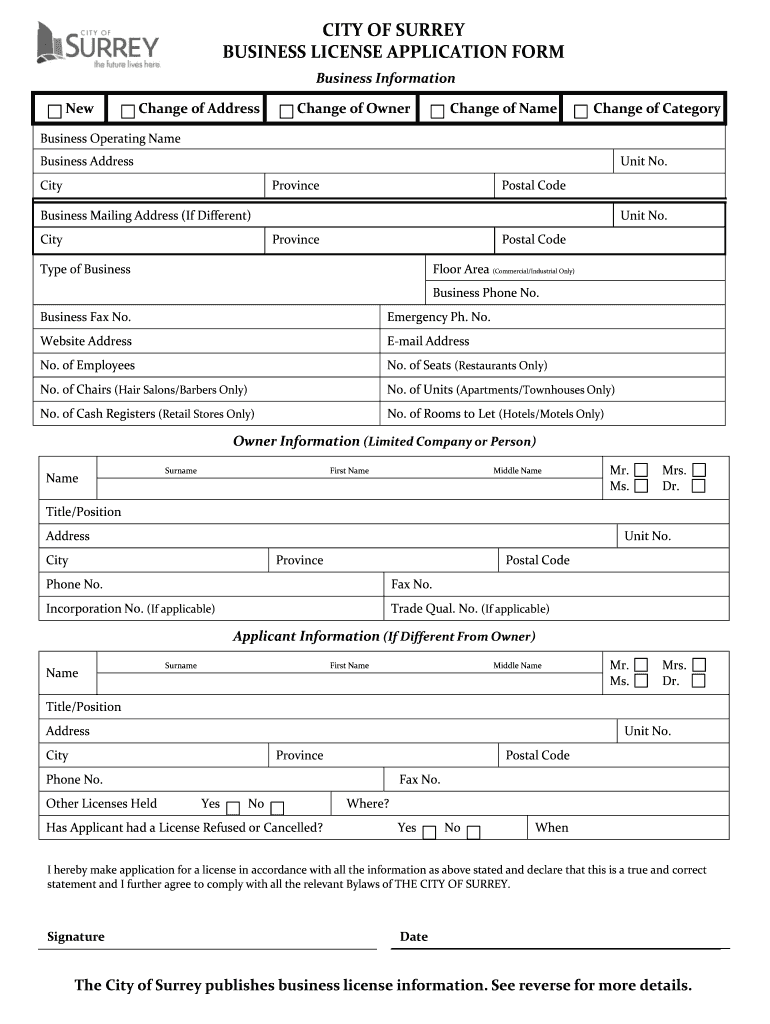
Click ‘Get Form’ to open the Surrey Business License Application in the editor.
Begin by selecting the appropriate option for your application type: New, Change of Address, Change of Owner, Change of Name, or Change of Category.
Fill in the 'Business Operating Name' and 'Business Address' fields. Ensure you include unit number, city, province, and postal code accurately.
If your mailing address differs from your business address, complete the 'Business Mailing Address' section with the same level of detail.
Indicate the 'Type of Business' and provide additional details such as floor area (if applicable) and contact information including phone and fax numbers.
Complete the 'Owner Information' section with personal details including name, title/position, and contact information.
If applicable, fill out the 'Applicant Information' section if it differs from the owner. Include any other licenses held and previous license refusals or cancellations.
Review all entered information for accuracy before signing and dating your application at the bottom of the form.
Start filling out your Surrey Business License today using our platform for free!
We've got more versions of the surrey business license form. Select the right surrey business license version from the list and start editing it straight away!
Surrey business license searchCity of Surrey business license renewalCity of Surrey business license loginCity of Surrey Business License feesCity of Surrey Business license contactCity of Surrey business license requirementsSurrey business license requirementsSurrey business license application
Security and compliance
At DocHub, your data security is our priority. We follow HIPAA, SOC2, GDPR, and other standards, so you can work on your documents with confidence.
Anyone conducting a business with gross receipts over $1,000 may be required to obtain a business license. Out-of-county contractors with a total of overRead more
Cookie consent notice
This site uses cookies to enhance site navigation and personalize your experience.
By using this site you agree to our use of cookies as described in our Privacy Notice.
You can modify your selections by visiting our Cookie and Advertising Notice.