




Here's how it works

01. Edit your missing receipt affidavit template online
Type text, add images, blackout confidential details, add comments, highlights and more.

02. Sign it in a few clicks
Draw your signature, type it, upload its image, or use your mobile device as a signature pad.

03. Share your form with others
Send missing receipt affidavit template free via email, link, or fax. You can also download it, export it or print it out.
How to use or fill out missing receipt form with our platform

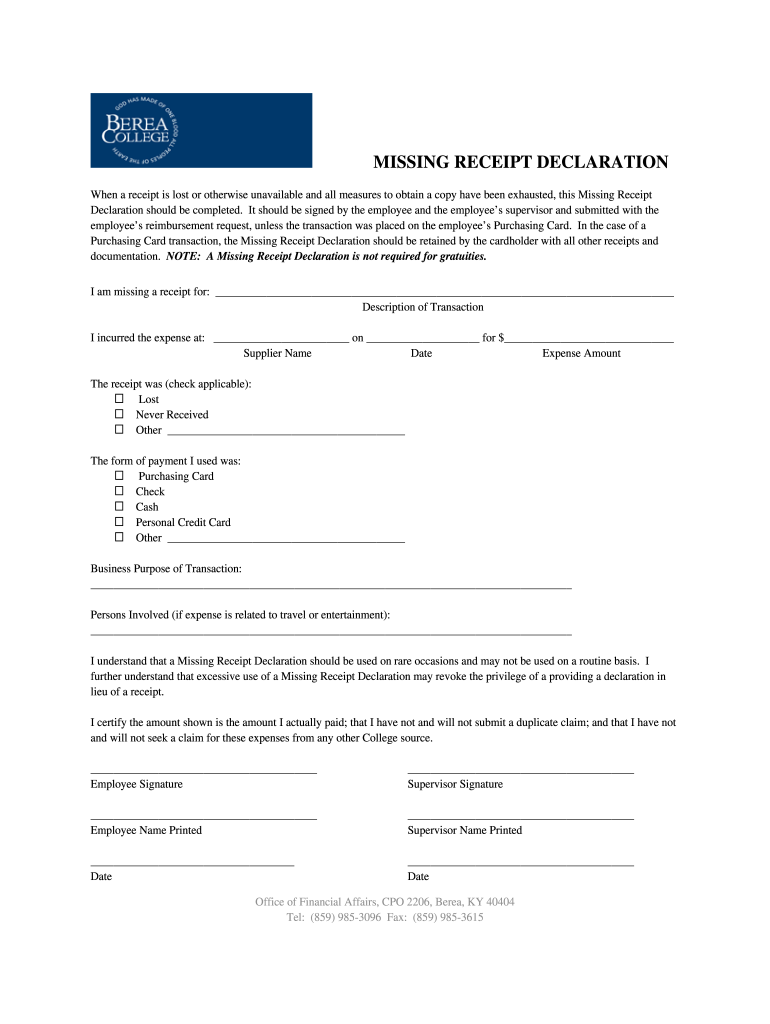
- Click ‘Get Form’ to open the Missing Receipt Declaration in the editor.
- In the first section, provide details about the missing receipt by filling in the blank for 'I am missing a receipt for:' with a brief description of the transaction.
- Next, complete the 'Description of Transaction' section by entering the supplier name, date of expense, and amount spent.
- Indicate how the receipt was lost by checking one of the options: Lost, Never Received, or Other. If you select 'Other', specify in the provided space.
- Select your form of payment from options such as Purchasing Card, Check, Cash, Personal Credit Card, or Other.
- Clearly state the business purpose of the transaction in the designated area.
- If applicable, list any persons involved related to travel or entertainment expenses.
- Finally, ensure both you and your supervisor sign and print your names before submitting this declaration with your reimbursement request.
Start using our platform today to easily fill out your Missing Receipt Declaration for free!
Fill out missing reciept form online
It's free
It's free
Got questions?
We have answers to the most popular questions from our customers. If you can't find an answer to your question, please contact us.
Contact us
How to do a missing receipt declaration?
However, all hope is not lost. You can often obtain a duplicate receipt from the business where you made the purchase. docHub out to them with details like the date of purchase, the transaction amount, and other relevant information. Some companies may issue a copy or verify the transaction for you.
How to prove a purchase without a receipt?
Proof of purchase is often required in scenarios such as claiming travel expenses and processing rebates. If the original receipt is lost, there are some cases where a credit card statement or confirmation email may suffice.
What to do if I lost a receipt?
Enter a missing receipt affidavit From within the mobile application, select the expense entry to which you want to add the Missing Receipt Declaration. At the top of the expense details, select Add Receipt. From the list of options that appear, select Missing Receipt Declaration.
How to get a missing receipt?
For any lost receipts, the easiest way is to go to the original place of purchase. Most stores can look up your purchase and print you a new receipt if your method of payment was a credit or debit card.
What is a form of receipt?
Common examples of receipts include packing slips, cash register tape, invoices, credit card statements, petty cash slips, and invoices. The format for these forms may vary but they all serve the same purpose of documenting the time and value of a business transaction.
Security and compliance
At DocHub, your data security is our priority. We follow HIPAA, SOC2, GDPR, and other standards, so you can work on your documents with confidence.
Learn more


People also ask
What is a missing receipt form?
The Missing Receipt Declaration (which some users may remember as the Missing Receipt Affidavit) allows a user to provide a declaration for lost or misplaced required receipt images.