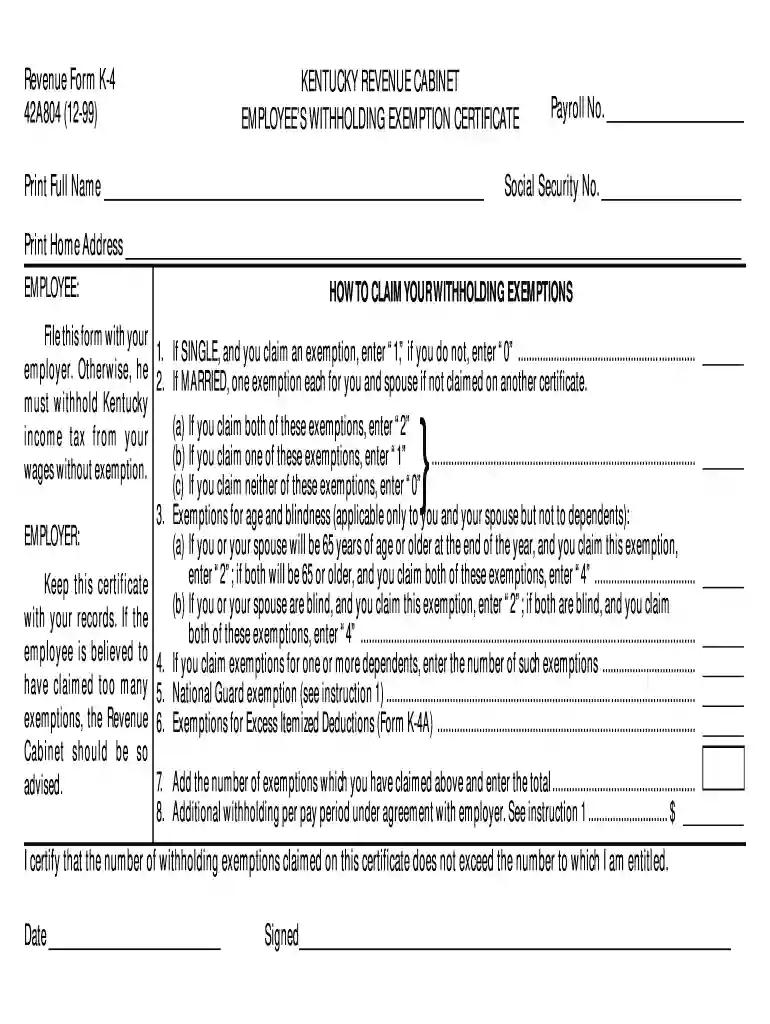
2019 kentucky k 4 form-2026

Get Form
ky k4 Preview on Page 1

Here's how it works

01. Edit your ky k4 online
Type text, add images, blackout confidential details, add comments, highlights and more.

02. Sign it in a few clicks
Draw your signature, type it, upload its image, or use your mobile device as a signature pad.

03. Share your form with others
Send kentucky k 4 2023 via email, link, or fax. You can also download it, export it or print it out.

How to use or fill out 2019 Kentucky K-4 form with our platform

Form edit decoration
9.5
Ease of Setup
DocHub User Ratings on G2
9.0
Ease of Use
DocHub User Ratings on G2
  1. Click ‘Get Form’ to open the 2019 Kentucky K-4 form in the editor.
  2. Begin by entering your full name, payroll number, and social security number in the designated fields.
  3. In the exemptions section, indicate your marital status. If you are single and claiming an exemption, enter '1'; if not, enter '0'. For married individuals, enter '2' for both spouses claiming exemptions or '1' for one spouse.
  4. If applicable, claim exemptions for age or blindness by entering the appropriate numbers based on your situation. For example, if you or your spouse is 65 or older, enter '2' or '4' as instructed.
  5. List any dependents you are claiming by entering the total number of exemptions in line 4.
  6. Finally, review all entries for accuracy before signing and dating the form at the bottom.

Start using our platform today to fill out your forms online for free!

See more 2019 kentucky k 4 form versions

We've got more versions of the 2019 kentucky k 4 form form. Select the right 2019 kentucky k 4 form version from the list and start editing it straight away!
Versions Form popularity Fillable & printable
2024 4.6 Satisfied (57 Votes)
2022 4.5 Satisfied (59 Votes)
2021 4.9 Satisfied (44 Votes)
2020 4.3 Satisfied (184 Votes)
2019 4.4 Satisfied (73 Votes)
2013 4.2 Satisfied (68 Votes)
2010 4.1 Satisfied (31 Votes)
2005 4.3 Satisfied (54 Votes)
1999 4.8 Satisfied (48 Votes)
be ready to get more

Complete this form in 5 minutes or less

Get form

Got questions?

We have answers to the most popular questions from our customers. If you can't find an answer to your question, please contact us.
Contact us
The Schedule K-1 is the form that reports the amounts passed to each party with an interest in an entity, like a business partnership or an S corporation. The parties use the information on the K-1 to prepare their separate tax returns.
Form K-4 is only required to document that an employee has requested an exemption from withholding OR to document that an employee has requested additional withholding in excess of the amounts calculated using the formula or tables. If neither situation applies, then an employer is not required to maintain Form K-4.
Forms and instructions are available online from the Department of Revenues website at revenue.ky.gov and at all Kentucky Taxpayer Service Centers. They may also be obtained by writing FORMS, Kentucky Department of Revenue, 501 High Street, Station 23B, Frankfort, KY 40601, or by calling (502) 564-3658.
16-660, Withholding Exemptions Every employee who can claim an exemption from Kentucky withholding tax must furnish their employer a signed withholding exemption certificate on Form K-4 by the start of employment.
K-4 Form. Similar to the W-4 form for federal withholding, employees must complete a Kansas K-4 form for state withholding. The K-4 form is not available to update online; it must be submitted to the KU Payroll Office. More information on Kansas withholding is available on the Kansas Department of Revenue website.

People also ask

Complete Form W-4R so your payer can withhold the correct amount of federal income tax from your nonperiodic payment(s) or eligible rollover distribution from an employer retirement plan, annuity (including a commercial annuity), or individual retirement arrangement (IRA).

k4 form 2023