




Here's how it works



How to use or fill out Non-custodial Parent's Form - Princeton University - princeton with our platform

- Click ‘Get Form’ to open it in the editor.
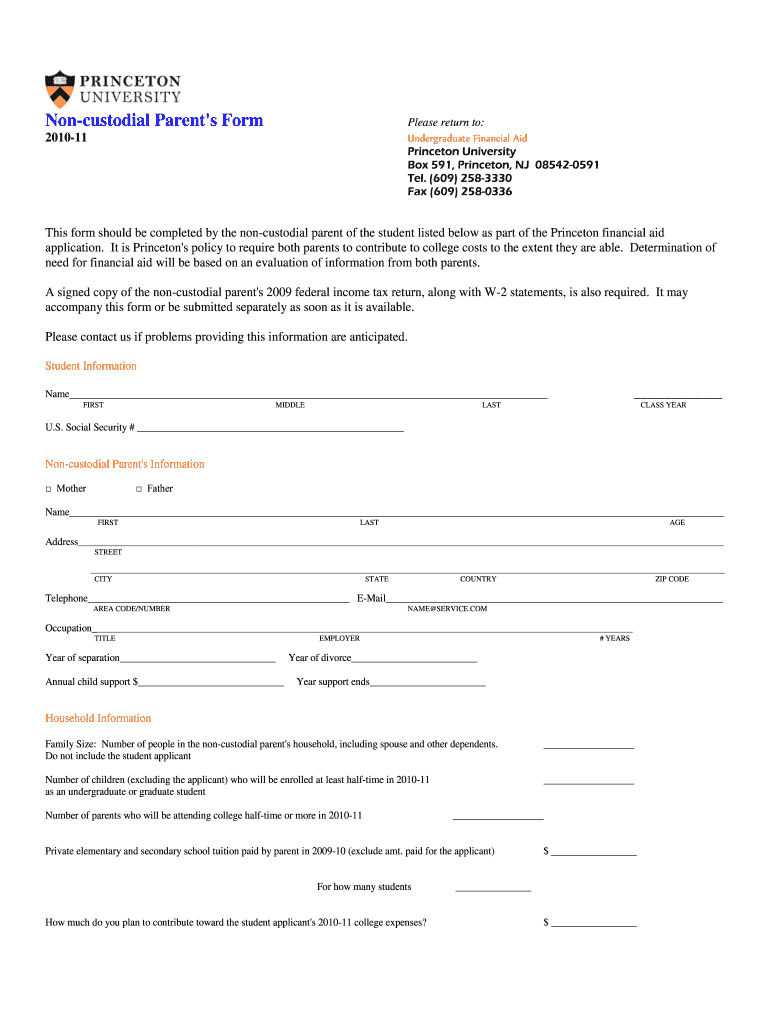
- Begin by entering the student’s information, including their name and Social Security number. Ensure accuracy as this is crucial for processing.
- Next, provide the non-custodial parent's details. Select whether you are the mother or father, and fill in your name, age, address, and contact information.
- Complete the household information section by indicating family size and any other children enrolled in school. This helps Princeton assess financial need accurately.
- In the Parent's Taxable Income section, choose whether to report actual figures or estimates for 2009 and 2010. Fill in all relevant income details as requested.
- Detail any untaxed income and expenses for both years. Be thorough to ensure a complete financial picture is presented.
- List all household members along with their educational details. This section may require additional space; feel free to attach a separate sheet if necessary.
- Finally, review all entries for accuracy before signing and dating the form at the bottom. A complete submission ensures timely processing of your application.
Start filling out your Non-custodial Parent's Form today using our platform for free!
It's free
See more Non-custodial Parent's Form - Princeton University - princeton versions
Got questions?
How can I eSign my as specified by ferpa non custodial parents from Gmail?
With DocHub, it’s quite simple. The service offers users an add-on called DocHub for Gmail, which you can locate in the Google Workspace Marketplace without being charged. Install it and give it access to your Google account. Open your email with your as specified by ferpa non custodial parents attached and click on the add-on button in the right-side panel. Log in to your DocHub account, and upload the file to our editor, where you can complete it and sign.
How do you edit ferpa noncustodial parents in Chrome?
If you are using Chrome, there are two simple ways to edit your ferpa noncustodial parents online. First, visit the DocHub website, add your file, and edit it using our toolbar. You can also install our Chrome extension and edit any document by dragging and dropping it in your web browser window.
What rights do non custodial parents have in Texas?
What is a non-custodial parent form Princeton?
What is the difference between custodial and non custodial?
Security and compliance
At DocHub, your data security is our priority. We follow HIPAA, SOC2, GDPR, and other standards, so you can work on your documents with confidence.
Learn more


