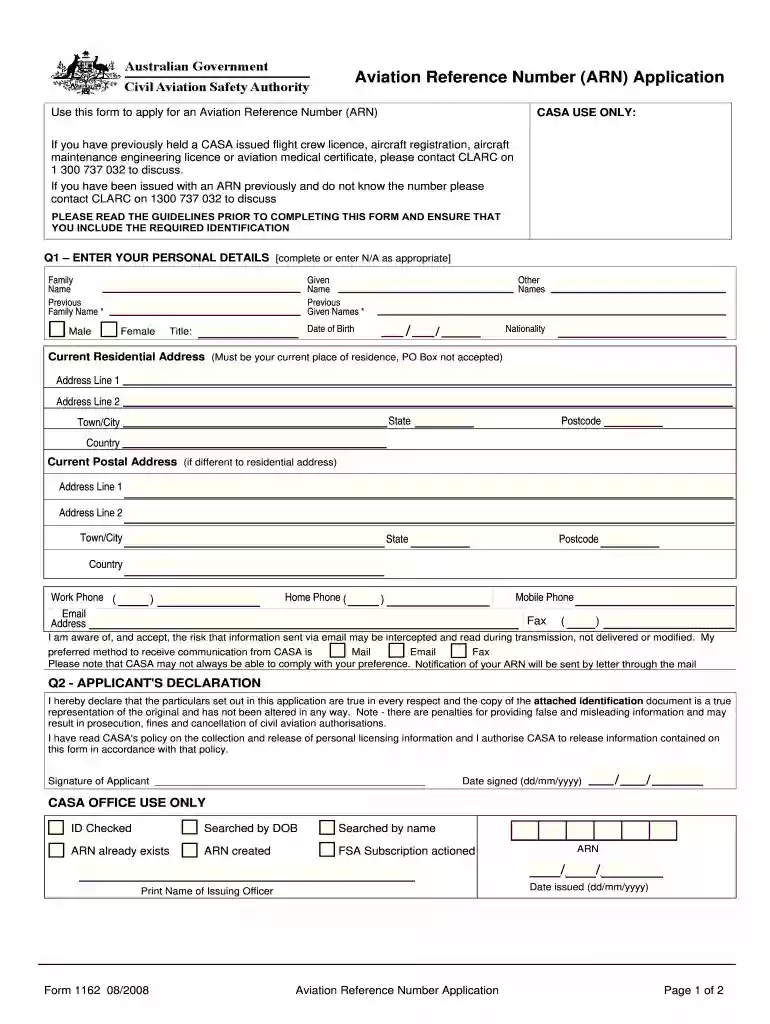
Aviation reference numberarn form 1162-2026

Get Form
aviation reference number Preview on Page 1

Here's how it works

01. Edit your aviation reference number online
Type text, add images, blackout confidential details, add comments, highlights and more.

02. Sign it in a few clicks
Draw your signature, type it, upload its image, or use your mobile device as a signature pad.

03. Share your form with others
Send what is arn form via email, link, or fax. You can also download it, export it or print it out.

How to use or fill out aviation reference numberarn form 1162 with our platform

Form edit decoration
9.5
Ease of Setup
DocHub User Ratings on G2
9.0
Ease of Use
DocHub User Ratings on G2
  1. Click ‘Get Form’ to open the aviation reference numberarn form 1162 in the editor.
  2. Begin by entering your personal details in Q1. Fill in your family name, given names, date of birth, and nationality. Ensure all information is accurate or enter 'N/A' where applicable.
  3. Provide your current residential address. Remember, a PO Box is not acceptable. If your postal address differs, complete that section as well.
  4. In Q2, read the applicant's declaration carefully. Confirm that all information provided is true and sign the form digitally using our platform’s signature feature.
  5. Attach a copy of your identification document as specified in the guidelines. This can be done by uploading directly within the editor.
  6. Review all entries for accuracy before submitting. You can easily modify any field if needed.

Start filling out your aviation reference numberarn form 1162 today for free on our platform!

See more aviation reference numberarn form 1162 versions

We've got more versions of the aviation reference numberarn form 1162 form. Select the right aviation reference numberarn form 1162 version from the list and start editing it straight away!
Versions Form popularity Fillable & printable
2021 4.4 Satisfied (54 Votes)
2008 4.8 Satisfied (50 Votes)
be ready to get more

Complete this form in 5 minutes or less

Get form

Got questions?

We have answers to the most popular questions from our customers. If you can't find an answer to your question, please contact us.
Contact us
Once a customer has initiated a payment online, the payment data is securely transferred from the payment gateway to the acquirer. After the acquirer has authenticated the payment, they then encrypt this data and create an ARN number before passing the payment information on to the issuer to authorise.
Apply for an individual ARN Log in to myCASA. You will need to create a myCASA account if you havent used myCASA before. Enter your personal details. Fill out your personal details. Verify your identity. Submit your application.
What is an Acquirer Reference Number (ARN) and where can I find it? Go to Transaction Payments. Find the transaction and open this. Scroll down to the Refunds section. Under the ARN column, you can View and Copy the ARN.
ARN for Buyers and Sellers ARNs are created for peace of mind of the merchant and customer, as the number gives both parties access to tracking the payment when its in between accounts. An acquirer reference number (ARN) acts as bank account proof for customers requesting refunds for an online service.

Security and compliance

At DocHub, your data security is our priority. We follow HIPAA, SOC2, GDPR, and other standards, so you can work on your documents with confidence.

Learn more
ccpa2
pci-dss
gdpr-compliance
hipaa
soc-compliance