4506 t form-2026

Get Form
4506 t form Preview on Page 1

Here's how it works

01. Edit your form online
Type text, add images, blackout confidential details, add comments, highlights and more.
02. Sign it in a few clicks
Draw your signature, type it, upload its image, or use your mobile device as a signature pad.
03. Share your form with others
Send it via email, link, or fax. You can also download it, export it or print it out.

How to use or fill out 4506-T form with our platform

Form edit decoration
9.5
Ease of Setup
DocHub User Ratings on G2
9.0
Ease of Use
DocHub User Ratings on G2
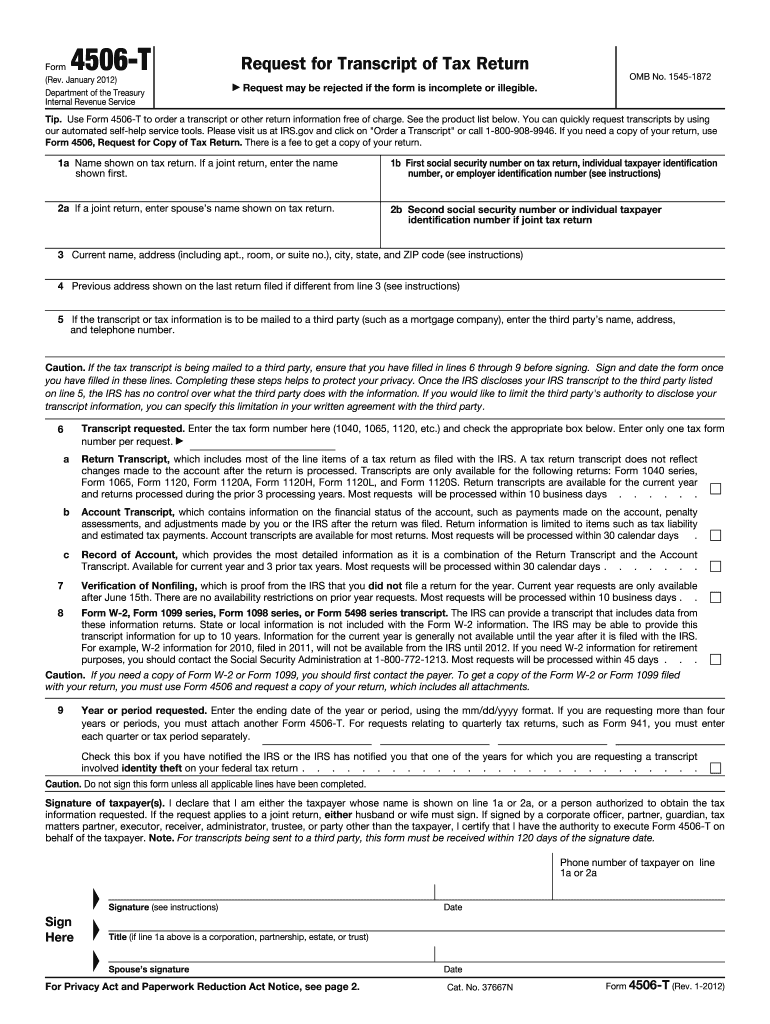
  1. Click ‘Get Form’ to open the 4506-T in the editor.
  2. Begin by filling out your name as shown on your tax return in line 1a. If it's a joint return, enter the first name listed.
  3. In line 1b, provide the first social security number or employer identification number associated with the tax return.
  4. If applicable, enter your spouse’s name in line 2a and their social security number in line 2b.
  5. Complete lines 3 and 4 with your current address and any previous address if different from your current one.
  6. If you want the transcript sent to a third party, fill out line 5 with their details. Ensure lines 6 through 9 are completed before signing.
  7. Select the type of transcript you need in section 6 and specify the year or period requested in line 9.
  8. Finally, sign and date the form at the bottom, ensuring all fields are filled out correctly before submission.

Start using our platform today for free to streamline your document editing and form completion!

be ready to get more

Complete this form in 5 minutes or less

Get form

Got questions?

We have answers to the most popular questions from our customers. If you can't find an answer to your question, please contact us.
Contact us
Use Form 4506-T to request any of the transcripts: tax return, tax account, wage and income, record of account and verification of non-filling. The transcript format better protects taxpayer data by partially masking personally identifiable information.
Please submit the form directly to the IRS at the address or fax number listed for your state of residence at the time your return was filed. The IRS will mail you a copy of the document you have requested. You will then submit all pages of that document to the Financial Aid Scholarship Office for review.
Use Form 4506-T to request tax return information. Taxpayers using a tax year beginning in one calendar year and ending in the following year (fiscal tax year) must file Form 4506-T to request a return transcript.
Form 4506-T is free, and transcripts generally arrive in about three weeks. When you file the Form 4506-T, youll receive a printout of most of the line items on your tax return (rather than a copy of the actual return). This document is called a tax return transcript.
Mortgage lenders typically have complete Form 4506-T (though some lenders may require Form 4506). The 4506-T allows the lenders to gain access to information about your past few years of tax return transcripts to verify your income.

Security and compliance

At DocHub, your data security is our priority. We follow HIPAA, SOC2, GDPR, and other standards, so you can work on your documents with confidence.

Learn more
ccpa2
pci-dss
gdpr-compliance
hipaa
soc-compliance

People also ask

To get started on your Form 4506-T, you can get a copy of the form directly from the IRS or a tax professional. Then, follow these Form 4056-t instructions. Begin filling out the form by providing your personal information, including your most current address on file with the IRS.
Reasons orders may be Rejected by the IRS: The 4506T form, or an item on the form, is illegible, missing, or incomplete. The 4506T form is altered - there is evidence that an entry was changed with white out, lined through, or written-over, or if there is any indication of cutting and pasting.

Related links