Type text, add images, blackout confidential details, add comments, highlights and more.
02. Sign it in a few clicks
Draw your signature, type it, upload its image, or use your mobile device as a signature pad.
03. Share your form with others
Send form 6765 instructions via email, link, or fax. You can also download it, export it or print it out.
How to use or fill out form 6765 instruction 2006 with our platform
Ease of Setup
DocHub User Ratings on G2
Ease of Use
DocHub User Ratings on G2
Click ‘Get Form’ to open it in the editor.
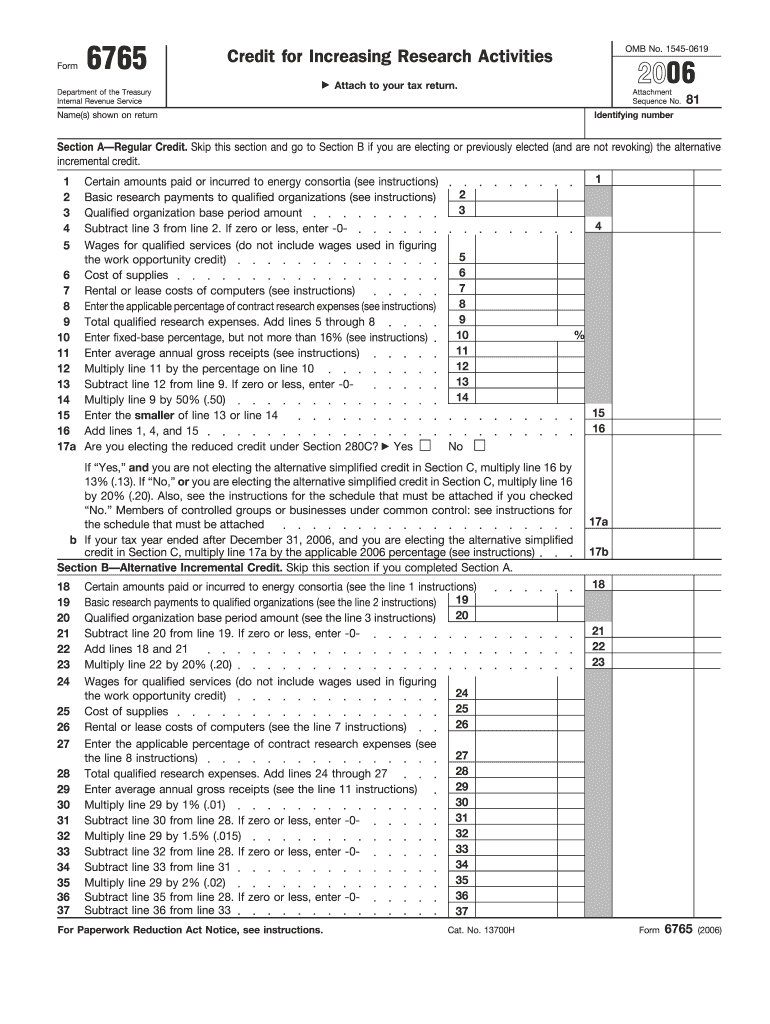
Begin by entering your name(s) and identifying number at the top of the form. This information is crucial for processing your tax return.
Proceed to Section A if you are claiming the Regular Credit. Fill in amounts for energy consortia, basic research payments, and qualified organization base period amounts as instructed.
In Section B, if electing the Alternative Incremental Credit, complete the relevant fields based on your qualified research expenses and follow the calculations provided.
If applicable, move to Section C for the Alternative Simplified Credit. Ensure you complete either Section A or B before proceeding here.
Finally, review all entries for accuracy and completeness before saving or exporting your filled form directly from our platform.
Start using our platform today to streamline your form completion process for free!
Fill out form 6765 instruction 2006 online It's free
Form 6765 (2006). For Paperwork Reduction Act Notice, see instructions. Cat. No. 13700H. Enter fixed-base percentage, but not more than 16% (see instructions).Read more
Oct 16, 2006 The personal exemption phaseout or reduction is calculated on a nine-line worksheet, the Deduction for Exemp- tions Worksheet, included in theRead more
Cookie consent notice
This site uses cookies to enhance site navigation and personalize your experience.
By using this site you agree to our use of cookies as described in our Privacy Notice.
You can modify your selections by visiting our Cookie and Advertising Notice.