Type text, add images, blackout confidential details, add comments, highlights and more.
02. Sign it in a few clicks
Draw your signature, type it, upload its image, or use your mobile device as a signature pad.
03. Share your form with others
Send otr 368 via email, link, or fax. You can also download it, export it or print it out.
How to use or fill out dc form otr 368 with our platform
Ease of Setup
DocHub User Ratings on G2
Ease of Use
DocHub User Ratings on G2
Click ‘Get Form’ to open the dc form otr 368 in the editor.
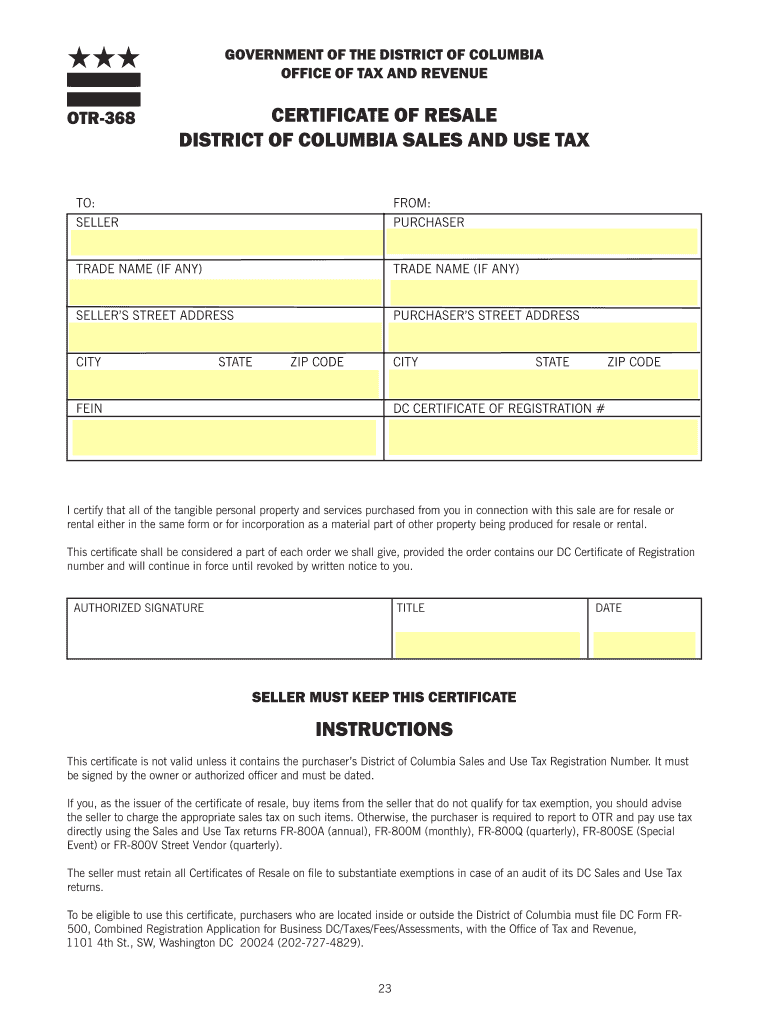
Begin by entering the seller's information, including their trade name, street address, city, state, and ZIP code. Ensure accuracy as this information is crucial for tax records.
Next, fill in the purchaser's details. Include the trade name (if applicable), street address, city, state, ZIP code, and Federal Employer Identification Number (FEIN).
Input your DC Certificate of Registration number. This is essential for validating the certificate of resale.
In the certification section, confirm that all purchased items are for resale or rental. This statement is vital for tax exemption purposes.
Finally, provide an authorized signature along with your title and date to complete the form. Remember that this certificate must be signed and dated to be valid.
Start using our platform today to fill out your dc form otr 368 online for free!
Dc form otr 368 pdfDc form otr 368 instructionsDc form otr 368 downloadDC OTR-368DC resale certificate verificationDC sales and use tax certificateDC Resale certificate formOTR 368 Certificate of Resale
Security and compliance
At DocHub, your data security is our priority. We follow HIPAA, SOC2, GDPR, and other standards, so you can work on your documents with confidence.
otr-368 certificate of resale district of columbia sales and
To be eligible to use this certificate, purchasers who are located inside or outside the District of Columbia must file DC Form FR-. 500, Combined Business TaxRead more
Heres a low-priced computer that wont run out of memory capacity or expandability halfway through your project. Typically, computer usage tends to grow,Read more
Cookie consent notice
This site uses cookies to enhance site navigation and personalize your experience.
By using this site you agree to our use of cookies as described in our Privacy Notice.
You can modify your selections by visiting our Cookie and Advertising Notice.