Type text, add images, blackout confidential details, add comments, highlights and more.
02. Sign it in a few clicks
Draw your signature, type it, upload its image, or use your mobile device as a signature pad.
03. Share your form with others
Send it via email, link, or fax. You can also download it, export it or print it out.
How to use or fill out 1040A 2014 with DocHub
Ease of Setup
DocHub User Ratings on G2
Ease of Use
DocHub User Ratings on G2
Click ‘Get Form’ to open the 1040A 2014 in our editor.
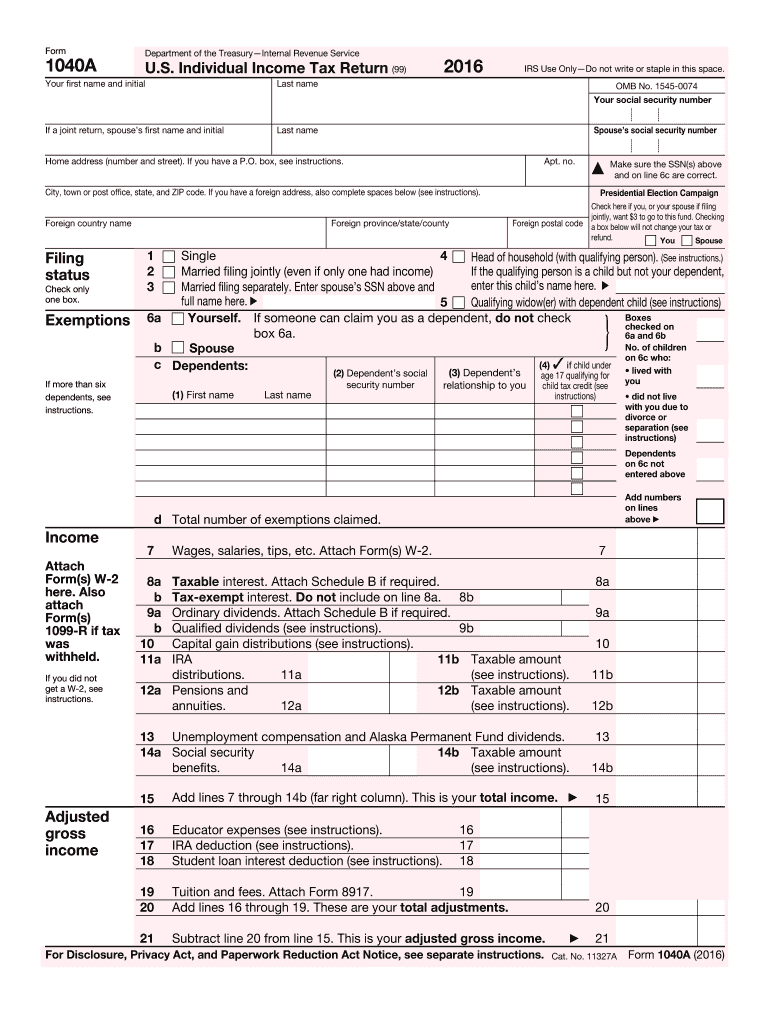
Begin by entering your personal information in the designated fields, including your first name, last name, and social security number. If filing jointly, include your spouse's details as well.
Select your filing status by checking the appropriate box. This is crucial for determining your tax obligations.
List any dependents you are claiming. Ensure that their names and social security numbers are accurately filled out to avoid issues.
Input your income details from W-2 forms and other sources in the income section. Attach any necessary documents directly within our platform for easy reference.
Calculate your adjusted gross income by following the instructions provided on the form, ensuring all deductions are accounted for.
Complete the tax calculation section, including credits and payments. Double-check all entries for accuracy before finalizing.
Sign and date the form electronically using our editor’s signature feature to ensure a smooth submission process.
Start filling out your 1040A 2014 today for free with our platform!
1040a 2014 instructions1040a 2014 download1040a 2014 pdf1040a 2014 form pdf2014 Form 1040 instructions2024 Form 10401040 Form 2022IRS 1040 Form 2021 PDF
Security and compliance
At DocHub, your data security is our priority. We follow HIPAA, SOC2, GDPR, and other standards, so you can work on your documents with confidence.
IRS Instructions for Employee Copies of 2014 W-2 Forms
QNontaxable combat pay. See the instructions for Form 1040 or Form 1040A for details on reporting this amount. REmployer contributions to your Archer MSA.Read more
Feb 21, 2014 Copyright 2012-2014. Garmin Ltd. or its subsidiaries Gain access by removing the right side GDU 1040A display unit (see Section 6.1.).Read more
1. Single. 2. Married filing jointly (even if only one had income). 3. Married filing separately. Enter spouses SSN above and full name here. ▷. 4. Head ofRead more
Cookie consent notice
This site uses cookies to enhance site navigation and personalize your experience.
By using this site you agree to our use of cookies as described in our Privacy Notice.
You can modify your selections by visiting our Cookie and Advertising Notice.