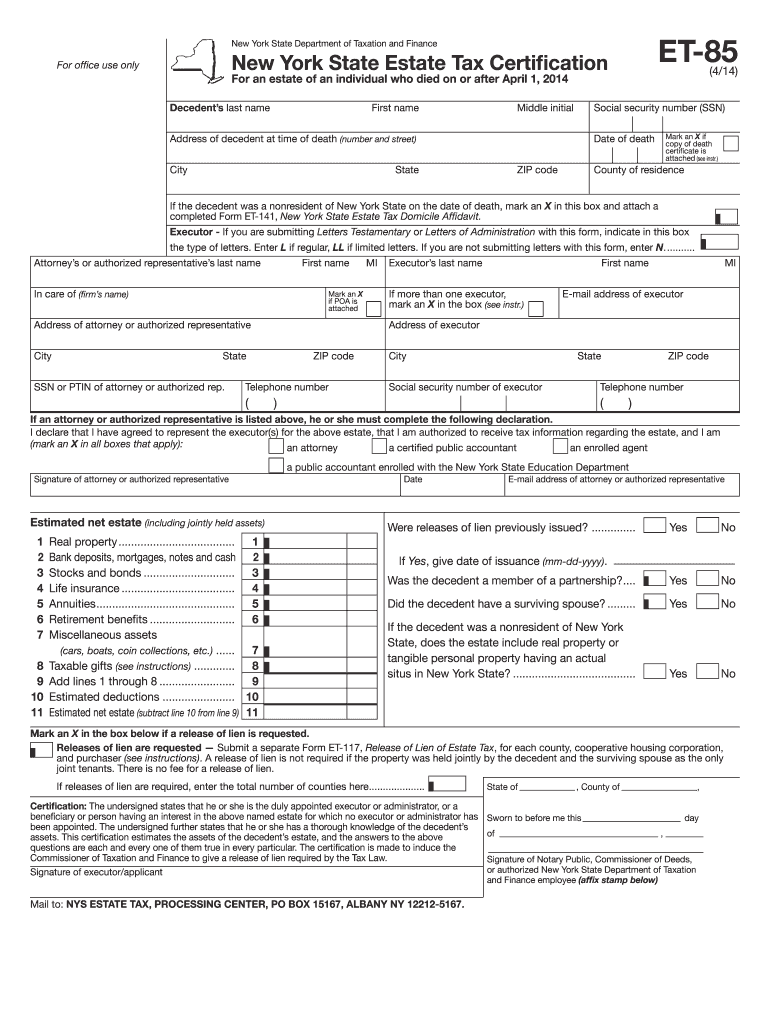
Form ET-85:4/14: New York State Estate Tax Certification For an ... 2025

Get Form
et 85 Preview on Page 1

Here's how it works

01. Edit your et 85 online
Type text, add images, blackout confidential details, add comments, highlights and more.
02. Sign it in a few clicks
Draw your signature, type it, upload its image, or use your mobile device as a signature pad.
03. Share your form with others
Send form et 85 via email, link, or fax. You can also download it, export it or print it out.

How to use or fill out Form ET-85:4/14: New York State Estate Tax Certification For an ... with our platform

Form edit decoration
9.5
Ease of Setup
DocHub User Ratings on G2
9.0
Ease of Use
DocHub User Ratings on G2
  1. Click ‘Get Form’ to open it in the editor.
  2. Begin by entering the decedent’s last name, first name, middle initial, and social security number in the designated fields.
  3. Fill in the address of the decedent at the time of death, including city, state, and ZIP code.
  4. Indicate the date of death and check if a copy of the death certificate is attached.
  5. If applicable, mark if the decedent was a nonresident and attach Form ET-141. Specify if you are submitting Letters Testamentary or Administration.
  6. Complete the executor's information including their name, address, email, and telephone number.
  7. Estimate the net estate by filling out each asset category from real property to miscellaneous assets. Sum these values as instructed.
  8. Review all entries for accuracy before signing and certifying your information at the end of the form.

Start using our platform today to complete your Form ET-85 efficiently and for free!

See more Form ET-85:4/14: New York State Estate Tax Certification For an ... versions

We've got more versions of the Form ET-85:4/14: New York State Estate Tax Certification For an ... form. Select the right Form ET-85:4/14: New York State Estate Tax Certification For an ... version from the list and start editing it straight away!
Versions Form popularity Fillable & printable
2023 4.6 Satisfied (44 Votes)
2020 4.8 Satisfied (76 Votes)
2019 4.2 Satisfied (54 Votes)
2014 4.3 Satisfied (47 Votes)
2014 4.1 Satisfied (28 Votes)
2012 4.1 Satisfied (45 Votes)
2008 4 Satisfied (46 Votes)
be ready to get more

Complete this form in 5 minutes or less

Get form

Got questions?

We have answers to the most popular questions from our customers. If you can't find an answer to your question, please contact us.
Contact us
Form 706 ensures that estate taxes are adequately assessed for larger estates, while Form 1041 helps report the estates income during the settlement process. By understanding these differences, executors and administrators can better manage estate obligations.
You must file Form ET-706 within nine months after the decedents date of death, unless you receive an extension of time to file the return. An extension of time to file the estate tax return may not exceed six months, unless the executor is out of the country.
The fiduciary of a domestic decedents estate, trust, or bankruptcy estate files Form 1041 to report: The income, deductions, gains, losses, etc. of the estate or trust. The income that is either accumulated or held for future distribution or distributed currently to the beneficiaries.
Residents. The estate of a New York State resident must file a New York State estate tax return if the following exceeds the basic exclusion amount: the amount of the residents federal gross estate, plus. the amount of any includible gifts.
The estate tax rate for New York is graduated. It starts at 3.06% and goes up to 16%. The taxable estate is the value of the estate above the $7.16 million exemption (unless the estate docHubes that cliff of 105% of $7.16 million, then the whole estate is taxable).

People also ask

How do I determine if I need to file Form IT-201 or IT-203? It depends on your residency status. If you were a full-year resident of New York, youd file IT-201. If you moved during the year, IT-203 is more likely applicable.
Filing Requirements Residents: The estate of a New York resident must file a New York State estate tax return if the amount of the residents federal gross estate, plus the amount of any includible gifts, exceeds the basic exclusion amount applicable at the date of death.
Generally, for New York estate tax purposes, if the value of assets passing to beneficiaries other than a spouse or charity is below a certain threshold ($7.16 million in 2025), the assets are fully exempt from tax and no New York estate taxes will be due.

new york estate tax return