Lic 624a 2026

Get Form
lic 624 Preview on Page 1

Here's how it works

01. Edit your lic 624 online
Type text, add images, blackout confidential details, add comments, highlights and more.

02. Sign it in a few clicks
Draw your signature, type it, upload its image, or use your mobile device as a signature pad.

03. Share your form with others
Send lic 624a via email, link, or fax. You can also download it, export it or print it out.

How to use or fill out lic 624a with our platform

Form edit decoration
9.5
Ease of Setup
DocHub User Ratings on G2
9.0
Ease of Use
DocHub User Ratings on G2
  1. Click ‘Get Form’ to open the lic 624a in the editor.
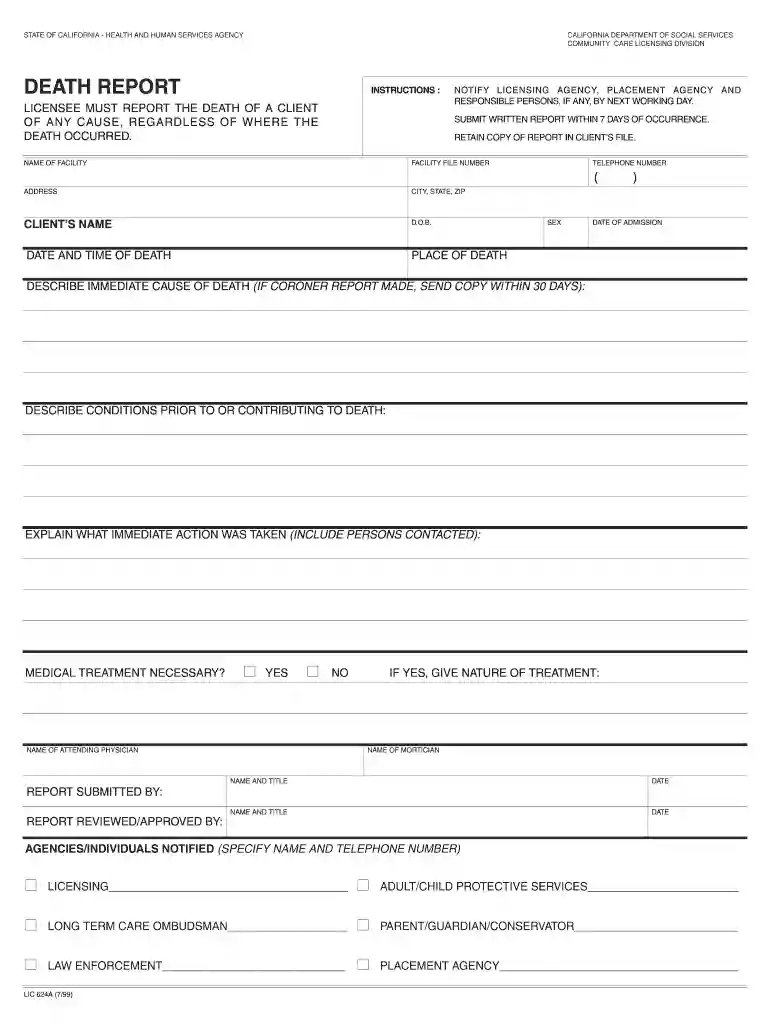
  2. Begin by entering the 'Name of Facility' and 'Facility File Number' at the top of the form. Ensure accuracy as this information is crucial for identification.
  3. Fill in the 'Address', 'City, State, ZIP', and 'Telephone Number' fields. This helps in maintaining clear communication with relevant agencies.
  4. Provide the 'Client’s Name', 'D.O.B.', and 'Date of Admission'. These details are essential for record-keeping and must be filled out correctly.
  5. Document the 'Place of Death', along with the 'Date and Time of Death'. This information is vital for reporting purposes.
  6. In the section regarding immediate cause of death, describe it thoroughly. If a coroner's report exists, remember to upload it within 30 days.
  7. Detail any conditions that contributed to death in the next field. This provides context for your report.
  8. Explain what immediate actions were taken following the death, including names of persons contacted.
  9. Indicate whether medical treatment was necessary by selecting ‘Yes’ or ‘No’. If yes, specify the nature of treatment required.
  10. Complete sections for names and titles of individuals submitting and reviewing/approving the report, ensuring all parties are documented.
  11. Finally, list all agencies or individuals notified about the incident, including their contact numbers for verification purposes.

Start using our platform today to fill out lic 624a easily and efficiently!

See more lic 624a versions

We've got more versions of the lic 624a form. Select the right lic 624a version from the list and start editing it straight away!
Versions Form popularity Fillable & printable
1999 4.9 Satisfied (42 Votes)
be ready to get more

Complete this form in 5 minutes or less

Get form

Got questions?

We have answers to the most popular questions from our customers. If you can't find an answer to your question, please contact us.
Contact us

Managing your documentation with DocHub this way is extremely straightforward after you have downloaded its extension for Google Chrome. Go to the Chrome Web Store and set up DocHub - Sign PDF from Gmail to get it. Give our tool access to your Google account, and then open an email with the lic 624 death report attached and point to the file with your cursor - the DocHub extension key will automatically appear there. Click on it to open your document in our editor. Make any essential adjustments, fill out the blanks, and click Sign to create your legally-binding electronic signature.

You may quickly complete, modify, and even eSign your lic death report using DocHub. Create a new account and begin your free trial. After that, you can add the document with the form and simply make all the required edits. No need to print on paper or use a third-party application to sign it, as you can put your electronic signature on your document quicker through DocHub.

If your loved one dies at home: Call the doctor or 911. If a living will or Do Not Resuscitate order is in place, it may sound odd, but make sure the person is dead before you call authorities. Once paramedics arrive and confirm the death, they may notify the local coroner or medical examiner.
The main reasons for investigating incidents is to try and identify the root cause/s that contributed to the incident or near miss occurring, so you have a greater opportunity to prevent the same type of incident from potentially occurring again.
An incident report form is used to provide a comprehensive record of any unwelcome or undesirable occurrence that occurs within the workplace environment. This includes such things as workplace accidents, hazardous material spills, safety violations or misconduct by employees.

Security and compliance

At DocHub, your data security is our priority. We follow HIPAA, SOC2, GDPR, and other standards, so you can work on your documents with confidence.

Learn more
ccpa2
pci-dss
gdpr-compliance
hipaa
soc-compliance
be ready to get more

Complete this form in 5 minutes or less

Get form

People also ask

UNUSUAL EVENT OR INCIDENT: Unusual incidents include resident abuse, unexplained absences, or anything that affects the physical or emotional health or safety of any resident and epidemic outbreaks, poisonings, catastrophes, facility fires or explosions.
These reports enable us to stay up to date with any changes that may have occurred at your facility. Also, reports of unusual incidents enable us to protect the health and safety of children in care, as well as the larger community.
Incident reporting in healthcare refers to collecting healthcare incident data with the goal to improve patient safety and care quality. Done well, it identifies safety hazards and guides the development of interventions to mitigate risks, thereby reducing harm.

lic624