Char500 2013 form-2026

Get Form
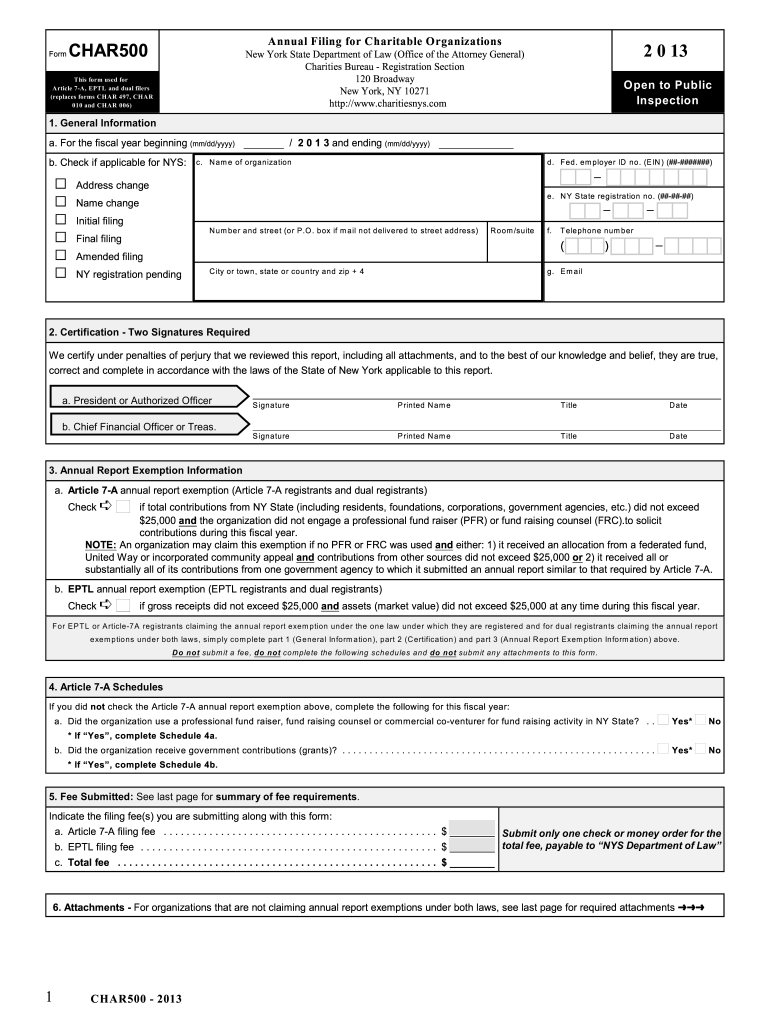
char500 2013 form Preview on Page 1

Here's how it works

01. Edit your form online
Type text, add images, blackout confidential details, add comments, highlights and more.
02. Sign it in a few clicks
Draw your signature, type it, upload its image, or use your mobile device as a signature pad.
03. Share your form with others
Send it via email, link, or fax. You can also download it, export it or print it out.

How to use or fill out char500 2013 form with our platform

Form edit decoration
9.5
Ease of Setup
DocHub User Ratings on G2
9.0
Ease of Use
DocHub User Ratings on G2
  1. Click ‘Get Form’ to open the char500 2013 form in the editor.
  2. Begin with Section 1: General Information. Fill in the fiscal year start date and check any applicable boxes regarding your organization’s status. Enter the name, Federal Employer ID number, and New York State registration number.
  3. In Section 2: Certification, ensure two authorized signatures are provided. Each signer must include their printed name, title, and date of signing.
  4. Proceed to Section 3: Annual Report Exemption Information. Check the appropriate box if your organization qualifies for an exemption based on contributions or assets.
  5. If applicable, complete Section 4: Article 7-A Schedules by answering questions about professional fundraisers and government contributions.
  6. Finally, review Section 5 for fee submission details and ensure all required attachments are included as per Section 6.

Start filling out your char500 2013 form online for free today!

See more char500 2013 form versions

We've got more versions of the char500 2013 form form. Select the right char500 2013 form version from the list and start editing it straight away!
Versions Form popularity Fillable & printable
2019 4.8 Satisfied (38 Votes)
2015 4.4 Satisfied (197 Votes)
2014 4.4 Satisfied (56 Votes)
2013 4.2 Satisfied (54 Votes)
2012 4.4 Satisfied (167 Votes)
2011 4 Satisfied (43 Votes)
2010 4.1 Satisfied (62 Votes)
2008 4 Satisfied (30 Votes)
2006 4 Satisfied (58 Votes)
be ready to get more

Complete this form in 5 minutes or less

Get form

Got questions?

We have answers to the most popular questions from our customers. If you can't find an answer to your question, please contact us.
Contact us
Failure to file the Form CHAR500 by the due date will result in the organizations Article 7-A revocation and be subject to a penalty of up to $1000 and $100 per day for noncompliance with the Article 7-A reporting requirements.
This includes any organization that conducts charitable activities, holds property that is used for charitable purposes, or solicits financial or other contributions.
Follow these steps to e-file your IRS Form 990 and/or NYS CHAR500: Step 1: Sign up for an account. Click here if you do not already have an account. Step 2: Create your Form 990 and/or CHAR500. Step 3: Complete your Form 990 and/or CHAR500. Step 4: Submit your completed forms and pay any applicable fees.
Each affiliate included in the CHAR500-C combined financial report with registration type Article 7-A or dual that does not claim the affiliate Article 7-A annual report exemption must pay a fee of $10, up to a maximum of $475.