




Here's how it works

01. Edit your clipper program online
Type text, add images, blackout confidential details, add comments, highlights and more.

02. Sign it in a few clicks
Draw your signature, type it, upload its image, or use your mobile device as a signature pad.

03. Share your form with others
Send it via email, link, or fax. You can also download it, export it or print it out.
How to use or fill out clinical facility clerkship with our platform

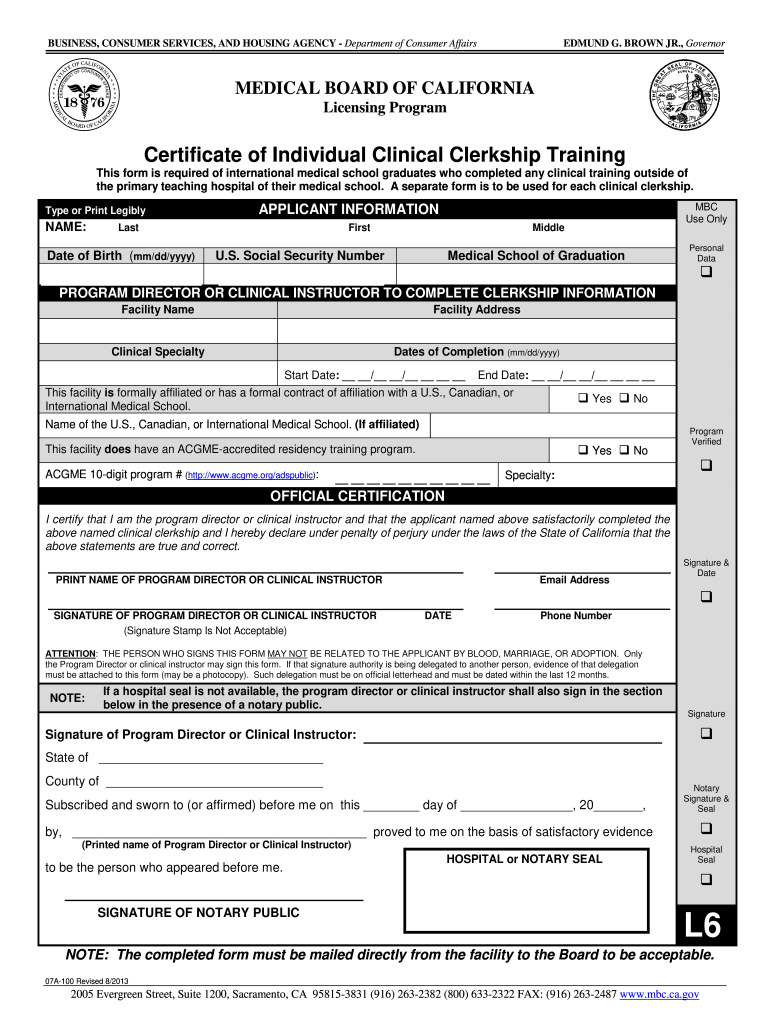
- Click ‘Get Form’ to open the clinical facility clerkship document in the editor.
- Begin by filling out the 'Applicant Information' section. Enter your last name, first name, middle name, date of birth, and U.S. Social Security Number clearly.
- Next, provide details about your medical school of graduation. Ensure that all information is typed or printed legibly for clarity.
- In the 'Clerkship Information' section, have your program director or clinical instructor complete the facility name, address, clinical specialty, and dates of completion (start and end dates).
- Indicate whether the facility has a formal affiliation with a U.S., Canadian, or International Medical School by checking 'Yes' or 'No'. If applicable, provide the name of the affiliated school.
- If applicable, confirm if the facility has an ACGME-accredited residency training program and enter the 10-digit program number.
- The program director or clinical instructor must then certify the completion of your clerkship by signing and dating in the designated area. Ensure their contact information is also provided.
- If required, arrange for notarization by having a notary public witness the signature of your program director or clinical instructor.
Start using our platform today to easily fill out your clinical facility clerkship form online for free!
Fill out clinical facility clerkship online
It's free
It's free
See more clinical facility clerkship versions
We've got more versions of the clinical facility clerkship form. Select the right clinical facility clerkship version from the list and start editing it straight away!
| Versions | Form popularity | Fillable & printable |
|---|---|---|
| 2013 | 4.9 Satisfied (481 Votes) |
Security and compliance
At DocHub, your data security is our priority. We follow HIPAA, SOC2, GDPR, and other standards, so you can work on your documents with confidence.
Learn more


