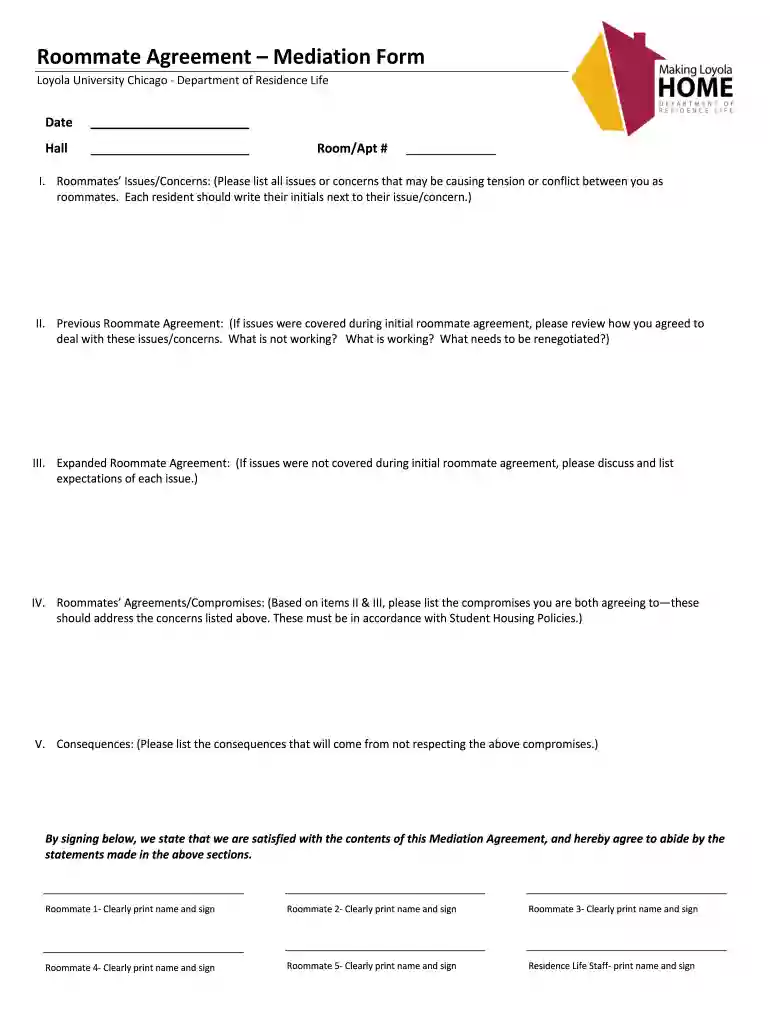
initials that should date Preview on Page 1

Roommate mediation form 2026

Here's how it works

  • 01. Edit your initials that should date online

    Type text, add images, blackout confidential details, add comments, highlights and more.

  • 02. Sign it in a few clicks

    Draw your signature, type it, upload its image, or use your mobile device as a signature pad.

  • 03. Share your form with others

    Send roommate mediation via email, link, or fax. You can also download it, export it or print it out.

How to use or fill out roommate mediation form with our platform

Form edit decoration
9.5
Ease of Setup
DocHub User Ratings on G2
9.0
Ease of Use
DocHub User Ratings on G2
  1. Click ‘Get Form’ to open the roommate mediation form in the editor.
  2. Begin by entering the date and hall information at the top of the form. This sets a clear context for your mediation session.
  3. In Section I, list all issues or concerns causing tension between roommates. Each resident should initial next to their respective concerns to acknowledge them.
  4. Move to Section II, where you will review any previous agreements. Discuss what worked, what didn’t, and what needs renegotiation.
  5. In Section III, outline any new expectations that were not covered in the initial agreement. Be specific about each issue.
  6. Section IV requires you to list compromises both roommates agree upon. Ensure these align with Student Housing Policies for validity.
  7. Finally, in Section V, specify consequences for not adhering to the agreed compromises. This helps establish accountability.
  8. Have all roommates sign at the bottom of the form to confirm satisfaction with its contents and commitment to abide by it.

Start using our platform today for free to streamline your roommate mediation process!

be ready to get more

Complete this form in 5 minutes or less

Got questions?

We have answers to the most popular questions from our customers. If you can't find an answer to your question, please contact us.

Sure, electronically drawing your signature is acceptable, but only if you utilize a tool that complies with industry regulations and policies. Consider DocHub, which ensures eSignature validity under ESIGN and UETA requirements. All you need to approve your roommate mediation form electronically is an account with DocHub and an internet connection. When you open your paperwork in our editor, click Sign and select the Draw option.

If you edit your roommate mediation form with DocHub, you merely need a steady web connection and virtually any web browser installed on your device. No need to set up any third-party applications or research guides. Just open a tab with DocHub, drag and drop your file, and modify it on the spot.

Security and compliance

At DocHub, your data security is our priority. We follow HIPAA, SOC2, GDPR, and other standards, so you can work on your documents with confidence.

Related links

Room Change Request Form Residence Life

Room change request forms are due by 9:00 am on Wednesdays. Submissions after 9:00 am on Wednesdays will be reviewed the following week. Requests are reviewedRead more

Learn more
HCBS-Settings-Rule-Roommate-Choice-

Conflict mediation is a process intended to assist roommates in resolving their differences while living successfully together. If conflict cannot be resolvedRead more

Learn more
If you believe that this page should be taken down, please follow our DMCA take down process here