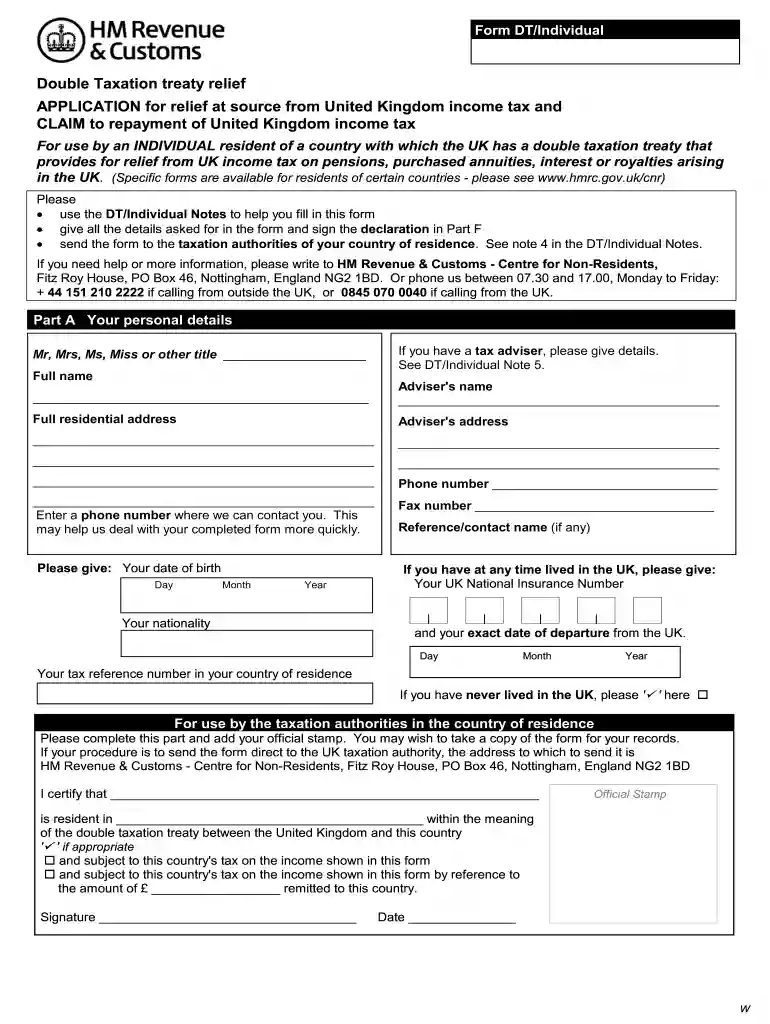
Template hmrc tax declaration format 2026

Get Form
cwf1 Preview on Page 1

Here's how it works

01. Edit your cwf1 online
Type text, add images, blackout confidential details, add comments, highlights and more.

02. Sign it in a few clicks
Draw your signature, type it, upload its image, or use your mobile device as a signature pad.

03. Share your form with others
Send cwf1 form via email, link, or fax. You can also download it, export it or print it out.

How to use or fill out template hmrc tax declaration format with our platform

Form edit decoration
9.5
Ease of Setup
DocHub User Ratings on G2
9.0
Ease of Use
DocHub User Ratings on G2
  1. Click ‘Get Form’ to open the template hmrc tax declaration format in the editor.
  2. Begin with Part A, where you will enter your personal details. Fill in your title, full name, and contact information. If applicable, include your tax adviser's details.
  3. Move to Part B and answer the questions regarding your residency status and any properties owned in the UK. Be sure to provide accurate dates for any relevant events.
  4. In Part C, select the appropriate section based on your income type (e.g., pensions, royalties). Provide detailed information about each income source as required.
  5. Complete Part D if you are claiming repayment of UK income tax already deducted from payments received. List all relevant income sources and amounts.
  6. In Part E, authorize any nominee to receive repayments on your behalf if desired. Ensure that their details are correctly filled out.
  7. Finally, sign and date the declaration in Part F to confirm that all information provided is accurate before submitting the form.

Start using our platform today for free to streamline your HMRC tax declaration process!

be ready to get more

Complete this form in 5 minutes or less

Get form

Got questions?

We have answers to the most popular questions from our customers. If you can't find an answer to your question, please contact us.
Contact us
The HMRC app offers a quick and easy way to access a range of information and services: View your letters: Get instant access to your HMRC letters, reducing the need to wait for postal delivery. You can also opt to go paperless in the app.
HMRC typically uses Royal Mail for this service, which is known for its extensive docHub across the UK. You should allow up to 15 working days for delivery, as this time frame accounts for any potential delays. This method is reliable but may take longer than electronic alternatives, which offer quicker confirmation.
My [employment/pension] income and PAYE tax paid in the year was: [] from [insert company/pension provider name and PAYE reference], with tax paid under PAYE of [] use the figures from your P60/P45. If you had more than one job or pension, list each of them here.
An HMRC document is any file issued by the United Kingdoms tax authority, His Majestys Revenue and Customs. This can include: Certificates of Residence. Tax Assessments. Unpaid Balance Letters.
HM Revenue Customs (HMRC) provides the information online. or paper originals will continue to be acceptable if you do not have access to the internet. These can be ordered by you (or your Accountant) by calling 0300 200 3310.

Security and compliance

At DocHub, your data security is our priority. We follow HIPAA, SOC2, GDPR, and other standards, so you can work on your documents with confidence.

Learn more
ccpa2
pci-dss
gdpr-compliance
hipaa
soc-compliance
be ready to get more

Complete this form in 5 minutes or less

Get form

People also ask

Youll get a statement after you file your tax return or if your circumstances change. This will either be available online or sent through the post.
The Income Tax Departments e-filing site () allows you to accomplish this electronically. Make an account, enter the required information about your income, and file the return. You may view your tax declaration in your e-filing account once it has been processed.

cwf1 form pdf