Trades retirement application 2026

Get Form
trades retirement application Preview on Page 1

Here's how it works

01. Edit your form online
Type text, add images, blackout confidential details, add comments, highlights and more.

02. Sign it in a few clicks
Draw your signature, type it, upload its image, or use your mobile device as a signature pad.

03. Share your form with others
Send it via email, link, or fax. You can also download it, export it or print it out.

How to use or fill out trades retirement application with our platform

Form edit decoration
9.5
Ease of Setup
DocHub User Ratings on G2
9.0
Ease of Use
DocHub User Ratings on G2
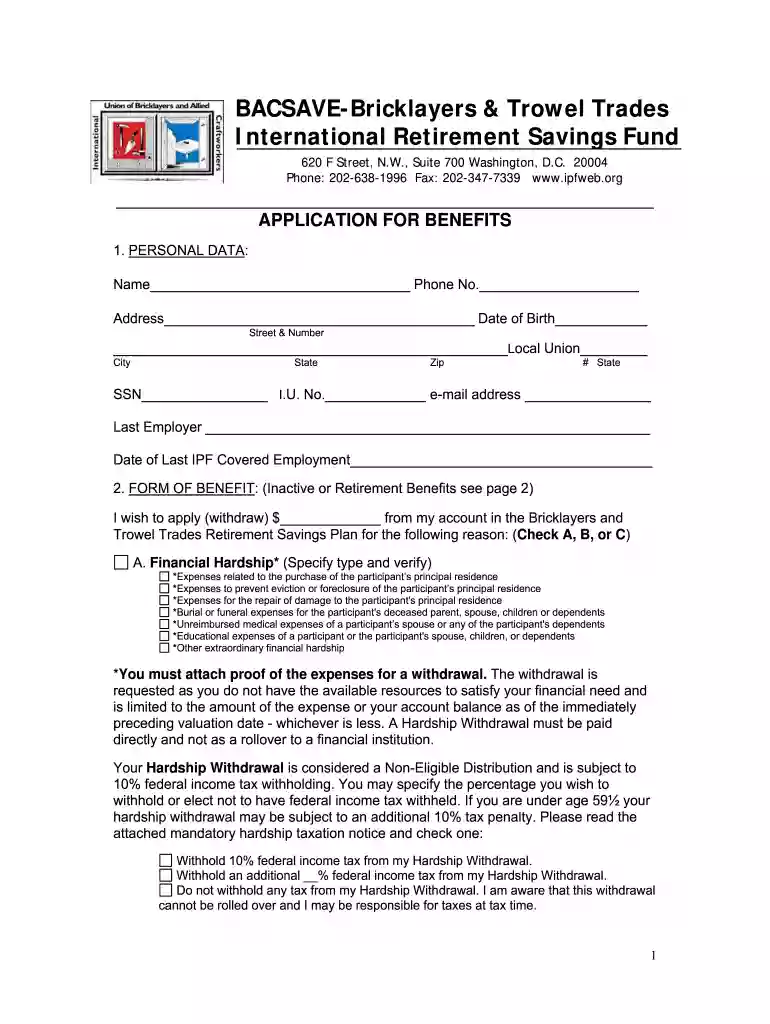
  1. Click ‘Get Form’ to open the trades retirement application in the editor.
  2. Begin by filling out your personal data in Section 1. Enter your name, phone number, address, date of birth, Social Security Number, and email address. Ensure all information is accurate for processing.
  3. In Section 2, select the form of benefit you are applying for: Financial Hardship, Inactive, or Retirement. Provide the necessary details and check the appropriate box based on your situation.
  4. Complete Section 3 by designating a beneficiary. Fill in their name, relationship to you, and contact information.
  5. Indicate your marital status in Section 4 by checking the appropriate box and attaching any required proof as specified.
  6. Choose your preferred form of payment in Section 5. Review options like Lump Sum or Fixed Monthly Annuity and provide any additional information if needed.
  7. If applicable, complete Section 6 for spouse authorization. This must be notarized if you do not wish to receive benefits in a Joint and Survivor Annuity form.
  8. Finally, review all sections for completeness before submitting your application through our platform.

Start using our platform today to easily fill out your trades retirement application for free!

be ready to get more

Complete this form in 5 minutes or less

Get form

Got questions?

We have answers to the most popular questions from our customers. If you can't find an answer to your question, please contact us.
Contact us
How long will it take to process my federal retirement application? It takes around 60 days (2 months) to process applications for common cases.
Benefit TypeEstimated Processing Time Frames Retirement Benefits Within 31​​ days after all required forms, documents, and payments (if applicable) have been received. Refunds Within 31 days after all required forms, documents, contributions are received, and final deposit is posted to the members account.6 more rows
Online; or. By calling our national toll-free service at 1-800-772-1213 (TTY 1-800-325-0778) or visiting your local Social Security office. Call ahead to make an appointment. If you do not live in the U.S. or one of its territories, you can also contact your nearest U.S.
Documents we may ask for include: Your Social Security card or a record of your number. Your original birth certificate, a copy certified by the issuing agency, or other proof of your age. If you were not born in the U.S., proof of U.S. citizenship or lawful alien status.
TRS annuity payments are issued on the last business day of each month. The following are the annuity issuance dates for fiscal year 2025.

Security and compliance

At DocHub, your data security is our priority. We follow HIPAA, SOC2, GDPR, and other standards, so you can work on your documents with confidence.

Learn more
ccpa2
pci-dss
gdpr-compliance
hipaa
soc-compliance
be ready to get more

Complete this form in 5 minutes or less

Get form

People also ask

Generally, withdrawing money from a 401(k) can take two to three business days for a direct transfer and roughly a week for a check, but the context in which you make a withdrawal can impact the timeline. It also depends on the policies of your plan administrator and the method of withdrawal.

Related links