Type text, add images, blackout confidential details, add comments, highlights and more.
02. Sign it in a few clicks
Draw your signature, type it, upload its image, or use your mobile device as a signature pad.
03. Share your form with others
Send employee census data for benefits bid via email, link, or fax. You can also download it, export it or print it out.
How to use or fill out employee census template excel with our platform
Ease of Setup
DocHub User Ratings on G2
Ease of Use
DocHub User Ratings on G2
Click ‘Get Form’ to open the employee census template in the editor.
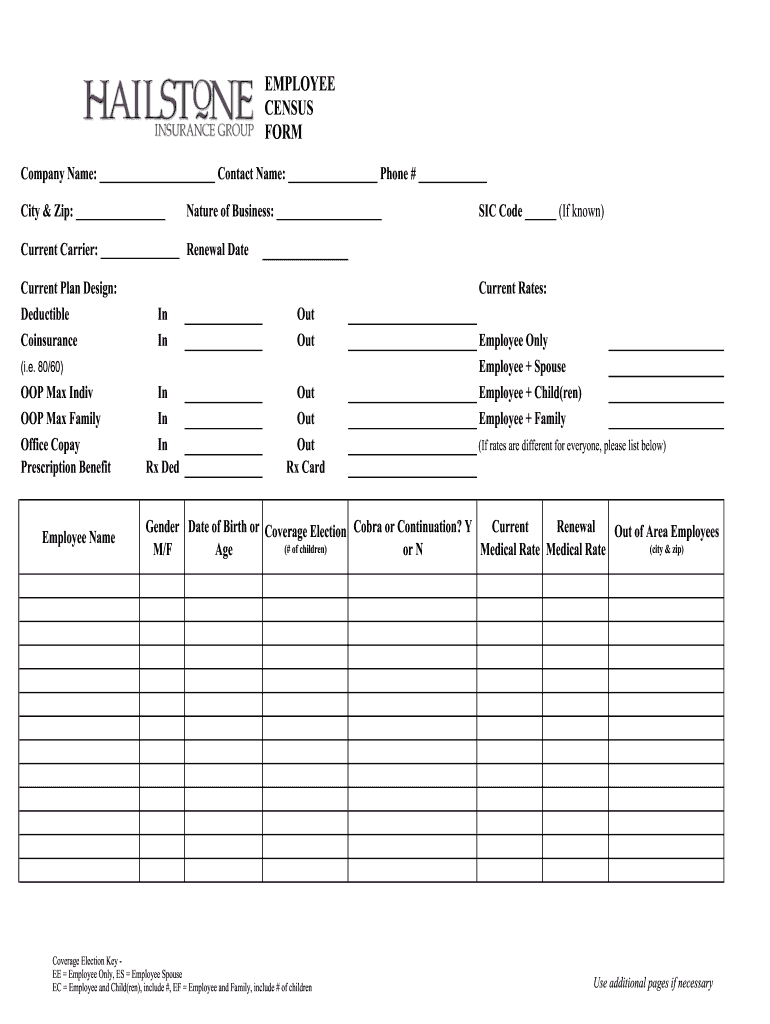
Begin by entering your company name, contact name, and phone number in the designated fields at the top of the form. This information is crucial for identifying your organization.
Fill in the city and zip code, along with the nature of your business and SIC code if known. This helps in categorizing your business type.
Next, provide details about your current insurance carrier and renewal date. This section is important for tracking coverage changes.
Complete the current plan design section by filling out deductibles, coinsurance rates, and current rates for both in-network and out-of-network services.
List each employee's name along with their coverage election options (e.g., Employee Only, Employee + Spouse) and relevant details such as gender and date of birth.
Indicate whether employees are opting for COBRA or continuation coverage by marking 'Y' or 'N' as applicable.
If necessary, use additional pages to include more employees or detailed information regarding their coverage elections.
Start using our platform today to streamline your document editing process for free!
Fill out employee census template excel online It's free
Once youve chosen what to track, follow the steps below to turn your Excel spreadsheet into a powerful employee database. Step 1: Create a new spreadsheet. Step 2: Add columns. Step 3: Collect and enter employee information. Step 4: Set permissions access. Step 5: Keep your employee database updated.
How to create an employee list?
How to Create an Employee Database in a Spreadsheet Create a spreadsheet or workbook. Start with a clean Excel sheet or Google Sheets workbook. Name your columns. Format and freeze headers. Build a workplace directory. Build a department directory. Link the sheets. Enter and format data. Sort and filter.
How to make a staff list in Excel?
13:23 25:46 And go to data validation. This opens the data validation dialogue box for the allow field IllMoreAnd go to data validation. This opens the data validation dialogue box for the allow field Ill choose list for the source Ill press the F3. Button. Here Ill select the employee list named. Range
How to create employee data?
7 Steps to Building Your Employee Database Consider what you want to accomplish with an employee database. Identify your specific data needs. Involve key stakeholders. Evaluate possible solutions. Gather relevant policies and information. Train and empower employees. Look for new ways to leverage employee data.
How to create an HR database in Excel?
6:49 10:15 So lets go along with list. And the source is B5 to B1. Okay now we can see a drop-own icon hereMoreSo lets go along with list. And the source is B5 to B1. Okay now we can see a drop-own icon here here you can see all the names.
employee census template excel
Free employee census template excelEmployee census template excel downloadEmployee census template excel free downloadEmployee census meaningEmployee census reportHealth insurance census form Excel
Security and compliance
At DocHub, your data security is our priority. We follow HIPAA, SOC2, GDPR, and other standards, so you can work on your documents with confidence.
You can download tables on data.census.gov in three formats: Excel, CSV, and ZIP. Click the Download button at the top of the table. In the pop-up window, select one of the radio buttons for Excel/CSV/ZIP and click the Download Data button.
employee census
How to calculate population and jobs within mile radius
Data related to population, housing, employment, etc. can be selected. To download the latest population data, go to. PeopleBasic. Count/EstimatesPopulation.Read more
Cookie consent notice
This site uses cookies to enhance site navigation and personalize your experience.
By using this site you agree to our use of cookies as described in our Privacy Notice.
You can modify your selections by visiting our Cookie and Advertising Notice.