Type text, add images, blackout confidential details, add comments, highlights and more.
02. Sign it in a few clicks
Draw your signature, type it, upload its image, or use your mobile device as a signature pad.
03. Share your form with others
Send it via email, link, or fax. You can also download it, export it or print it out.
How to use or fill out st 105d 2004 form with our platform
Ease of Setup
DocHub User Ratings on G2
Ease of Use
DocHub User Ratings on G2
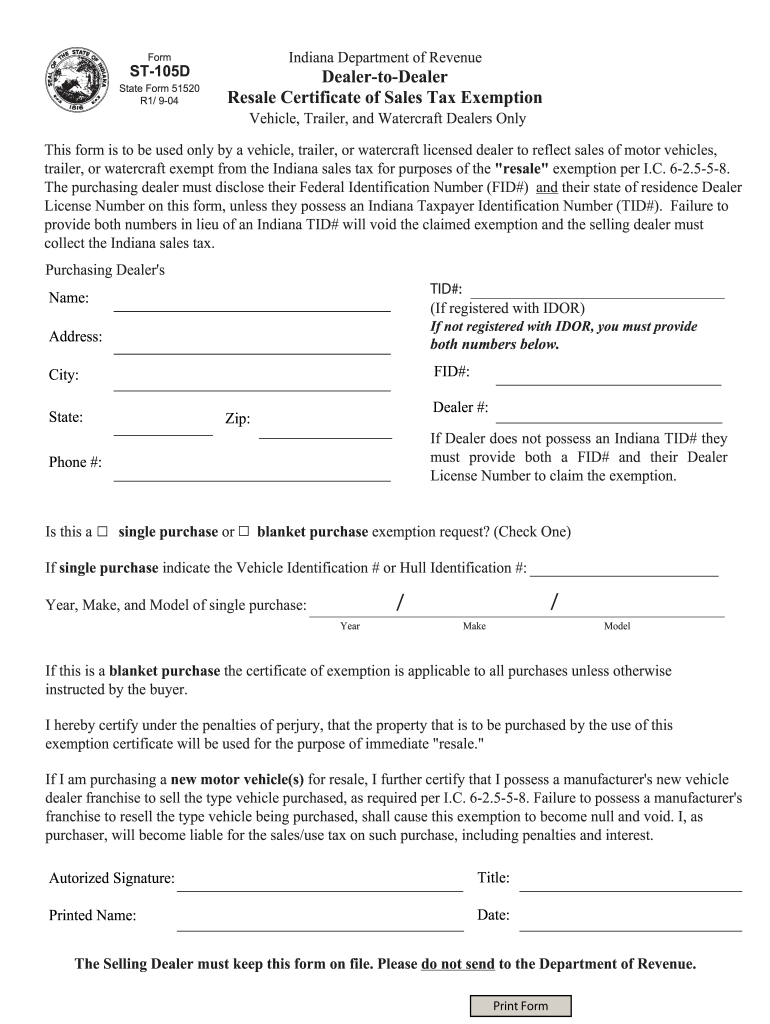
Click ‘Get Form’ to open the ST-105D form in the editor.
Begin by entering the Purchasing Dealer's TID# if registered with IDOR. If not, provide both the FID# and Dealer License Number.
Fill in the dealer's Name, Address, City, State, and Zip code accurately to ensure proper identification.
Indicate whether this is a single purchase or blanket purchase exemption request by checking the appropriate box.
If it’s a single purchase, enter the Vehicle Identification Number (VIN) or Hull Identification Number (HIN), along with the Year, Make, and Model of the vehicle.
Complete the certification section by providing your Authorized Signature, Title, Printed Name, and Date to validate your claim for exemption.
Start filling out your ST-105D form online for free today!
St 105d 2004 form pdfST-105 IndianaForm ST-105 Indiana fill inSt 105d 2004 form indianaST-105 form PDFPrintable ST 103 formForm ST-108EST-105 instructions
Security and compliance
At DocHub, your data security is our priority. We follow HIPAA, SOC2, GDPR, and other standards, so you can work on your documents with confidence.
The Taxpayer Identification Number may be used on sales tax exemption certificates (Form ST-105 or Streamlined Sales Tax Governing Board Form F0003) when
Sep 20, 2006 The Form ST-105 certificates may have documented that Taxpayer was not required to collect and remit sales tax on those transactions; however,Read more
Cookie consent notice
This site uses cookies to enhance site navigation and personalize your experience.
By using this site you agree to our use of cookies as described in our Privacy Notice.
You can modify your selections by visiting our Cookie and Advertising Notice.