Type text, add images, blackout confidential details, add comments, highlights and more.
02. Sign it in a few clicks
Draw your signature, type it, upload its image, or use your mobile device as a signature pad.
03. Share your form with others
Send charitable organization annual report form via email, link, or fax. You can also download it, export it or print it out.
How to use or fill out md cof 85 with our platform
Ease of Setup
DocHub User Ratings on G2
Ease of Use
DocHub User Ratings on G2
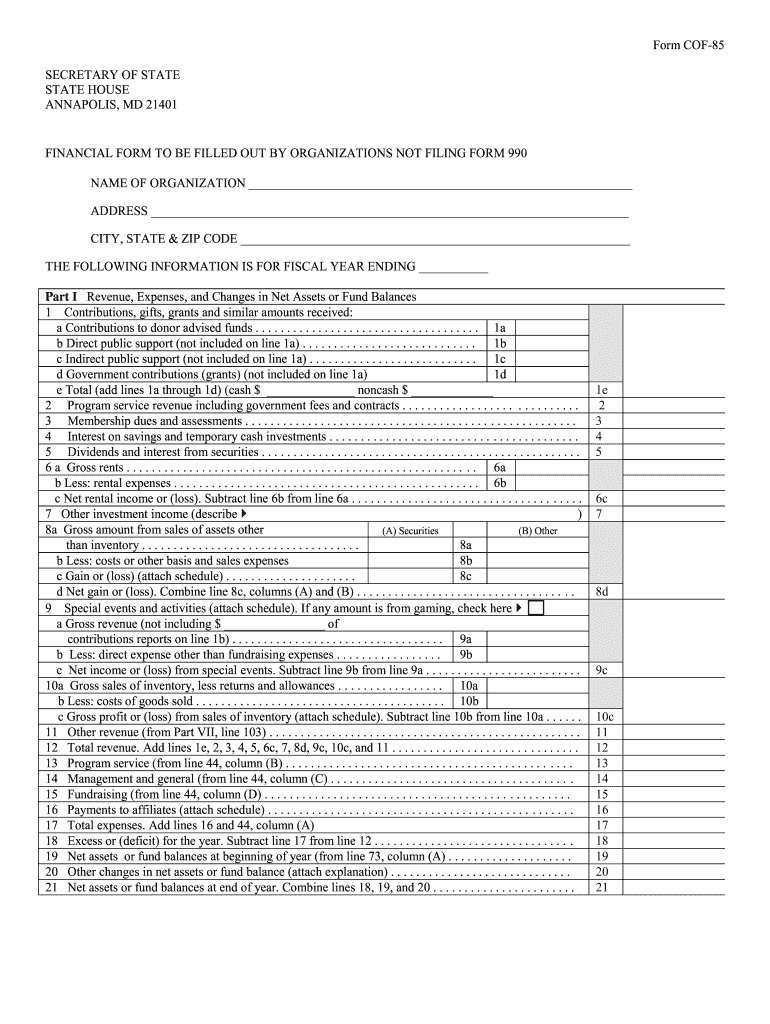
Click ‘Get Form’ to open the md cof 85 in the editor.
Begin by entering your organization’s name and address in the designated fields at the top of the form. Ensure accuracy for proper identification.
For Part I, provide detailed financial information for the fiscal year ending date. Fill in contributions, revenue sources, and total expenses as outlined in each section.
In Part II, list functional expenses. Be sure to categorize them correctly under program services, management, and general expenses.
Complete Part III by detailing program services rendered. Specify each service title and associated costs to reflect your organization’s activities accurately.
Finally, review all entries for completeness and accuracy before submitting. Utilize our platform's features to save or share your completed form easily.
Start filling out your md cof 85 today for free using our platform!
Sampling Design for Aquatic Ecological: Monitoring, Phase I
Otto and Associates (Baltimore, MD), and the introductions to utility industry contacts he provided. The project team members visited numerous electric utility.Read more
At the top of the COF-85, enter the name of the organization for which this financial report is completed, the mailing address of the organization, the EIN ofRead more
See the VectorStar MS4640 VNA Programming Manual (PM) 10410-002676 for an introduction to VectorStar VNA programming, network addressing, connections,Read more
Cookie consent notice
This site uses cookies to enhance site navigation and personalize your experience.
By using this site you agree to our use of cookies as described in our Privacy Notice.
You can modify your selections by visiting our Cookie and Advertising Notice.