Blank itemized form 2026

Get Form
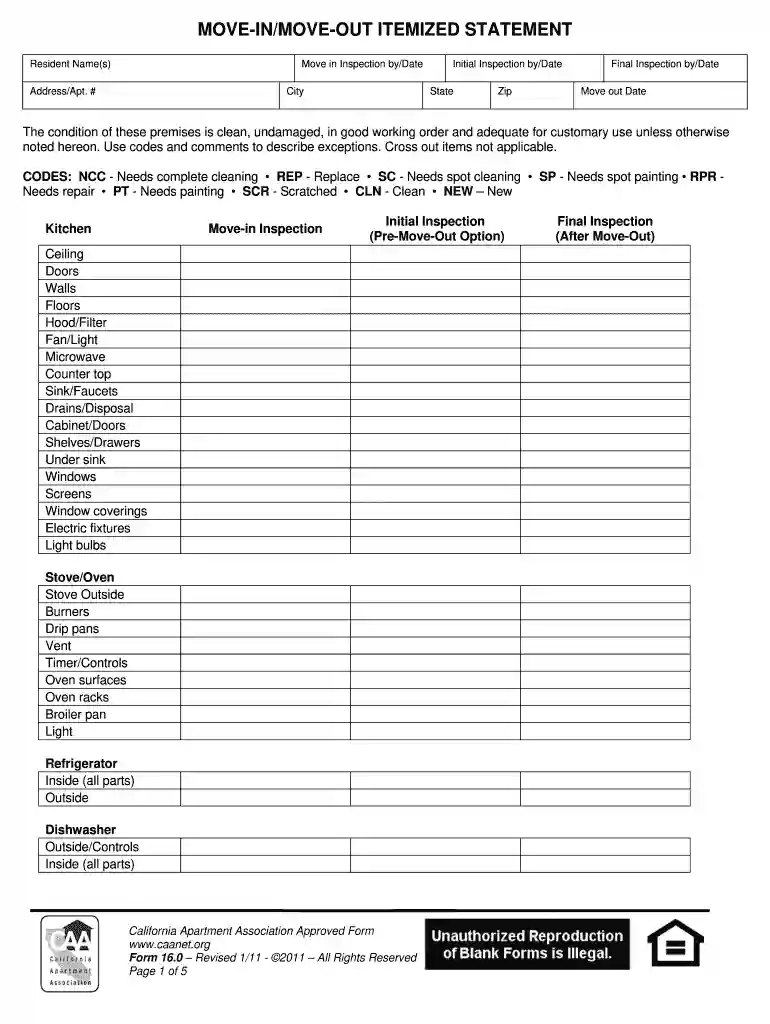
itemization form Preview on Page 1

Here's how it works

01. Edit your itemization form online
Type text, add images, blackout confidential details, add comments, highlights and more.

02. Sign it in a few clicks
Draw your signature, type it, upload its image, or use your mobile device as a signature pad.

03. Share your form with others
Send itemized form via email, link, or fax. You can also download it, export it or print it out.

How to use or fill out blank itemized form with our platform

Form edit decoration
9.5
Ease of Setup
DocHub User Ratings on G2
9.0
Ease of Use
DocHub User Ratings on G2
  1. Click ‘Get Form’ to open the blank itemized form in the editor.
  2. Begin by entering the Resident Name(s) and Address/Apt. # at the top of the form. This information is crucial for identifying the premises being inspected.
  3. Fill in the Move-in Inspection date and Initial Inspection date. These dates help track the timeline of inspections.
  4. Proceed to each section, such as Kitchen, Dining Room, and Bedrooms. For each item listed, indicate its condition using the provided codes (e.g., NCC for Needs complete cleaning).
  5. For any items that do not apply, simply cross them out to maintain clarity in your inspection report.
  6. Complete all sections including bathrooms and systems, ensuring you check off every relevant detail for a comprehensive assessment.
  7. Finally, review your entries for accuracy before saving or sharing your completed form directly from our platform.

Start using our platform today to streamline your document editing and form completion process for free!

be ready to get more

Complete this form in 5 minutes or less

Get form

Got questions?

We have answers to the most popular questions from our customers. If you can't find an answer to your question, please contact us.
Contact us
How to Make an Itemized Receipt Online? Download the itemized receipt template in your desired format (Word, Excel, Google Docs, Google Sheets, and PDF). Add the business details - business name, address, city, state, and country. Add receipt details such as the sales receipt number, currency, and date.
If you have an account with any financial institution, they have to make your statements available to you in some way. If you need an itemized statement for a specific time frame, you can contact your bank, for example, and ask for one to be sent.
An Itemized Original Receipt must, at the least, have the following items on the receipt: Name of Merchant. Address/Phone # (at least one way to contact the merchant) Description of each item purchased. Price for each item purchased. Tax for the taxable items. Grand Total. Date of Purchase. Method of payment.
Example of an Itemized Statement On June 7, Check #123 that Bert wrote to his landlord for $700 was cleared in his account. On June 12, Bert spent $100 on groceries using his debit card with an account number on the card that ends in 5678. He also deposited $50 cash using the banks ATM.

Security and compliance

At DocHub, your data security is our priority. We follow HIPAA, SOC2, GDPR, and other standards, so you can work on your documents with confidence.

Learn more
ccpa2
pci-dss
gdpr-compliance
hipaa
soc-compliance
be ready to get more

Complete this form in 5 minutes or less

Get form