Florida election petition form 2026

Get Form
florida election petition form Preview on Page 1

Here's how it works

01. Edit your form online
Type text, add images, blackout confidential details, add comments, highlights and more.
02. Sign it in a few clicks
Draw your signature, type it, upload its image, or use your mobile device as a signature pad.
03. Share your form with others
Send it via email, link, or fax. You can also download it, export it or print it out.

How to use or fill out Florida Election Petition Form with DocHub

Form edit decoration
9.5
Ease of Setup
DocHub User Ratings on G2
9.0
Ease of Use
DocHub User Ratings on G2
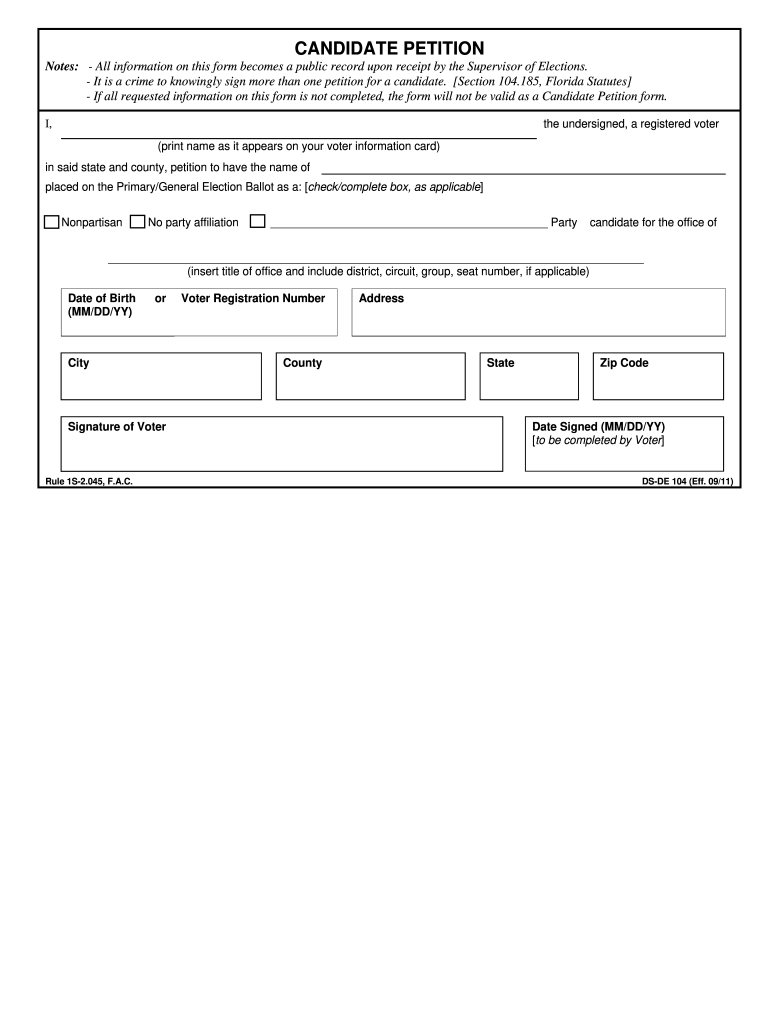
  1. Click ‘Get Form’ to open the Florida Election Petition Form in our editor.
  2. Begin by entering your name as it appears on your voter information card in the designated field.
  3. Indicate your party affiliation by checking the appropriate box: Nonpartisan, No party affiliation, or specify a party.
  4. Fill in the title of the office you are petitioning for, including any relevant district or seat numbers.
  5. Provide your date of birth in the MM/DD/YY format and complete your address details including city, state, and zip code.
  6. Sign the form in the designated area and ensure you include your Voter Registration Number.
  7. Finally, enter the date you signed the form in MM/DD/YY format before submitting it.

Start using our platform today to easily fill out and submit your Florida Election Petition Form for free!

be ready to get more

Complete this form in 5 minutes or less

Get form

Got questions?

We have answers to the most popular questions from our customers. If you can't find an answer to your question, please contact us.
Contact us

Sure, a typed name is accepted as a valid electronic signature when you create it on your form using a compliant solution like DocHub. Simply upload your florida election petition form to our editor, click Sign in the top tool pane → Create your signature → Type your name in the appropriate tab, and choose how it will appear on your document.

Document editing with DocHub is equally convenient on desktop and mobile devices. You only need an internet browser to revise your florida election petition form on Android. Open our website and sign in to access the tools you need. Add your document and introduce your intended changes. After that, you can keep your form in your document storage or send it out right away.

In Florida, the people have the right to propose amendments to the Florida Constitution through an initiative petition process. Sponsors of these initiatives must secure the required number of valid petition signatures in order for their initiative to be placed on a General Election ballot.
Per the Florida Constitution, the number of signatures needed is based on eight percent of the voters who cast votes in the last Presidential election. In addition, the signatures must also come from voters in at least one-half of the congressional districts of the state.
There is nothing in the Election Code that prohibits a candidate from paying persons to collect petitions. However, if any person is paid to solicit signatures on a petition, an undue burden oath may not subsequently be filed in lieu of paying the fee to have signatures verified for that petition.

Security and compliance

At DocHub, your data security is our priority. We follow HIPAA, SOC2, GDPR, and other standards, so you can work on your documents with confidence.

Learn more
ccpa2
pci-dss
gdpr-compliance
hipaa
soc-compliance
be ready to get more

Complete this form in 5 minutes or less

Get form

People also ask

Where Can Candidates Collect Petitions? Absent a local ordinance, a candidate can collect petition signatures in any public place including government-owned buildings. Section 106.15(4), Florida Statutes, is often misconstrued to prohibit collecting petition signatures in a government-owned building.
In Florida, the people have the right to propose amendments to the Florida Constitution through an initiative petition process. Sponsors of these initiatives must secure the required number of valid petition signatures in order for their initiative to be placed on a General Election ballot.
To cross the first threshold and be searchable within WhiteHouse.gov, a petition must docHub 150 signatures within 30 days. To cross the second threshold and require a response, a petition must docHub 100,000 signatures within 30 days.
Counties have 30 working days to complete a random sample of 3% or 500 signatures, whichever is greater, and report their results to the Secretary of State. If the statewide random sample total projects more than 110% of the required amount of signatures (601,317), the referendum would qualify for the ballot.
Absent a local ordinance, a candidate can collect petition signatures in any public place including government-owned buildings. Section 106.15(4), Florida Statutes, is often misconstrued to prohibit collecting petition signatures in a government-owned building.

Related links