Auburn medical form 2012-2026

Get Form
auburn medical form Preview on Page 1

Here's how it works

01. Edit your auburn medical form online
Type text, add images, blackout confidential details, add comments, highlights and more.

02. Sign it in a few clicks
Draw your signature, type it, upload its image, or use your mobile device as a signature pad.

03. Share your form with others
Send clearwave vactrak via email, link, or fax. You can also download it, export it or print it out.

How to use or fill out auburn medical form 2012 with our platform

Form edit decoration
9.5
Ease of Setup
DocHub User Ratings on G2
9.0
Ease of Use
DocHub User Ratings on G2
  1. Click ‘Get Form’ to open the auburn medical form 2012 in the editor.
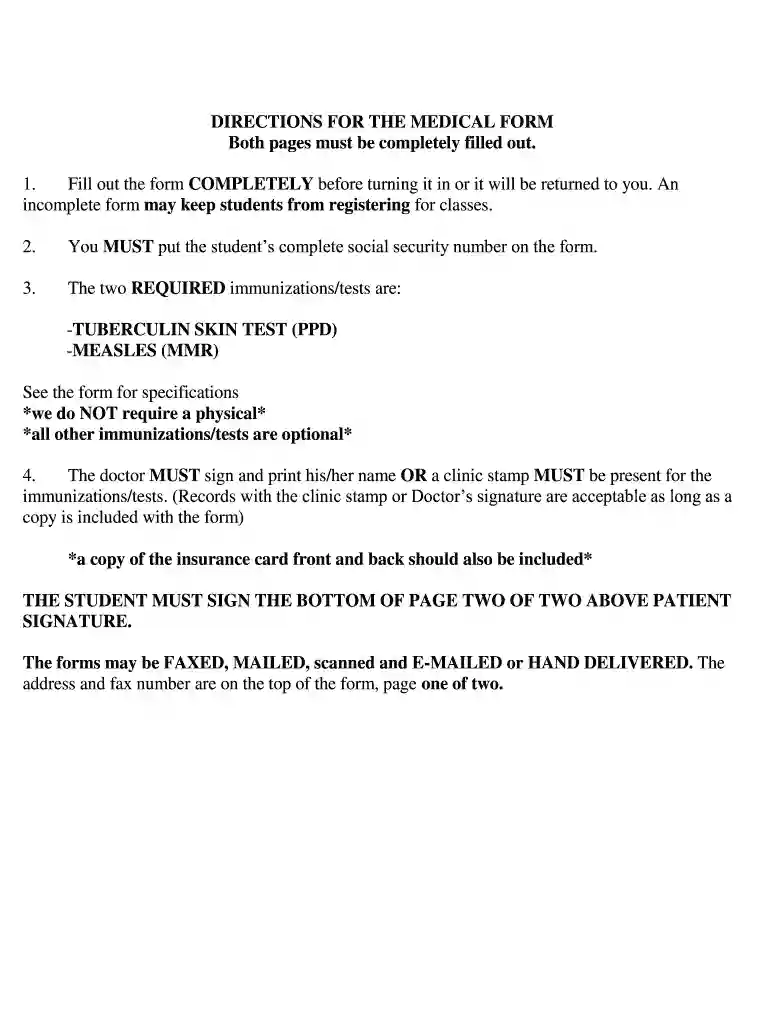
  2. Begin by entering the student's complete social security number in the designated field. This is crucial for processing.
  3. In the immunization section, ensure you document the required Tuberculin Skin Test (PPD) and Measles (MMR) details, including dates and results.
  4. Have a doctor sign or stamp the form to validate the immunizations. Ensure that a copy of the insurance card is attached as well.
  5. Complete all personal information fields, including emergency contact details and relationship to policyholder.
  6. Finally, make sure both pages are signed where indicated before submitting via fax, email, or mail as per instructions on page one.

Start filling out your auburn medical form 2012 online for free today!

See more auburn medical form 2012 versions

We've got more versions of the auburn medical form 2012 form. Select the right auburn medical form 2012 version from the list and start editing it straight away!
Versions Form popularity Fillable & printable
2013 4.8 Satisfied (100 Votes)
2012 4.2 Satisfied (62 Votes)
be ready to get more

Complete this form in 5 minutes or less

Get form

Got questions?

We have answers to the most popular questions from our customers. If you can't find an answer to your question, please contact us.
Contact us
All incoming students are required to complete the electronic medical information and immunization form through Med+Proctor. You will receive an email invite to your AUBURN email address. You will create an account with Med+Proctor and then upload your immunization information.
HIPAA, otherwise known as the Health Insurance Portability and Accountability Act of 1996, is one of the major pieces of legislation that keeps your medical records private from anyone trying to view them, be they parents or guardians, school administrators, or anyone else.
Add your health records On your iPhone or iPad, open the Health app. If youre on your iPhone, tap the Summary tab, then tap your profile picture. Under Features, tap Health Records, then tap Get Started. Youre prompted to allow the Health app to use your location to find hospitals and health networks near you.
Email can also be accessed from a Windows desktop or laptop by navigating to owa.auburn.edu and signing in using your Auburn University email (username@auburn.edu) and password. Note: If you are accessing your email account while on Auburns campus network/Wi-Fi, you will not be prompted to authenticate with Duo.
Our team of providers is experienced in treating your common medical problems, including minor surgery, suturing of lacerations and removal of ingrown toe nails.