




Here's how it works

01. Edit your post production tax exemption california online
Type text, add images, blackout confidential details, add comments, highlights and more.

02. Sign it in a few clicks
Draw your signature, type it, upload its image, or use your mobile device as a signature pad.

03. Share your form with others
Send section 6378 exemption certificate via email, link, or fax. You can also download it, export it or print it out.
How to use or fill out 6378 exemption certificate with our platform

- Click ‘Get Form’ to open the 6378 exemption certificate in the editor.
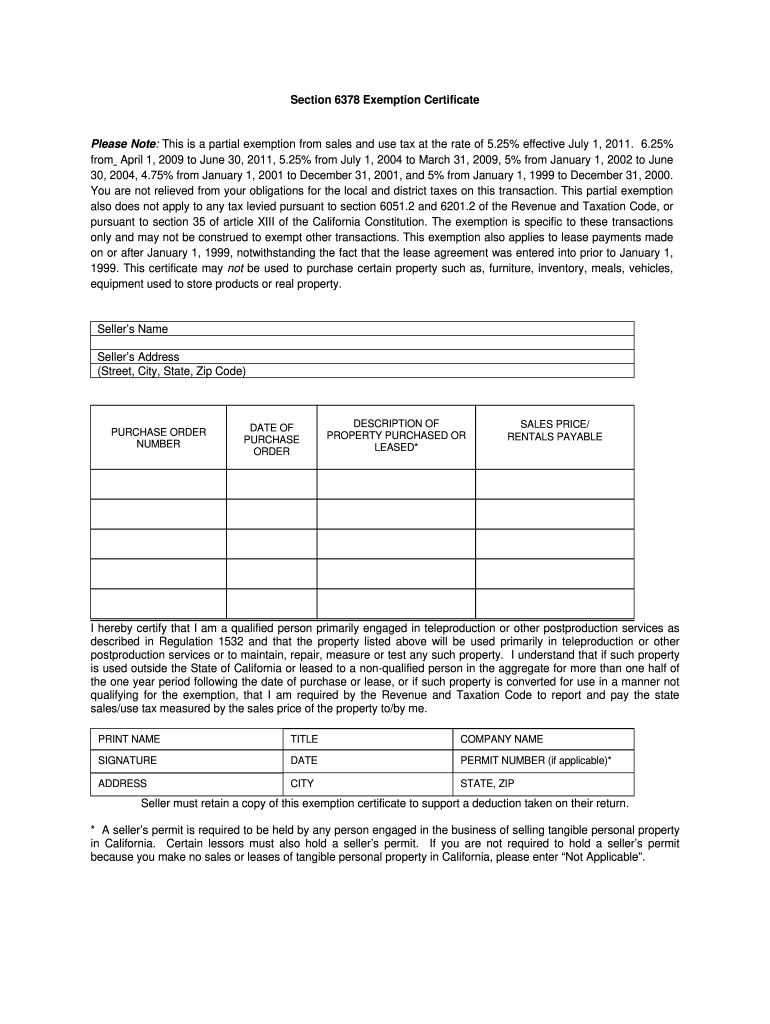
- Begin by filling in the 'Seller’s Name' and 'Seller’s Address' fields. Ensure that all details are accurate to avoid any issues with tax exemptions.
- Enter the 'Purchase Order Number' and 'Date of Purchase Order'. This information is crucial for tracking your transactions.
- In the 'Description of Property Purchased or Leased' section, provide a detailed description of the items involved. This helps clarify the purpose of the exemption.
- Fill in the 'Sales Price/Rentals Payable' field with the total amount for transparency and record-keeping.
- Complete the certification statement by printing your name, title, company name, and signing it. Don’t forget to include the date and permit number if applicable.
- Review all entries for accuracy before saving or exporting your completed form. Retain a copy for your records as required.
Start using our platform today to fill out your 6378 exemption certificate easily and for free!
Fill out 6378 exemption certificate online
It's free
Security and compliance
At DocHub, your data security is our priority. We follow HIPAA, SOC2, GDPR, and other standards, so you can work on your documents with confidence.
Learn more


