Type text, add images, blackout confidential details, add comments, highlights and more.
02. Sign it in a few clicks
Draw your signature, type it, upload its image, or use your mobile device as a signature pad.
03. Share your form with others
Send addendum to purchase agreement via email, link, or fax. You can also download it, export it or print it out.
How to use or fill out addendum to purchase agreement michigan with DocHub
Ease of Setup
DocHub User Ratings on G2
Ease of Use
DocHub User Ratings on G2
Click ‘Get Form’ to open the addendum in our editor.
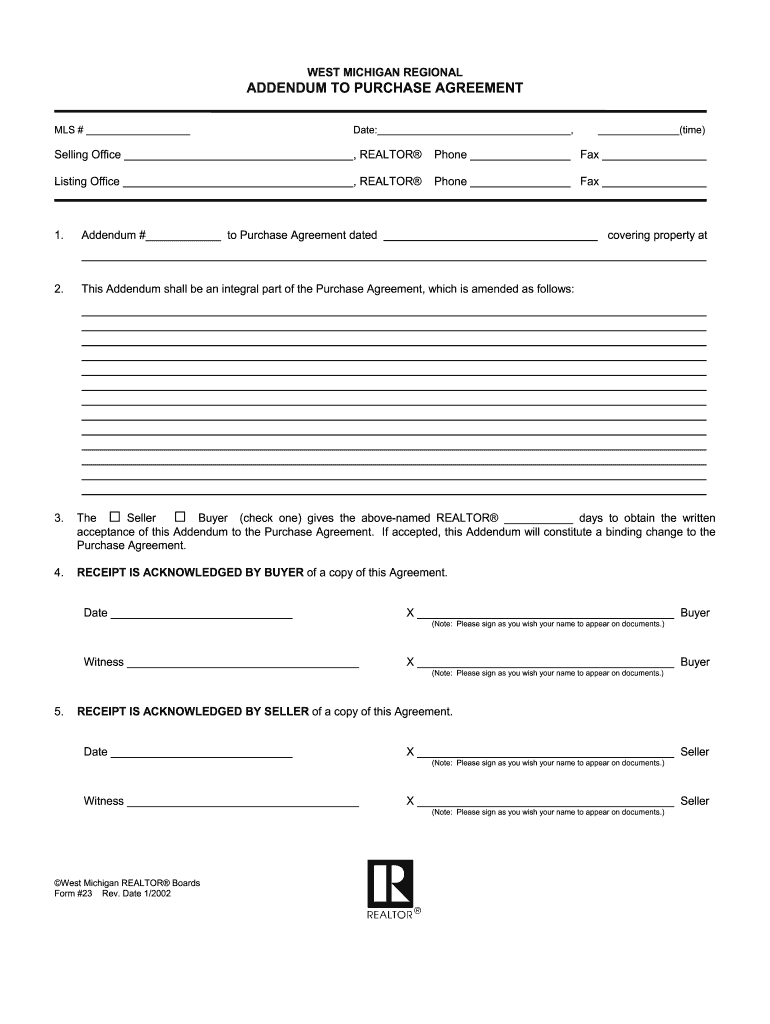
Fill in the MLS number and date at the top of the form. This information is crucial for identifying your specific transaction.
Complete the Selling Office and Listing Office sections by entering the names of the REALTORS® along with their phone and fax numbers.
In section 1, specify the Addendum number and reference the Purchase Agreement date. This links your addendum directly to the original agreement.
In section 3, indicate whether the Buyer or Seller is granting time for acceptance of this Addendum. Check the appropriate box and fill in the number of days allowed.
Both Buyer and Seller must acknowledge receipt of a copy of this Agreement by signing in sections 4 and 5. Ensure that signatures are as they wish their names to appear on documents.
Start using our platform today to streamline your document editing process for free!
Fill out addendum to purchase agreement michigan online It's free
Addendum to purchase agreement michigan templateSimple addendum to purchase agreement michiganFree addendum to purchase agreement michiganAddendum to purchase agreement michigan pdfAddendum to purchase agreement michigan sampleAddendum to purchase agreement michigan exampleAddendum to real estate purchase contractAddendum to contract of Sale
Security and compliance
At DocHub, your data security is our priority. We follow HIPAA, SOC2, GDPR, and other standards, so you can work on your documents with confidence.
Green and Sustainable Remediation: A Practical Framework
by AP Framework 2011 Appendix A summarizes the GSR state survey and addendum results; Appendix B contains the survey questionnaire. Responding states generally did not report anyRead more
Accept as expressly modified herein all terms of the Purchase Agreement shall remain in full force and effect. Dated: January 15, 2008. SELLER: Kathleen J.Read more
Cookie consent notice
This site uses cookies to enhance site navigation and personalize your experience.
By using this site you agree to our use of cookies as described in our Privacy Notice.
You can modify your selections by visiting our Cookie and Advertising Notice.