




01. Edit your 990 2015 online
Type text, add images, blackout confidential details, add comments, highlights and more.

Type text, add images, blackout confidential details, add comments, highlights and more.

Draw your signature, type it, upload its image, or use your mobile device as a signature pad.

Send 2015 form 990 via email, link, or fax. You can also download it, export it or print it out.
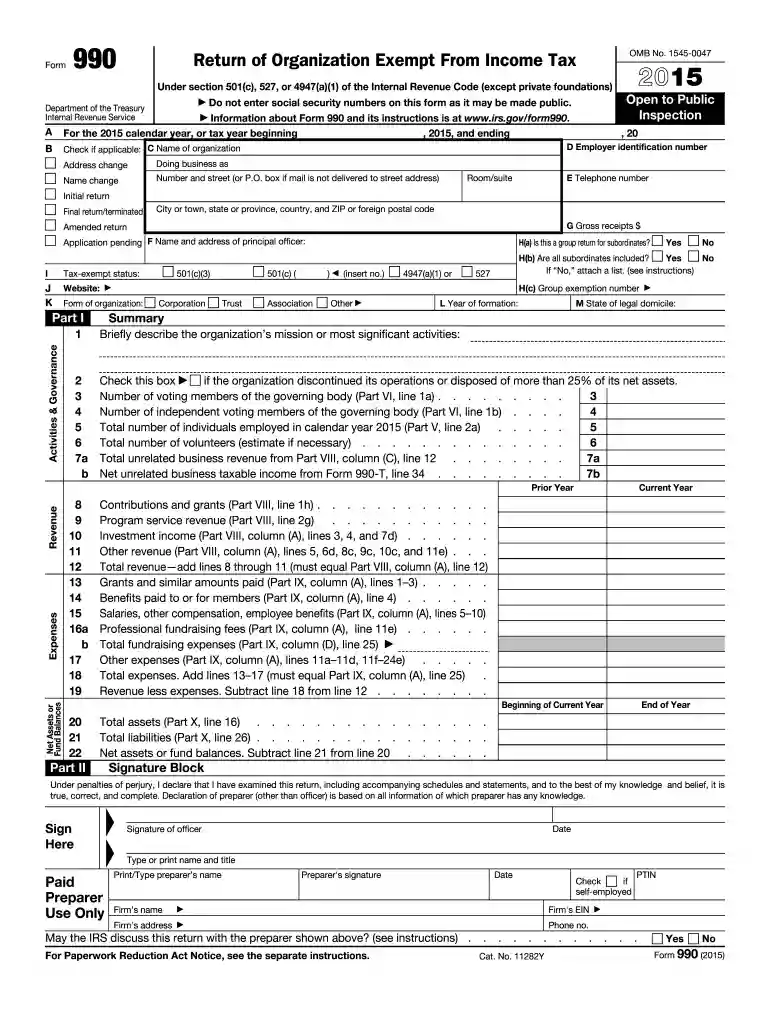
Form 990 for the year 2015 is a pivotal document used by tax-exempt organizations in the United States. Filed annually with the Internal Revenue Service (IRS), this form is mandatory for organizations that fall under sections 501(c), 527, or 4947(a)(1) of the Internal Revenue Code. It primarily serves to provide the IRS and the public with detailed information about an organization’s financial health, governance, and operational transparency. This includes specifics about revenue generation, functional expenses, net assets, and program service accomplishments. Moreover, disclosures regarding officer compensations and political engagements are also part of the reporting. Form 990 acts as a tool to maintain transparency and ensure accountability among tax-exempt bodies.
The Form 990 is structured to extract comprehensive data from organizations. Core elements include:
Additionally, the form delves into sections that address governance details, such as board members and operational policies, providing insight into the transparency of the organization’s internal processes.
Using Form 990 correctly is essential for compliance and transparency. Here are steps to guide through its use:
Completing Form 990 requires careful attention to detail. Here is a step-by-step guide:
Timeliness is key to maintaining good standing with the IRS. The regular deadline for Form 990 is the 15th day of the fifth month following the end of the organization's accounting period. For a calendar-year filer, this typically means May 15. Extensions are possible but must be requested before the initial deadline. Missing these crucial dates can lead to penalties, so maintaining an organized schedule for compliance is vital.
Failure to file Form 990 on time can result in significant financial penalties. Organizations can incur fines up to $100 per day of lateness, with a maximum penalty reaching $50,000 each year. Repeated failures can lead to revocation of tax-exempt status, severely impacting the organization's operations and public trust. Therefore, it's critical that all organizations adhere to IRS deadlines and filing procedures with diligence.
The IRS mandates the use of Form 990 to uphold legal and ethical standards within tax-exempt organizations. The form's disclosure requirements ensure not only compliance with federal tax laws but also alignment with broader governance and transparency obligations. Accurately reporting on finances and governance—such as listing significant donations or political contributions—helps maintain the organization's accountability and public trust.
The IRS provides comprehensive guidelines for Form 990, which outline who must file, which version to use, and essential instructions for completion. These guidelines are indispensable for ensuring accuracy and compliance. Organizations are encouraged to review the latest IRS instructions each year, as regulations or reporting requirements can change. Tax professionals or consultants can also provide valuable insight into applying these guidelines to specific organizational contexts.
We've got more versions of the 990 2015 form. Select the right 990 2015 version from the list and start editing it straight away!
| Versions | Form popularity | Fillable & printable |
|---|---|---|
| 2025 | 4.6 Satisfied (50 Votes) | |
| 2024 | 4.6 Satisfied (53 Votes) | |
| 2023 | 3.4 Satisfied (37 Votes) | |
| 2022 | 4.3 Satisfied (30 Votes) | |
| 2021 | 4.8 Satisfied (102 Votes) | |
| 2020 | 4.4 Satisfied (60 Votes) | |
| 2019 | 4.3 Satisfied (102 Votes) | |
| 2018 | 4.3 Satisfied (128 Votes) | |
| 2017 | 4.3 Satisfied (133 Votes) | |
| 2016 | 4.4 Satisfied (565 Votes) | |
| 2015 | 4 Satisfied (61 Votes) | |
| 2015 | 4.5 Satisfied (22 Votes) | |
| 2014 | 4 Satisfied (49 Votes) | |
| 2013 | 4.1 Satisfied (45 Votes) | |
| 2012 | 4 Satisfied (27 Votes) |
As outlined by eSignature regulations, documents signed digitally have the same validity as those approved with pen and paper. You can eSign almost any business and personal paperwork. Four types of paperwork still call for handwritten signatures only - wills and testamentary trusts, court orders and other court forms, state statutes regulating divorce, adoption, or other family law, and notice of cancellation of utility services. If you adhere to the rules and use a trustworthy and compliant software solution, like DocHub, you can eSign your form 990 2015 without printing it.
If you are looking for a state-specific irs form 990 2015 sample, you can find it in our DocHub Forms & Templates catalog. Use the search field, enter your form’s name, and search through the results for your state. You can also filter out irrelevant results while searching our catalog by groups.
At DocHub, your data security is our priority. We follow HIPAA, SOC2, GDPR, and other standards, so you can work on your documents with confidence.


May 2, 2016 Total revenue, gains, and other support per audited financial statements. Amounts included on line 1 but not on Form 990, Part VIII, line 12:.Read more
Dec 17, 2020 Net sales and revenues were $35.54 billion, and net income was $2.75 billion, the sixth-best in company history. Customers responded favorablyRead more
All Form 990 filers are required to complete Schedule O. 38. Form 990 (2015). Page 5. Form 990 (2015).Read more


