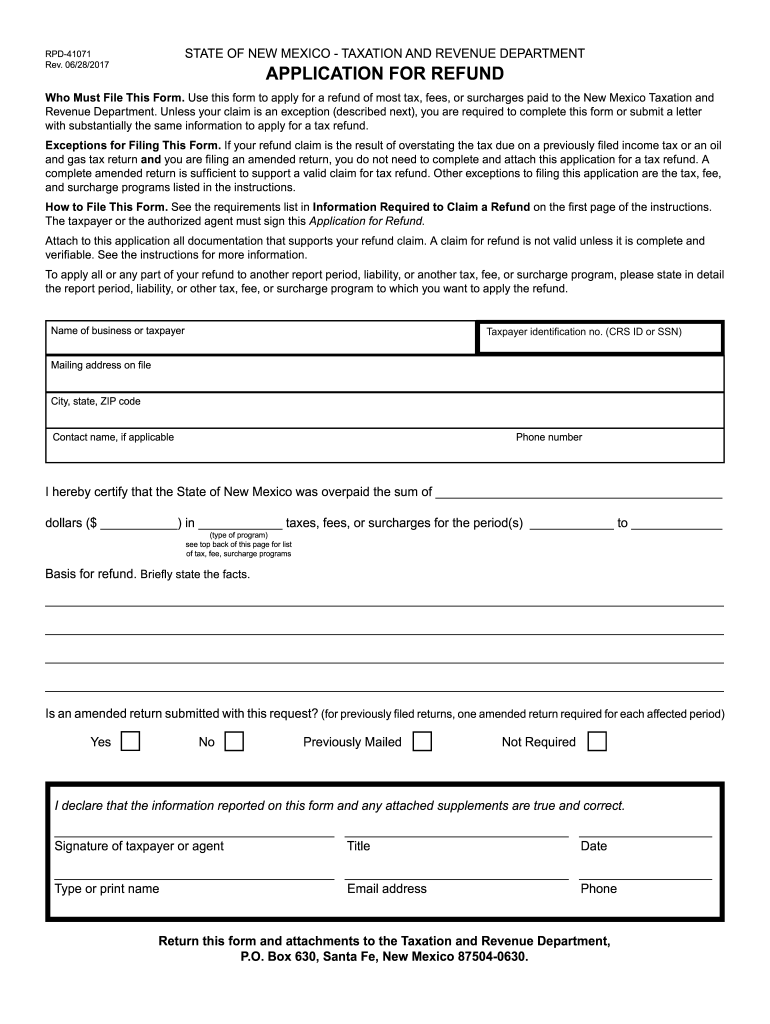
rpd 41071 Preview on Page 1

Rpd 41071 2026

Here's how it works

  • 01. Edit your rpd 41071 online

    Type text, add images, blackout confidential details, add comments, highlights and more.

  • 02. Sign it in a few clicks

    Draw your signature, type it, upload its image, or use your mobile device as a signature pad.

  • 03. Share your form with others

    Send it via email, link, or fax. You can also download it, export it or print it out.

How to use or fill out rpd 41071 with our platform

Form edit decoration
9.5
Ease of Setup
DocHub User Ratings on G2
9.0
Ease of Use
DocHub User Ratings on G2
  1. Click ‘Get Form’ to open the RPD-41071 in the editor.
  2. Begin by entering your taxpayer identification number (CRS ID or SSN) at the top of the form. This is essential for processing your refund.
  3. Fill in your name, mailing address, city, state, and ZIP code. Ensure that this information matches what is on file with the Taxation and Revenue Department.
  4. In the section regarding overpayment, specify the amount you believe was overpaid and detail the type of taxes, fees, or surcharges involved.
  5. Provide a brief statement explaining the basis for your refund claim. Be clear and concise to support your request effectively.
  6. If applicable, indicate whether an amended return is submitted with this request by checking 'Yes' or 'No'.
  7. Sign and date the form at the bottom. If you are an authorized agent, include your title and contact information.
  8. For direct deposit requests, complete the routing number and account number fields accurately to ensure timely processing.

Start using our platform today to fill out RPD-41071 easily and for free!

See more rpd 41071 versions

We've got more versions of the rpd 41071 form. Select the right rpd 41071 version from the list and start editing it straight away!

VersionsForm popularityFillable & printable
20214.8 Satisfied (37 Votes)
20174.3 Satisfied (99 Votes)
20154.3 Satisfied (101 Votes)
20124.4 Satisfied (65 Votes)
20124 Satisfied (35 Votes)
20074 Satisfied (53 Votes)

be ready to get more

Complete this form in 5 minutes or less

Got questions?

We have answers to the most popular questions from our customers. If you can't find an answer to your question, please contact us.

According to eSignature laws, documents approved digitally have the same validity as traditionally approved ones. You can eSign almost any business and personal paperwork. Four types of paperwork still demand wet signatures only - wills and testamentary trusts, court orders and other court papers, state statutes governing divorce, adoption, or other family law, and notice of cancellation of utility services. If you follow the guidelines and use a trustworthy and compliant software solution, like DocHub, you can eSign your rpd 41071 without printing it.

If you store your files in Google Drive, there is no need to download your rpd 41071 on your computer and upload it back to our editor. A much simpler way is to set up a browser extension created by DocHub to simplify this flow. The extension allows editing PDFs in your internet browser. Alternatively, you may integrate your DocHub and Gmail accounts for more efficient editing.

Security and compliance

At DocHub, your data security is our priority. We follow HIPAA, SOC2, GDPR, and other standards, so you can work on your documents with confidence.

Related links

Gross Receipts Tax : Tax Professionals

If you are requesting a refund of tax previously paid, you must also submit Form RPD-41071, Application for Refund, with all required attachments to theRead more

Learn more
AU College/Account Index

RPD-7-561 4-20633 AKC-CHF-#2245-YR2 4-20635 KENNETH A SCOTT-2003 4-20641 41071 TENNIS GIFTS 6-41081 ISBELL C W-BASKETBL 6-41091 BASEBALL GIFTS 6Read more

Learn more
If you believe that this page should be taken down, please follow our DMCA take down process here