De 1snp 2026

Get Form
corporation code Preview on Page 1

Here's how it works

01. Edit your corporation code online
Type text, add images, blackout confidential details, add comments, highlights and more.

02. Sign it in a few clicks
Draw your signature, type it, upload its image, or use your mobile device as a signature pad.

03. Share your form with others
Send de1snp via email, link, or fax. You can also download it, export it or print it out.

How to use or fill out de 1snp with our platform

Form edit decoration
9.5
Ease of Setup
DocHub User Ratings on G2
9.0
Ease of Use
DocHub User Ratings on G2
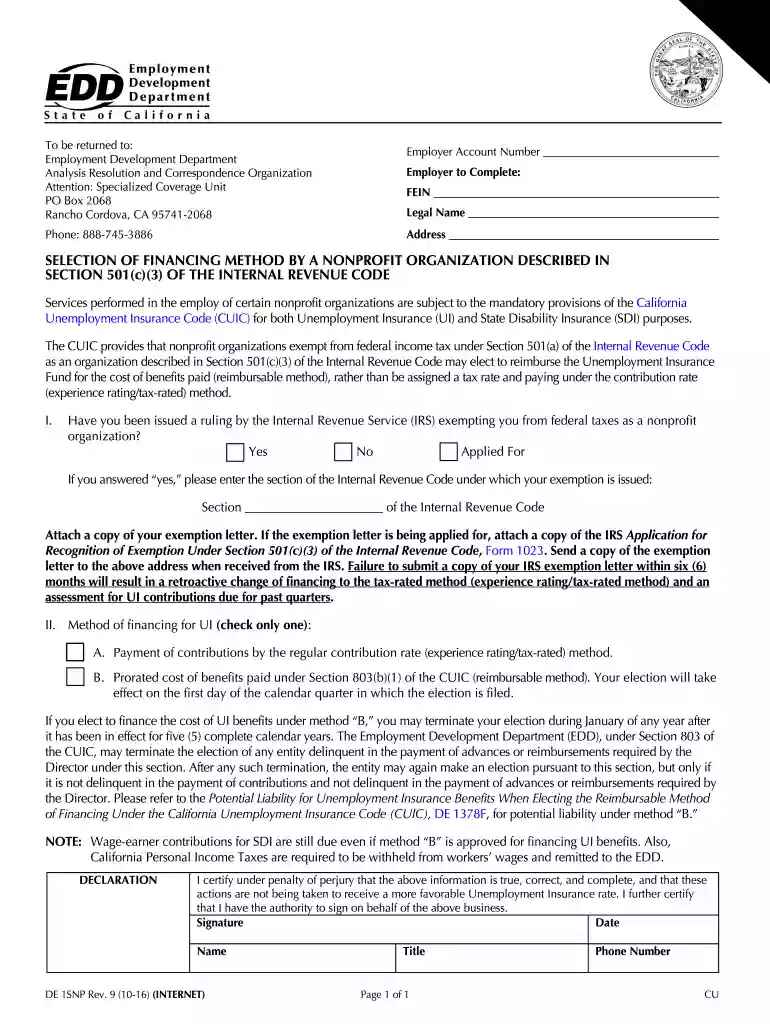
  1. Click ‘Get Form’ to open the de 1snp in the editor.
  2. Begin by entering your Employer Account Number, FEIN, Legal Name, and Address in the designated fields. Ensure all information is accurate to avoid processing delays.
  3. Next, indicate whether you have received a ruling from the IRS exempting you from federal taxes as a nonprofit organization by selecting 'Yes', 'No', or 'Applied For'. If 'Yes', enter the relevant section of the Internal Revenue Code.
  4. Attach any required documents, such as your exemption letter or IRS Application for Recognition of Exemption (Form 1023), using our platform's attachment feature.
  5. Select your method of financing for UI by checking either option A or B. Remember that this choice will affect your contributions moving forward.
  6. Finally, complete the declaration section by signing and dating the form. Ensure that you provide your name and title before submitting.

Start filling out your de 1snp form online for free today!

See more de 1snp versions

We've got more versions of the de 1snp form. Select the right de 1snp version from the list and start editing it straight away!
Versions Form popularity Fillable & printable
2016 4.8 Satisfied (182 Votes)
2015 4.4 Satisfied (165 Votes)
be ready to get more

Complete this form in 5 minutes or less

Get form

Got questions?

We have answers to the most popular questions from our customers. If you can't find an answer to your question, please contact us.
Contact us
Although EDD Form DE-4 is not required, an employee may use the form to request additional state tax to be withheld each pay period or to request additional allowances for estimated deductions. Employees may modify their withholding status at any time during the year by filing a new Form DE-4 or W-4.
A 501c3 has charitable activities as its primary purpose. A 501c4 is known as a social welfare organization. Both are exempt from federal income tax, both are considered a means to help society, but apart from volunteer fire organizations and veteran organizations, 501c4s cannot receive tax-deductible contributions.
The Commercial Employer Account Registration and Update Form (DE 1) is for new employers to register with the Employment Development Department (EDD) and existing employers to make updates to their business status.
The important thing to note is that, at the state level, EANs and EINs are the same thingyour state will just call them one name or the other. Certain states have even more names for state EANs, such as EDD state ID number in California or wage withholding account number in Wyoming.
While 501(c)(3) nonprofits are exempt from paying unemployment tax, their employees are eligible for unemployment benefits. Nonprofits have the option to pay the state unemployment program for the unemployment claims they are liable for.

Security and compliance

At DocHub, your data security is our priority. We follow HIPAA, SOC2, GDPR, and other standards, so you can work on your documents with confidence.

Learn more
ccpa2
pci-dss
gdpr-compliance
hipaa
soc-compliance
be ready to get more

Complete this form in 5 minutes or less

Get form

People also ask

Its fast, easy, and secure, and available 24 hours a day, 7 days a week. Step 1 - Create a username and password. Go to e-Services for Business. Select Enroll. Step 2 - Log in to e-Services for Business. Select New Employer, then select Next. Review the information on the New Registration screen.

501 organization