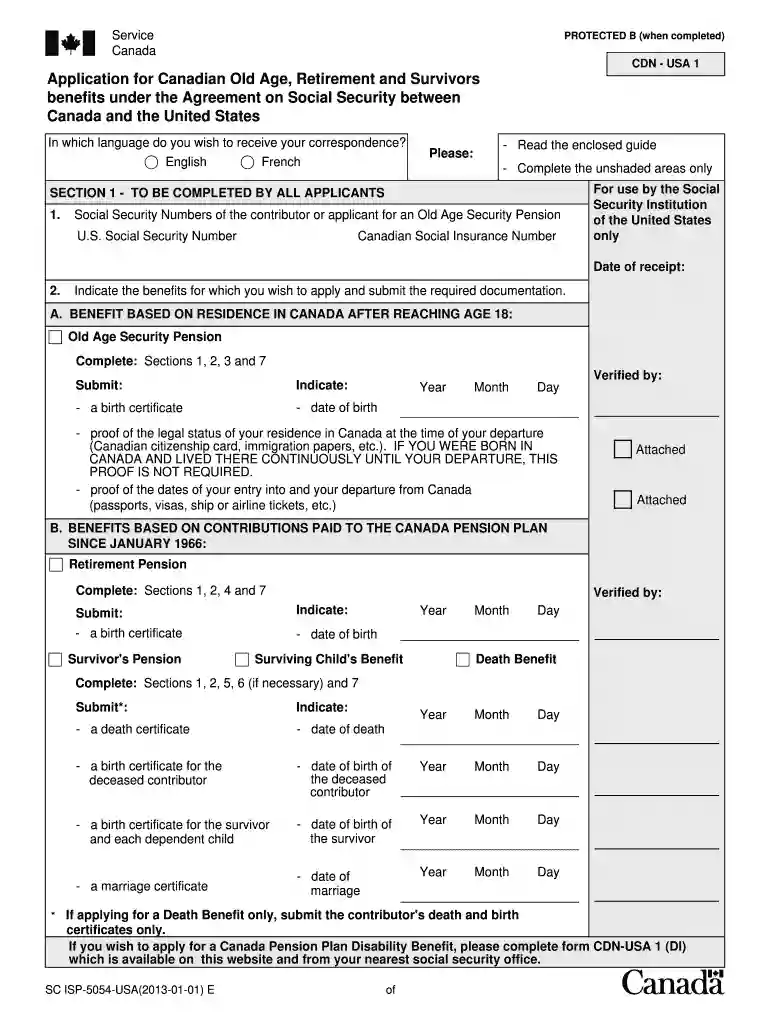
cdn usa 1 form Preview on Page 1

Canada pension application 2026

Here's how it works

  • 01. Edit your cdn usa 1 form online

    Type text, add images, blackout confidential details, add comments, highlights and more.

  • 02. Sign it in a few clicks

    Draw your signature, type it, upload its image, or use your mobile device as a signature pad.

  • 03. Share your form with others

    Send cdn usa 1 via email, link, or fax. You can also download it, export it or print it out.

How to use or fill out Canada Pension Application with DocHub

Form edit decoration
9.5
Ease of Setup
DocHub User Ratings on G2
9.0
Ease of Use
DocHub User Ratings on G2
  1. Click ‘Get Form’ to open the Canada Pension Application in our editor.
  2. Begin with Section 1, where you will need to provide your Social Security Numbers and select the benefits you wish to apply for. Ensure you attach the required documentation as specified.
  3. Move to Section 2, filling in your general information such as name, address, and marital status. Be thorough to avoid delays in processing.
  4. If applying for Old Age Security, complete Section 3 by providing details about your entry into Canada and your legal status at departure.
  5. For a Retirement Pension, proceed to Section 4 and indicate when you want your pension to start. Make sure this aligns with your eligibility.
  6. Complete Sections 5 and 6 if applying for Survivor's benefits or a Death Benefit, ensuring all necessary documents are attached.
  7. Finally, sign Section 7, confirming that all information is accurate. If needed, have a witness sign as well.

Start using our platform today to fill out your Canada Pension Application easily and for free!

See more cdn usa 1 form versions

We've got more versions of the cdn usa 1 form form. Select the right cdn usa 1 form version from the list and start editing it straight away!

VersionsForm popularityFillable & printable
20194.8 Satisfied (113 Votes)
20134.3 Satisfied (131 Votes)
20124 Satisfied (25 Votes)

be ready to get more

Complete this form in 5 minutes or less

Got questions?

We have answers to the most popular questions from our customers. If you can't find an answer to your question, please contact us.

Most eSignature services require users to have a paid subscription. With DocHub, there are two ways for you to create an electronic signature to your form cdn usa 1 without being charged:

  • You can do it during a 7-day trial period;
  • You can sign up for a free plan.

The second option, though, has limitations on the number of signatures, sign requests, emails, and documents for adjusting available per month. You can check for full information here.

Using a swift editing system like DocHub, you do not need anything but a browser and internet connection to edit your how to apply for cpp from usa on the internet swiftly. Add your document or find the relevant form in DocHub’s catalog, open our editor with one click, and finish it digitally. To revise your forms at any time, register a free account with DocHub.

Security and compliance

At DocHub, your data security is our priority. We follow HIPAA, SOC2, GDPR, and other standards, so you can work on your documents with confidence.

cdn usa1 form

POMS: GN 01715.220 - Application Forms for Canadian Benefits

Dec 29, 2017 — Applicants should apply for CPP benefits using the CDN-USA 1 when the worker last resided in any other part of Canada. If the applicant is ...

Learn more
If you believe that this page should be taken down, please follow our DMCA take down process here