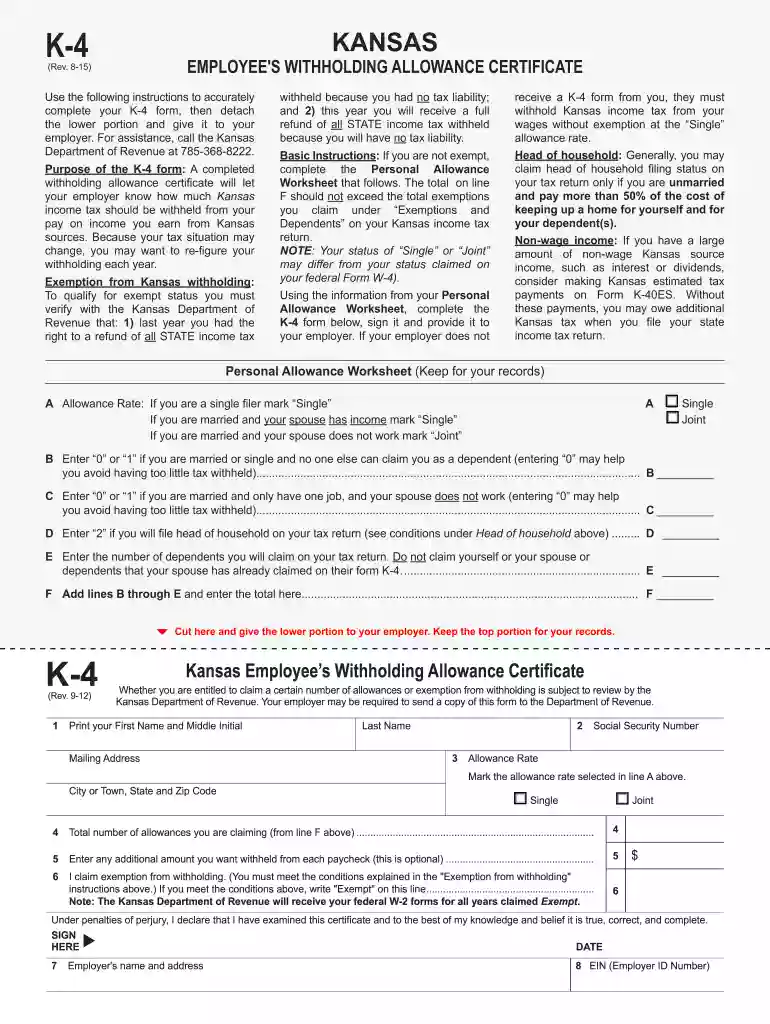
k4 form Preview on Page 1

K 4 fillable form 2015-2019-2026

Here's how it works

  • 01. Edit your k4 form online

    Type text, add images, blackout confidential details, add comments, highlights and more.

  • 02. Sign it in a few clicks

    Draw your signature, type it, upload its image, or use your mobile device as a signature pad.

  • 03. Share your form with others

    Send it via email, link, or fax. You can also download it, export it or print it out.

How to use or fill out K 4 fillable form 2015-2019 with our platform

Form edit decoration
9.5
Ease of Setup
DocHub User Ratings on G2
9.0
Ease of Use
DocHub User Ratings on G2
  1. Click ‘Get Form’ to open the K 4 fillable form in the editor.
  2. Begin by filling out your personal information at the top of the form, including your first name, last name, mailing address, and Social Security number.
  3. Select your allowance rate by marking either 'Single' or 'Joint' based on your filing status.
  4. Complete the Personal Allowance Worksheet. Enter values for lines B through E based on your marital status and dependents, then sum these values on line F.
  5. Input the total number of allowances you are claiming from line F into the designated field on the form.
  6. If desired, specify any additional amount you want withheld from each paycheck in the optional field provided.
  7. If you qualify for exemption from withholding, write 'Exempt' in the appropriate section. Ensure you meet all conditions outlined in the instructions.
  8. Finally, sign and date the form before detaching the lower portion to submit to your employer.

Start using our platform today to easily complete your K 4 fillable form for free!

See more k4 form versions

We've got more versions of the k4 form form. Select the right k4 form version from the list and start editing it straight away!

VersionsForm popularityFillable & printable
20244.8 Satisfied (60 Votes)
20184.8 Satisfied (156 Votes)
20154.4 Satisfied (173 Votes)
20094 Satisfied (33 Votes)
20074.1 Satisfied (53 Votes)

be ready to get more

Complete this form in 5 minutes or less

Security and compliance

At DocHub, your data security is our priority. We follow HIPAA, SOC2, GDPR, and other standards, so you can work on your documents with confidence.

Related links

Institutional Self-Evaluation Report

fillable forms. Students are able to interact with offices via email and Skype calls. As a consequence of the pandemic, several offices provide on-groundRead more

Learn more
Internal Revenue Service Data Book, 2019

This report describes activities conducted by the Internal Revenue Service during Fiscal Year. 2019 (October 1, 2018, through September 30,. 2019).Read more

Learn more
If you believe that this page should be taken down, please follow our DMCA take down process here