Type text, add images, blackout confidential details, add comments, highlights and more.
02. Sign it in a few clicks
Draw your signature, type it, upload its image, or use your mobile device as a signature pad.
03. Share your form with others
Send it via email, link, or fax. You can also download it, export it or print it out.
How to use or fill out joseph pension plan hoopp with our platform
Ease of Setup
DocHub User Ratings on G2
Ease of Use
DocHub User Ratings on G2
Click ‘Get Form’ to open the joseph pension plan hoopp in the editor.
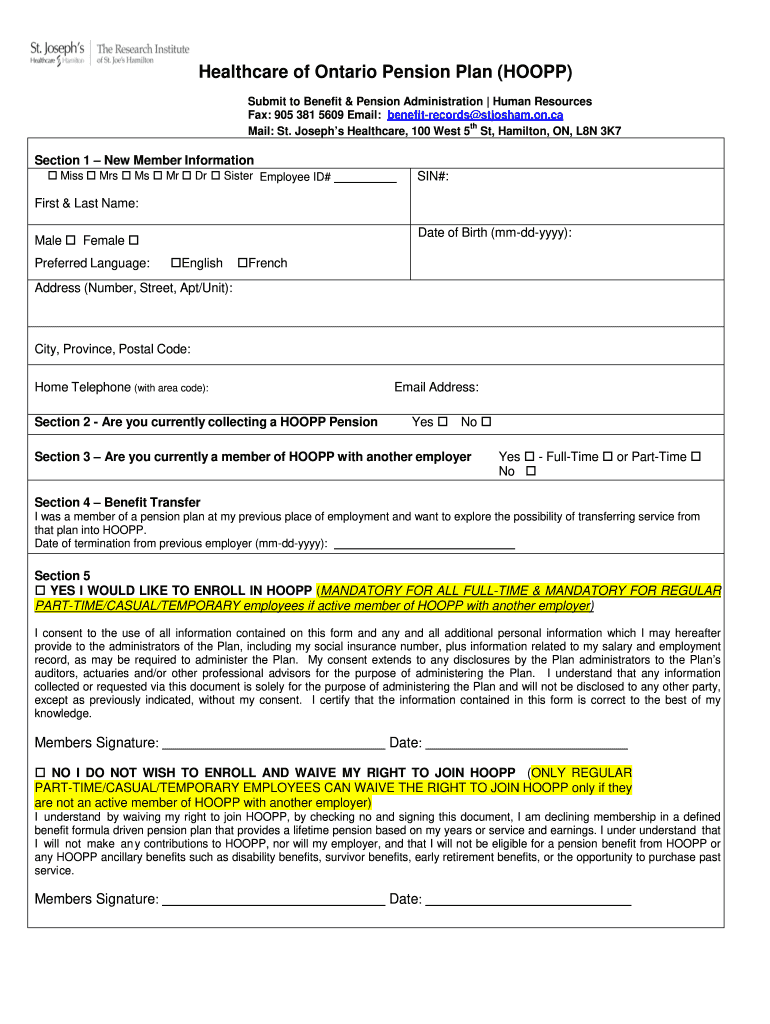
Begin with Section 1, where you will provide your New Member Information. Fill in your Employee ID#, SIN#, First & Last Name, Date of Birth, and select your gender. Don’t forget to indicate your preferred language and complete your address details.
In Section 2, answer whether you are currently collecting a HOOPP Pension by selecting 'Yes' or 'No'.
Proceed to Section 3 to indicate if you are a member of HOOPP with another employer. Choose between Full-Time or Part-Time if applicable.
Section 4 requires you to provide information about any previous pension plans and the date of termination from that employer if applicable.
In Section 5, decide whether you would like to enroll in HOOPP by checking the appropriate box and signing the document. Ensure all information is accurate before submission.
Start filling out your joseph pension plan hoopp form online for free today!
Fill out joseph pension plan hoopp online It's free
Joseph pension plan hoopp loginHOOPP Connect Pension EstimatorHOOPP pensionHOOPP payment dates 2026Healthcare of Ontario pension Plan (HOOPP)HOOPP pension calculator CanadaHOOPP pension increase 2026HOOPP login ID and password
Security and compliance
At DocHub, your data security is our priority. We follow HIPAA, SOC2, GDPR, and other standards, so you can work on your documents with confidence.
Global Board Gender Diversity Efforts Still Need Fairness-
government employees, and the Healthcare of Ontario Pension Plan. (HOOPP), a pension plan for Ontarian healthcare workers, have updated their respectiveRead more
Feb 12, 2026 She said the Texas Pension Review Board currently had a limit of 30 years but are looking at targeting 20 years as the new maximum. Mr. JoeRead more
Cookie consent notice
This site uses cookies to enhance site navigation and personalize your experience.
By using this site you agree to our use of cookies as described in our Privacy Notice.
You can modify your selections by visiting our Cookie and Advertising Notice.