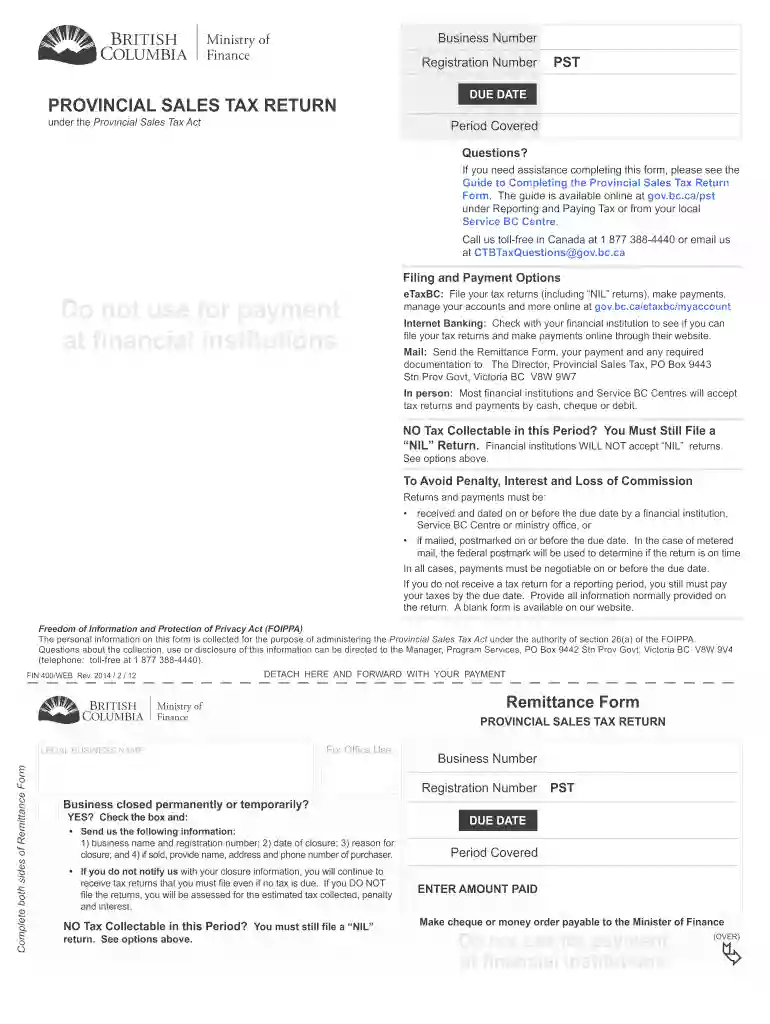
Pst filing form bc 2026

Get Form
fin400 Preview on Page 1

Here's how it works

01. Edit your fin400 online
Type text, add images, blackout confidential details, add comments, highlights and more.

02. Sign it in a few clicks
Draw your signature, type it, upload its image, or use your mobile device as a signature pad.

03. Share your form with others
Send etaxbc pst login via email, link, or fax. You can also download it, export it or print it out.

How to use or fill out pst filing form bc with our platform

Form edit decoration
9.5
Ease of Setup
DocHub User Ratings on G2
9.0
Ease of Use
DocHub User Ratings on G2
  1. Click ‘Get Form’ to open the PST Filing Form BC in the editor.
  2. Begin by entering your Business Number and Registration Number at the top of the form. This information is crucial for identifying your business.
  3. In the 'Period Covered' section, specify the reporting period for which you are filing. Ensure this aligns with your sales records.
  4. Complete Box A by entering your total taxable, non-taxable, and exempt sales and leases. This includes both in-province and out-of-province transactions.
  5. In Box B, input all tax collected or levied but not yet collected. Remember not to deduct any amounts from this box.
  6. Calculate your commission in Box C based on the amount in Box B, following the guidelines provided.
  7. Proceed to fill out Boxes E and F regarding purchases and leases for registrant’s consumption, ensuring accuracy for tax calculations.
  8. Finally, review all entries for accuracy before submitting your completed form through our platform or via other available methods.

Start using our platform today to streamline your PST filing process effortlessly!

See more pst filing form bc versions

We've got more versions of the pst filing form bc form. Select the right pst filing form bc version from the list and start editing it straight away!
Versions Form popularity Fillable & printable
2017 4.8 Satisfied (154 Votes)
2014 4.1 Satisfied (69 Votes)
2013 4.3 Satisfied (40 Votes)
be ready to get more

Complete this form in 5 minutes or less

Get form

Got questions?

We have answers to the most popular questions from our customers. If you can't find an answer to your question, please contact us.
Contact us
Am I required to pay PST on goods I purchase for business use, such as office equipment, furniture, supplies and tools? Yes, you must pay PST on all goods you acquire for business or personal use, unless a specific exemption applies (e.g. goods purchased for resale).
Registering online through eTaxBC is the fastest way to get your PST number. Register now if you are a new user. eTaxBC is a convenient online service that allows you to manage your account, file returns, make payments and communicate with ministry staff.
When you register, youre assigned a PST number. Your PST number is 11 characters long and is in this format: PST-1234-5678.
For instance, if you purchase a product in Ontario, you will pay the HST rate of 13%. In contrast, if you make a purchase in British Columbia, you will pay the GST rate of 5% plus the PST rate of 7%, resulting in a total sales tax of 12%.